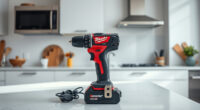
Keeping your DEWALT XR Impact Driver clean is essential for maintaining its performance and extending its lifespan. Proper cleaning prevents dust, debris, and grime from affecting the internal components and ensures safe operation. Follow these simple, practical steps to clean your impact driver safely.

Get business pricing on tools and workshop supplies
- Business-only prices and quantity discounts
- Tax-exempt purchasing
- Multiple users, one account, clear invoices
Key Takeaways
| Safety First | Always disconnect the impact driver from the battery before cleaning. |
| Use Proper Tools | Use a soft brush and compressed air for cleaning internal parts. |
| Avoid Moisture | Never immerse the impact driver in water or use excessive liquid. |
| Regular Maintenance | Clean after each use to prevent buildup and ensure smooth operation. |
Preparation Before Cleaning
- Remove the battery from the impact driver to prevent accidental activation and electrical shorts.
- Gather cleaning tools: a soft brush, compressed air can, a lint-free cloth, and mild cleaning solution if needed.
Cleaning External Surfaces
- Wipe the exterior with a slightly damp cloth to remove dust and dirt.
- Use a soft brush to clean vents and hard-to-reach areas, preventing debris buildup.
Cleaning Internal Components
- Use compressed air to blow out dust from the vents and internal motor housing — hold the can upright and use short bursts.
- Avoid direct contact with internal parts or using liquids inside the housing.
Inspect and Maintain
Check the impact driver for any damage or wear, especially around the chuck and vents. Lubricate moving parts if recommended by DEWALT, and replace worn components as needed.
Reassemble and Test
Once cleaned, reattach the battery and briefly run the impact driver to ensure it operates smoothly after cleaning.
The Products in This Guide

DEWALT 20V MAX Cordless Drill and Impact Driver
- ✔ Weight: 3.9 lbs
- ✔ Battery Included: Yes
- ✔ Max Speed: 2800 RPM
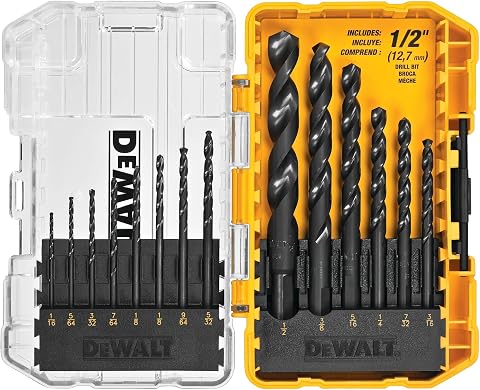
DEWALT Drill Bit Set
- ✔ Bit Size Range: 1/16-in to 3/8-in
- ✔ Tip Type: Split point
- ✔ Material: High-Speed Steel
DEWALT 20V MAX Cordless Drill and Impact Driver
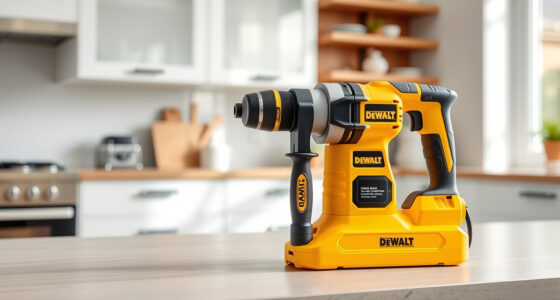
The DEWALT 20V MAX Cordless Impact Driver offers a compact, lightweight design with a brushless motor, making it ideal for tight spaces and prolonged use. Its ergonomic grip and bright LED enhance usability, and regular cleaning helps maintain its performance.
Pros:
- Lightweight and compact design
- Brushless motor for efficiency
- Bright LED for visibility
- Quick-release hex chuck for easy bit changes
Cons:
- Battery life may vary with heavy use
- No variable speed control on impact mode
- Requires regular cleaning for optimal performance
Best for: Home improvement, furniture assembly, and DIY projects
Not ideal for: Heavy-duty industrial tasks or prolonged continuous use without maintenance
Bottom line: A reliable, versatile impact driver that performs well with proper maintenance and cleaning.
DEWALT Drill Bit Set
Pair your impact driver with this durable DEWALT drill bit set, designed for plastic, wood, and metal with split point tips to reduce walking and ensure precision.
Pros:
- 135-degree split point tip
- High-speed steel for durability
- Includes 14 bits in various sizes
- Corrosion-resistant coating
Cons:
- Not suitable for heavy-duty industrial drilling
- Limited to basic drill bits in this set
- Requires compatible chuck for best fit
Best for: General purpose drilling, DIY projects, home repairs
Not ideal for: Heavy industrial or professional masonry work
Bottom line: A versatile drill bit set that complements your impact driver for various projects.
Frequently Asked Questions
How often should I clean my impact driver?
It’s recommended to clean your impact driver after each use, especially if used in dusty or dirty environments, to ensure optimal performance.
Can I use water to clean my impact driver?
No, avoid using water or excessive liquids. Instead, use a damp cloth and compressed air to clean external and internal parts safely.
What should I do if my impact driver isn’t working properly after cleaning?
Check for debris in the vents and internal parts, ensure the battery is charged and properly connected, and inspect for any damage. If problems persist, consult a professional or contact DEWALT support.
Is it safe to clean the impact driver with compressed air?
Yes, compressed air is safe when used in short bursts and held upright. Keep the nozzle away from internal components to prevent damage.
Keep Your Impact Driver in Top Shape
Regular cleaning of your DEWALT XR Impact Driver ensures it operates smoothly and lasts longer. Follow these simple steps to maintain its performance and safety. Proper care not only enhances your tools’ efficiency but also saves you money in the long run.
Affiliate disclosure: As an Amazon Associate we earn from qualifying purchases. Prices and availability are accurate as of the time of publishing.