Use this guide to choose a cordless power drill set and complete a basic drilling or screw-driving job. It is for beginners doing household repairs, furniture assembly, or simple projects in wood, drywall, or other suitable materials. Allow 30-60 minutes to compare a set, prepare the work area, and practice on scrap material.

Get business pricing on tools and workshop supplies
- Business-only prices and quantity discounts
- Tax-exempt purchasing
- Multiple users, one account, clear invoices

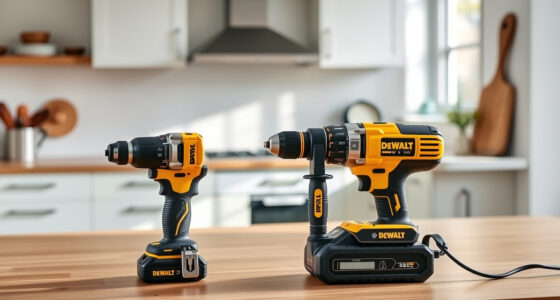
DEWALT 20V MAX Cordless Drill and Impact Driver Combo Kit (DCK240C2)
- ✔ Voltage: 20V MAX
- ✔ Tools included: Drill/driver and impact driver
- ✔ Batteries: Two lithium-ion batteries, 1.3 Ah

BLACK+DECKER 20V MAX POWERCONNECT Cordless Drill Driver Kit, 100-Piece
- ✔ Voltage: 20V MAX
- ✔ Battery: Lithium-ion, 1.5 Ah
- ✔ Maximum speed: 650 rpm

DEKOPRO 20V Cordless Drill Set with Battery and Charger
- ✔ Voltage: 20V
- ✔ Battery: Lithium-ion, 1.5 Ah
- ✔ Variable speed ranges: 0–350 / 0–1,350 rpm
Difficulty: Beginner | Time: 30-60 minutes
What You’ll Need
Tools & Materials:
- Cordless drill or drill-driver set with a charged battery
- Drill bit or screwdriver bit matched to the task
- Safety glasses
- Tape measure and pencil
- Clamps and a stable work surface
- Scrap material for a practice hole or screw
Knowledge:
- Basic ability to identify the material you will drill or fasten
- Ability to read the drill and battery manufacturer’s instructions
Check the intended material for hidden wires, pipes, or other services before drilling. Use an appropriate detector or consult a qualified professional if you cannot confirm the area is clear. Choose bits rated for your material; ordinary wood bits are not suitable for masonry.
DEWALT 20V MAX Cordless Drill and Impact Driver Combo Kit (DCK240C2)
For buyers who want a cordless drill set that covers more than basic screw driving, DEWALT’s two-tool combo has the clearest advantage in this group. It pairs a 20V MAX drill/driver with a separate impact driver, so we can use the drill for drilling and controlled fastening, then switch to the impact driver for more demanding screw-driving jobs. BLACK+DECKER and DEKOPRO each supply one drill, which keeps their kits simpler but leaves them without that dedicated fastening tool.The kit includes two 1.3 Ah batteries, a charger, and a contractor bag, a practical combination when we need to keep working while the other battery charges. Both tools also have LED work lights with a 20-second delay, useful in dim corners where the work area is hard to illuminate. The impact driver’s one-handed 1/4-inch hex chuck makes bit changes straightforward. Against the lighter DEKOPRO drill, the DEWALT kit carries more capability but is not the single-tool choice for buyers prioritizing the lowest stated weight.Its tradeoffs are the small-capacity included batteries and a drill/driver maximum speed of 1,500 rpm. That speed is higher than the supplied BLACK+DECKER maximum but does not, by itself, establish drilling performance across materials. We would choose this set for varied household and workshop tasks, and skip it if a single lightweight drill with a larger accessory starter assortment is the main goal.
Pros:
- Includes both a drill/driver and an impact driver for distinct drilling and fastening jobs.
- Two batteries let us rotate between work and charging.
- Both tools have LED work lights with a 20-second delay.
- Impact driver has a one-handed 1/4-inch hex chuck for quick bit changes.
Cons:
- Included batteries are 1.3 Ah, which may mean more frequent charging during extended work.
- The drill/driver’s maximum rotational speed is listed at 1,500 rpm.
Best for: DIYers and homeowners who expect to drill and drive a variety of fasteners and want a dedicated impact driver in the same kit.
Not ideal for: Buyers who want a single lightweight drill, a large included accessory assortment, or longer run time from higher-capacity batteries.
Bottom line: We rank the DEWALT first because its separate impact driver and two-battery setup make it the most versatile complete set here, despite modest battery capacity.
“We rank the DEWALT first because its separate impact driver and two-battery setup make it the most versatile complete set here, despite modest battery capacity.”
BLACK+DECKER 20V MAX POWERCONNECT Cordless Drill Driver Kit, 100-Piece
The BLACK+DECKER kit is the straightforward pick for buyers who want a drill and a wide spread of bits in one case. Its 100-piece accessory assortment gives a new homeowner or occasional DIYer more options immediately than the DEKOPRO’s specified 10 drill bits and 10 screwdriver bits. That breadth is convenient for small repairs, but it does not make the drill itself more powerful: the listed maximum speed is 650 rpm, and stated drilling capacity is 10 mm in wood and 8 mm in metal.A 24-position clutch helps us limit how firmly screws are driven, reducing the chance of burying a screw or damaging softer material. The soft-grip handle is designed for comfort, and its 20V lithium-ion battery also works with other POWERCONNECT tools. Compared with the DEWALT, however, it is a single drill/driver and has no second battery listed. That makes it a simpler household kit, but a less adaptable choice for sustained work or repeated heavy fastening.We should treat its included 1.5 Ah battery and compact drilling specifications as signals to keep expectations realistic. The 100 accessories may serve occasional maintenance well, yet buyers tackling larger holes, denser materials, or extensive projects may outgrow this configuration. It suits a beginner who values variety and controlled screw driving more than a second tool or higher listed output; for those wanting broader tool capability, DEWALT is the stronger step up.
Pros:
- The 100-piece assortment offers more included accessories than the DEKOPRO set.
- A 24-position clutch supports controlled screw driving.
- The 20V battery is compatible with other BLACK+DECKER POWERCONNECT tools.
- Includes a charger and zippered storage case.
Cons:
- The listed maximum rotational speed is 650 rpm.
- Listed drilling capacity is 10 mm in wood and 8 mm in metal.
- The kit lists one 1.5 Ah battery and no separate impact driver.
Best for: First-time tool owners and occasional DIYers who want a drill, adjustable clutch, and many common bits together in a storage case.
Not ideal for: Buyers planning heavy fastening, larger drilling tasks, or extended projects where a second battery or separate impact driver would help.
Bottom line: We recommend BLACK+DECKER for an accessible home starter kit with many accessories, while its modest listed drilling capacity makes it less suitable for demanding jobs than the DEWALT combo.
“We recommend BLACK+DECKER for an accessible home starter kit with many accessories, while its modest listed drilling capacity makes it less suitable for demanding jobs than the DEWALT combo.”
DEKOPRO 20V Cordless Drill Set with Battery and Charger
DEKOPRO is the portability pick: the drill is listed at 2.5 pounds, lighter than the BLACK+DECKER kit’s stated 6.1-pound item weight. For quick household fixes, furniture assembly, or carrying a drill between rooms, that can make the tool easier to handle. Its two variable speed ranges, 0–350 and 0–1,350 rpm, also offer more speed choice than BLACK+DECKER’s single listed maximum of 650 rpm, giving us a slower setting for controlled starts and a faster range for routine drilling.The set comes with a 1.5 Ah battery and charger, 10 drill bits, a magnetic bit holder, and 10 screwdriver bits. That is a useful basic selection, though BLACK+DECKER provides a much larger 100-piece assortment and DEWALT supplies a second tool. DEKOPRO’s stated 40 N·m maximum torque and 18+1 torque settings cover the basic-drill positioning, but the supplied description cautions that torque may not be enough for heavy-duty applications.There is also a notable specification limit: the listed wood drilling capacity is 2 mm, unusually restrictive for a general-purpose drill set. We should confirm the intended capacity before relying on this tool for larger holes. Its 0.5-inch chuck size is another stated constraint for larger bit use. Choose it for light jobs where compact handling and two speeds matter most; for broader task coverage, DEWALT offers a dedicated impact driver, while BLACK+DECKER brings more accessories.
Pros:
- Listed tool weight is 2.5 pounds for easier carrying and handling.
- Two speed ranges provide more control than a single maximum speed.
- Includes a battery, charger, drill bits, screwdriver bits, and magnetic holder.
- 18+1 torque settings support adjustment for different light-duty tasks.
Cons:
- Maximum torque is listed as 40 N·m and may not suit heavy-duty applications.
- Listed wood drilling capacity is only 2 mm, so buyers should verify suitability for their intended holes.
- The stated 0.5-inch chuck size limits larger bit use.
Best for: DIY users who prioritize a low listed tool weight, two speed ranges, and a basic set of bits for light household work.
Not ideal for: Buyers who need a drill for heavy fastening, larger bits, demanding materials, or work requiring clearly substantial drilling capacity.
Bottom line: DEKOPRO is the lightest listed single-drill option with two speed ranges, but its stated drilling and torque limits keep it behind the more versatile DEWALT and accessory-rich BLACK+DECKER.
“DEKOPRO is the lightest listed single-drill option with two speed ranges, but its stated drilling and torque limits keep it behind the more versatile DEWALT and accessory-rich BLACK+DECKER.”
As an Amazon Associate we earn from qualifying purchases.
Before You Start
Decide whether the job is mainly drilling holes, driving screws, or both. A drill-driver set usually suits household work. A hammer drill adds a hammer action for masonry, but it does not replace a masonry bit. Compare battery voltage, included battery count, charger, chuck capacity, clutch settings, weight, and the bits or accessories included. Check that replacement batteries are available for the same tool platform.
Read the manual for chuck operation, speed selection, clutch settings, and battery charging. Remove the battery before changing a bit or making adjustments. Do not wear loose clothing or jewelry near a rotating chuck, and tie back long hair.
Step-by-Step Instructions
Step 1: Match the set to the job
List the materials and tasks you expect to handle, then choose a set rated for them. For wood, drywall, furniture assembly, and many basic repairs, a drill-driver set is often enough. For regular work in brick or masonry, select a hammer drill and compatible masonry bits. Check the tool’s chuck capacity against the bit sizes you need, and compare tool weight if you will work overhead.
Review what the kit includes: battery, charger, case, drill bits, and screwdriver bits. Treat bundled bits as a starting point; confirm that each bit suits your material and fastener.
Tip:Battery voltage alone does not tell you whether a drill suits your job. Check the manufacturer’s stated uses and the tool’s clutch and speed controls.
Check: The set includes a compatible battery and charger, accepts the needed bit size, and is rated for your materials.
Step 2: Charge and inspect the drill
Charge the battery with the supplied charger according to its instructions. Inspect the battery, charger, drill body, chuck, and cord for cracks, damage, or unusual heat. Fit the charged battery until its latch clicks. If the tool has a removable battery, keep it detached while you fit a bit.
Tip:Use only batteries and chargers approved for the drill’s platform. Stop if a battery is swollen, leaking, or damaged.
Check: The battery is seated securely, the drill starts and stops when you operate the trigger, and no visible damage is present.
Step 3: Mark and secure the work
Measure and mark the hole or fastener location with a pencil. Check both sides of the workpiece when possible, and confirm the area is clear of hidden services. Place the work on a stable surface and clamp it so it cannot spin or shift. Keep your hands away from the drill path.
Tip:Do not hold a small workpiece in one hand while drilling it with the other. A bit that catches can twist the material suddenly.
Check: The mark is clear, the workpiece cannot move easily, and you have room to hold the drill straight.
Step 4: Fit the correct bit
Remove the battery before changing the bit. Choose a sharp bit made for the material and the hole size, or a screwdriver bit that matches the fastener head. Open the chuck, insert the bit straight, and tighten the chuck firmly according to the manual. Pull gently on the bit to check that it is held securely, then reattach the battery.
Tip:A mismatched screwdriver bit can slip and damage the screw head. For a pilot hole, use a bit sized for the screw and material rather than guessing.
Check: The bit sits straight in the chuck and does not wobble or pull free during a gentle check.
Step 5: Set speed and clutch
Select the lower speed range for screw driving and the higher range for many drilling tasks, following the tool manual and bit guidance. Set the clutch to a low setting for driving screws, then raise it only if the drill stops before the screw is seated. Use the drill setting for drilling, where available, because the clutch may otherwise interrupt the cut.
Tip:Do not start with maximum speed or torque. A low setting gives you more control while you learn how the tool responds.
Check: The selected speed and mode match the task, and the clutch is set to limit screw overdriving.
Step 6: Drill the hole or drive the screw
Hold the drill with a firm, balanced grip and align the bit with the mark or screw head. Start at low trigger pressure so the bit engages without jumping. Keep the drill straight, apply steady pressure, and increase speed gradually if the bit cuts cleanly. For a hole, ease pressure as the bit exits the far side. For a screw, stop when its head is seated; release the trigger before moving the drill away.
Tip:Stop if the bit binds, the workpiece shifts, or the drill becomes unusually hot. Release the trigger and remove the battery before clearing a jam or inspecting the bit.
Check: The hole is at the marked location or the screw is seated straight, with no visible slipping or damage to the material.
Step 7: Finish and store the set
Release the trigger and wait for the chuck to stop before setting the drill down. Remove the battery before changing bits or cleaning the tool. Brush dust from the drill and bits, check for damage, and store them in the case. Let a warm battery cool as directed by its manual before charging or storage.
Tip:Keep bits dry and organized by type and size so you can find the correct one for the next job.
Check: The drill is switched off, the work area is clear, and the tool, battery, charger, and bits are stored safely.
Common Mistakes to Avoid
- Using too much speed or torque at the start. — Begin with low trigger pressure and a low clutch setting for screws, then adjust only as needed.
Troubleshooting
Problem: The bit slips in the chuck or wobbles.
Solution: Release the trigger, remove the battery, and reseat the bit straight. Tighten the chuck as directed in the manual. Replace a bent or damaged bit.
Problem: The drill stops before a screw is fully seated.
Solution: Check that the battery is charged and the screwdriver bit fits the screw head. If the clutch is stopping the tool, raise its setting slightly and try on scrap material.
Problem: The drill bit struggles to make a hole.
Solution: Confirm the bit suits the material and is sharp, then check that the drill is in the correct mode. Reduce pressure if the bit is binding. For masonry, use a hammer drill and masonry bit rated for the job.
Problem: The screw head is damaged or the screw goes in crooked.
Solution: Stop driving. Use the correct bit, realign it with the screw head, and start slowly. Drill a suitable pilot hole if the material or screw requires one.
What Success Looks Like
The drill set matches the material and task, the bit is securely fitted, and the workpiece stayed stable during operation. The finished hole is at the intended location and reasonably clean, or the screw is straight and seated without a stripped head. The drill is off and the equipment is stored according to its manual.
Next Steps
After the first practice run, note which bit sizes and clutch settings worked for your materials. Add suitable bits as future tasks require them, and inspect bits and batteries before each use. If the job involves uncertain wiring or plumbing, structural members, or materials beyond the tool’s rating, stop and get qualified help.
Frequently Asked Questions
Do I need a hammer drill in a cordless drill set?
Choose a hammer drill if you expect to drill into brick or masonry. For common wood, drywall, and furniture tasks, a standard drill-driver is often sufficient. Use a masonry bit rated for the material.
Can I use the same drill bit for wood and metal?
Use a bit rated for the material. Some general-purpose bits can handle more than one material, but a wood bit may cut poorly or become damaged in metal. Follow the bit manufacturer’s rating.
Why does my drill have a clutch?
The clutch limits turning force when driving screws. A lower setting can help prevent overdriving or damaging the screw head. Use the drill mode for drilling when the tool provides one.
Should I remove the battery before changing a bit?
Yes. Remove the battery before changing bits or adjusting the drill so the trigger cannot start the tool while your hand is near the chuck.