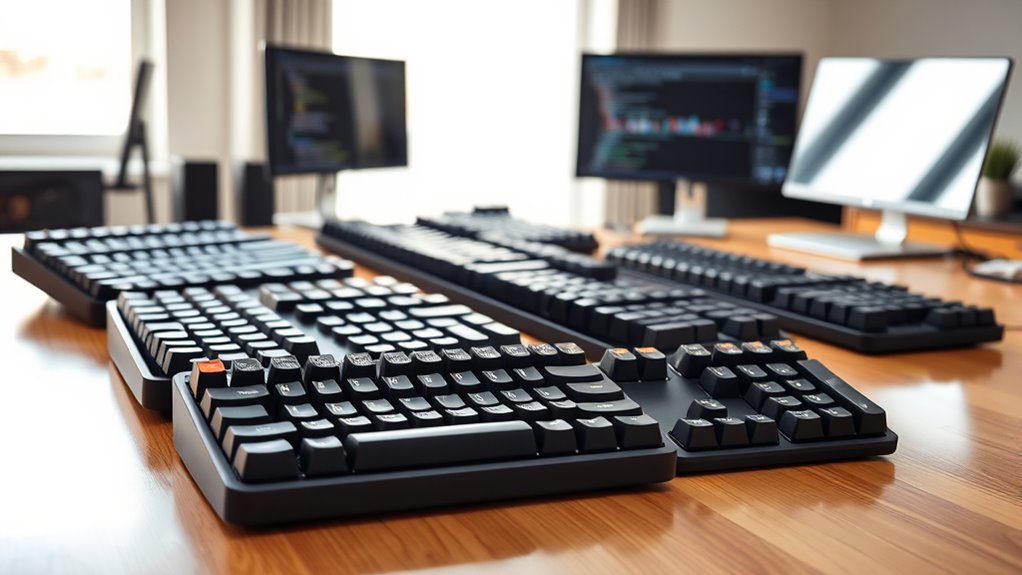

Ergonomic split keyboards for programmers range from familiar, low-profile boards to mechanical models with extensive separation and tenting. My best overall pick is the Kinesis Advantage360 Professional for its distinctive split, sculpted layout and adjustability, while the Kinesis Freestyle Edge RGB Plus stands out for mechanical typing and the Logitech ERGO K860 for a gentler move from a standard keyboard. The main tradeoffs are how much layout change you can tolerate, whether you need mechanical keys, and how much desk space and setup flexibility you want. Some boards prioritize easy adoption; others offer more control but ask for patience and adaptation. Read on for how all 13 options compare and which one fits your programming workflow.

Get business pricing on tools and workshop supplies
- Business-only prices and quantity discounts
- Tax-exempt purchasing
- Multiple users, one account, clear invoices
Complete the kit


Key Takeaways
- The Kinesis Advantage360 Professional leads for adjustability and a more distinctive ergonomic layout, but its specialized key arrangement makes it a bigger change than the Logitech ERGO K860.
- The Freestyle Edge RGB Plus is the mechanical middle ground: it separates into two halves while retaining a more familiar key layout than the Advantage360 or Corne.
- The lineup splits between straightforward desk upgrades and enthusiast keyboards; the Arteck and Logitech models favor familiarity, while the Corne and Advantage360 require more adaptation.
- Wired and wireless choices affect desk setup as much as convenience: wired models avoid battery upkeep, while wireless options such as the Logitech and Arteck boards reduce cable clutter.
- Several entries are close variants rather than distinct categories, including two Arteck wireless listings and two RK Royal Kludge S70 models, so layout, switch type, and bundled accessories matter more than the name alone.
| Kinesis Freestyle2 Ergonomic USB-A Keyboard with VIP3 Lifters for PC |  | Best for Adjustable Tenting | Layout: Windows QWERTY | Key count: 94 | Sections: 2 | VIEW ON AMAZON | See Our Full Breakdown |
| Arteck Split Ergonomic Wired Backlit Keyboard with Palm Rest | 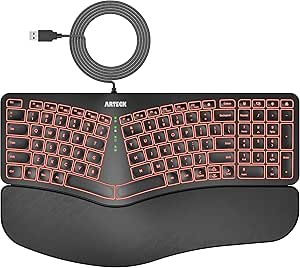 | Best for Straightforward Office Typing | Layout: QWERTY | Key count: 101 | Switch type: Scissor switch | VIEW ON AMAZON | See Our Full Breakdown |
| Corne Wired Ergonomic Split Mechanical Keyboard with Knobs, 58 Keys, Hot-Swappable, RGB, Silent Linear Switches |  | Best Compact Programmable Pick | Layout: 4×6 column-staggered split, QWERTY | Keys and controls: 58 keys and 2 knobs | Connectivity: Wired USB-C | VIEW ON AMAZON | See Our Full Breakdown |
| SABLUTE Rechargeable Ergonomic Wireless Keyboard and Mouse Combo |  | Best Wireless Desk Combo | Connectivity: 2.4GHz wireless | Keyboard layout: Full-size split QWERTY with number pad | Compatible operating systems: Windows, macOS | VIEW ON AMAZON | See Our Full Breakdown |
| KINESIS Freestyle Edge RGB Plus Split Mechanical Keyboard with Linear Switches |  | Best for Programmable Mechanical Typing | Layout: AZERTY | Key count: 174 | Switch type: Mechanical, hot-swappable linear | VIEW ON AMAZON | See Our Full Breakdown |
| Kinesis Advantage360 Professional Split Ergonomic Keyboard |  | Best for Deep Ergonomic Customization | Layout: 76-key QWERTY, two sections | Switches: Kailh Box Pink Silent linear | Connectivity: Bluetooth | VIEW ON AMAZON | See Our Full Breakdown |
| Frixalox Wired Ergonomic Split Keyboard with RGB Backlight and Number Pad |  | Best Full-Size Wired Pick | Layout: Full-size QWERTY with number pad | Key count: 120 | Switch type: Membrane | VIEW ON AMAZON | See Our Full Breakdown |
| RK Royal Kludge S70 75% Ergonomic Split Mechanical Keyboard |  | Best Compact Wireless Pick | Layout: 75% QWERTY | Key count: 74 | Switches: Pre-lubed linear, hot-swappable 3-pin and 5-pin | VIEW ON AMAZON | See Our Full Breakdown |
| RK ROYAL KLUDGE S70 Ergonomic Split Mechanical Keyboard, Tactile Brown Switches, Black |  | Best for Tactile Typing | Layout: 75% QWERTY | Key count: 74 | Switches: Tactile brown, hot-swappable 3-pin and 5-pin | VIEW ON AMAZON | See Our Full Breakdown |
| Cloud Nine C989M Ergonomic Split Mechanical Keyboard with Kailh Brown Switches |  | Best Full-Size Mechanical Pick | Layout: 104-key QWERTY | Switches: Kailh Brown tactile | Maximum separation: 8 inches | VIEW ON AMAZON | See Our Full Breakdown |
| Arteck Split Ergonomic Wireless Keyboard with Palm Rest |  | Best Simple Wireless Pick | Layout: QWERTY, 102 keys | Switch type: Scissor switch | Connectivity: 2.4 GHz wireless via USB receiver | VIEW ON AMAZON | See Our Full Breakdown |
| Arteck Split Ergonomic Wireless Keyboard with Cushioned Wrist Rest |  | Best for Multi-Device Wireless Setups | Layout: QWERTY | Switch type: Mechanical, Cherry MX Brown | Connectivity: Bluetooth, 2.4 GHz USB-A, and 2.4 GHz USB-C | VIEW ON AMAZON | See Our Full Breakdown |
| Logitech ERGO K860 Wireless Ergonomic Split Keyboard with Wrist Rest |  | Best for Adjustable Posture and Broad OS Support | Layout: Full-size QWERTY, 105 keys | Connectivity: Bluetooth or USB receiver | Compatible operating systems: Windows, macOS, Linux, Chrome OS | VIEW ON AMAZON | See Our Full Breakdown |
| ergonomic split keyboards for programmer | Layout | Connectivity |
|---|---|---|
| Kinesis Freestyle2 Ergonomic U | Windows QWERTY | USB-A |
| Arteck Split Ergonomic Wired B | QWERTY | USB wired |
| Corne Wired Ergonomic Split Me | 4×6 column-staggered split, QWERTY | Wired USB-C |
| SABLUTE Rechargeable Ergonomic | — | 2.4GHz wireless |
| KINESIS Freestyle Edge RGB Plu | AZERTY | USB-A |
| Kinesis Advantage360 Professio | 76-key QWERTY, two sections | Bluetooth |
| Frixalox Wired Ergonomic Split | Full-size QWERTY with number pad | — |
| RK Royal Kludge S70 75% Ergono | 75% QWERTY | 2.4 GHz wireless, Bluetooth, USB-C |
| RK ROYAL KLUDGE S70 Ergonomic | 75% QWERTY | 2.4 GHz wireless, Bluetooth, USB-C |
| Cloud Nine C989M Ergonomic Spl | 104-key QWERTY | USB |
| Arteck Split Ergonomic Wireles | QWERTY, 102 keys | 2.4 GHz wireless via USB receiver |
| Arteck Split Ergonomic Wireles | QWERTY | Bluetooth, 2.4 GHz USB-A, and 2.4 GHz USB-C |
| Logitech ERGO K860 Wireless Er | Full-size QWERTY, 105 keys | Bluetooth or USB receiver |
More Details on Our Top Picks
Kinesis Freestyle2 Ergonomic USB-A Keyboard with VIP3 Lifters for PC
The Freestyle2 is my pick for programmers who want to tune the angle and spacing of a familiar full-size layout without adopting a compact keymap. Its two halves separate by up to 9 inches, while the included VIP3 lifters offer three tenting angles; that combination gives more room to position hands than the fixed split layout of the Arteck HA315B. Low-force membrane switches and cushioned palm supports favor steady, quiet office typing over the distinct feedback or switch customization of the KINESIS Freestyle Edge RGB Plus. The tradeoff is a wired USB-A connection and Windows-oriented key layout, so desk placement and alternate layouts are less flexible. I’d choose it for adjustable posture and familiar navigation keys, not for mechanical feel or extensive remapping.
Pros:- Two keyboard halves separate by up to 9 inches
- VIP3 accessory provides 5-, 10-, and 15-degree tenting options
- Low-force membrane switches support quiet, light typing
- Includes cushioned palm supports, numeric keypad, and multimedia shortcuts
Cons:- Wired USB-A connection limits placement flexibility
- Windows layout may not suit programmers seeking another key arrangement
- Membrane switches do not offer the mechanical customization of the Freestyle Edge RGB Plus
Best for: Programmers who want a familiar Windows full-size keyboard with adjustable separation and tenting for their desk setup.
Not ideal for: People seeking wireless use, mechanical switches, or a compact programmable layout; the USB-A cable and membrane design do not serve those preferences.
- Layout:Windows QWERTY
- Key count:94
- Sections:2
- Maximum separation:9 inches
- Tenting angles:5, 10, or 15 degrees
- Switch type:Membrane
- Connectivity:USB-A
- Compatible operating systems:Windows, Linux
Our verdict“Choose the Freestyle2 if adjustable spacing and tenting matter more to you than wireless freedom or mechanical switches.”
Arteck Split Ergonomic Wired Backlit Keyboard with Palm Rest
The Arteck HA315B suits programmers who want a split arrangement and cushioned support without learning a new layout or configuring keymaps. Its 101-key QWERTY layout keeps familiar navigation and number-entry habits intact, while the scissor switches offer a different, low-profile feel from the mechanical KINESIS Freestyle Edge RGB Plus. Seven backlight colors with three brightness settings can help make keys easier to see at a desk, though they do not add programming-specific controls. Compared with the Kinesis Freestyle2, this Arteck is simpler and provides fewer ways to tune the halves’ angle or spacing. Its appeal is ease of setup, not deep ergonomic adjustment. The 1.8 m wired connection also keeps it tethered, and the listed Windows compatibility makes it a less certain choice for Mac or Linux users.
Pros:- Familiar 101-key QWERTY layout
- Cushioned wrist and palm rest
- Seven backlight colors with three brightness levels
- USB wired connection provides a simple setup
Cons:- Wired connection limits placement flexibility
- Product information lists Windows compatibility only
- Not water resistant
Best for: Windows programmers who want a familiar full-size split keyboard, cushioned palm support, and simple USB setup.
Not ideal for: Mac or Linux users, people who need a wireless desk setup, and buyers who want adjustable tenting or detailed key remapping.
- Layout:QWERTY
- Key count:101
- Switch type:Scissor switch
- Connectivity:USB wired
- Cable length:1.8 m (6 ft)
- Backlighting:7 colors, 3 brightness levels
- Compatible operating system:Windows
- Water resistance:Not water resistant
Our verdict“Pick the HA315B for familiar, backlit split typing with a cushioned rest, provided Windows support and a wired setup fit your desk.”
Corne Wired Ergonomic Split Mechanical Keyboard with Knobs, 58 Keys, Hot-Swappable, RGB, Silent Linear Switches
The Corne is the most compact, customization-led option in this group: its 58-key column-staggered layout and two knobs leave far less desk footprint than the full-size Freestyle2, but ask the programmer to adapt to layers and a different key arrangement. Vial remapping makes it possible to place frequently used commands where they suit a personal workflow, and hot-swappable linear switches allow switch changes without replacing the keyboard. Those benefits favor keyboard enthusiasts more than anyone seeking immediate familiarity. The Corne also lets users adjust spacing, tilt, and rotation, giving its split halves more positioning flexibility than the Arteck HA315B. In exchange, the product information warns of a one- to two-week adaptation period; advanced customization may frustrate beginners, and the halves remain linked by cables. It is a specialist choice, not a plug-and-play full-size replacement.
Pros:- Compact 58-key column-staggered split layout with two knobs
- All keys are programmable through Vial remapping
- Hot-swappable 3-pin and 5-pin linear switches
- Spacing, tilt, and rotation are adjustable
Cons:- Compact layout can take one to two weeks to adapt to
- Advanced remapping may be challenging for beginners
- The keyboard is wired and its halves require cable connections
Best for: Programmers comfortable with layers and remapping who want a small split board with adjustable halves and replaceable switches.
Not ideal for: Beginners who rely on a conventional full-size layout, need a numeric keypad, or want a wireless keyboard without inter-half cables.
- Layout:4×6 column-staggered split, QWERTY
- Keys and controls:58 keys and 2 knobs
- Connectivity:Wired USB-C
- Switches:Pre-lubricated linear, 40 g actuation force; hot-swappable 3-pin/5-pin
- Programmability:Vial remapping; all keys programmable
- Backlighting:RGB, approximately 16.8 million colors; 45 preset modes
- Dimensions:11 × 4.65 × 1.1 inches
- Enclosure material:Plastic
Our verdict“Choose the Corne if you want a compact, programmable split keyboard and are willing to adapt to layers and a 58-key layout.”
SABLUTE Rechargeable Ergonomic Wireless Keyboard and Mouse Combo
The SABLUTE is the only pick here that pairs a split keyboard with a matching mouse, making it a practical option for programmers who want fewer desk cables and a coordinated starting point for their setup. Its 2.4GHz wireless connection, rechargeable devices, adjustable keyboard tilt, and cushioned wrist rest offer a different kind of flexibility from the wired Kinesis Freestyle2. The full-size layout retains a number pad, while Windows and macOS support broadens its fit compared with the Windows-only Arteck HA315B. The mouse adds adjustable DPI and forward/back buttons, though this combo offers less keyboard-focused customization than the Corne’s programmable layout. The main compromise is space: at 19 inches wide, the keyboard needs a generous desk area. Its receiver is USB-A, so USB-C-only computers need the included adapter.
Pros:- Split full-size layout includes a number pad
- Keyboard and mouse recharge via USB-C
- Compatible with Windows and macOS
- Mouse offers adjustable DPI and forward/back navigation buttons
Cons:- Full-size keyboard takes substantial desk space
- USB-A wireless receiver requires the included adapter for USB-C ports
- Less suited to keymap customization than the programmable Corne
Best for: Programmers who want a full-size split keyboard and mouse bundle for a Windows or Mac desk with room for both.
Not ideal for: People with compact desks, those who want a mechanical programmable keyboard, or USB-C-only users who prefer not to use an adapter.
- Connectivity:2.4GHz wireless
- Keyboard layout:Full-size split QWERTY with number pad
- Compatible operating systems:Windows, macOS
- Keyboard dimensions:19 × 10.45 × 1.88 inches
- Weight:3.4 pounds
- Mouse DPI:800/1200/1600/2400
- Keyboard standby:Up to 250 hours
- Included connection accessories:USB-A receiver and USB-C adapter
Our verdict“Choose the SABLUTE if you want a rechargeable wireless split keyboard-and-mouse set and have room for its full-size footprint.”
KINESIS Freestyle Edge RGB Plus Split Mechanical Keyboard with Linear Switches
The Freestyle Edge RGB Plus is my choice for programmers who want a split mechanical board with switch customization and programmable controls, rather than the familiar membrane experience of the Freestyle2. Its hot-swappable linear switches let owners change switches without replacing the keyboard, while RGB lighting and full programmability support a more tailored setup. The included palm support and lift kit add ergonomic options, and Mac keycaps broaden its appeal beyond the Windows-focused description of the Freestyle2. However, the listed AZERTY layout is a significant fit question for programmers accustomed to QWERTY, and the stated compatibility centers on PC and Windows 10 or later. USB-A connectivity also keeps it tethered. Compared with the compact Corne, this pick offers a less radical route to mechanical customization, but it does not have the Corne’s stated all-keys Vial remapping details.
Pros:- Split mechanical design with hot-swappable linear switches
- Fully programmable controls and RGB lighting
- Includes detachable palm support and lift kit
- Mac keycaps are included
Cons:- AZERTY layout may not suit QWERTY typists
- Compatibility information lists PC and Windows 10 or later
- USB-A connection requires a cable
Best for: Programmers who want a split mechanical keyboard with hot-swappable linear switches, programmable controls, and included palm support.
Not ideal for: QWERTY-first typists who do not want to change layouts, or users seeking wireless connectivity or clearly stated broad operating-system support.
- Layout:AZERTY
- Key count:174
- Switch type:Mechanical, hot-swappable linear
- Connectivity:USB-A
- Compatible devices:PC
- Compatible operating system:Windows 10 or later
- Features:RGB lighting, fully programmable, ergonomic
- Included accessories:Detachable palm support, lift kit, Mac keycaps
Our verdict“Pick the Freestyle Edge RGB Plus if mechanical switch swapping and programmable controls outweigh its AZERTY layout and wired connection.”
Kinesis Advantage360 Professional Split Ergonomic Keyboard
The Kinesis Advantage360 Professional is the most ergonomic-focused choice here for programmers who want more than a keyboard split into two halves. Its concave key wells and thumb keys bring frequently used inputs closer, while three tenting heights let you adjust wrist and forearm posture. The split can extend up to 10 inches, giving more placement flexibility than the Cloud Nine C989M’s 8-inch maximum. Quiet Kailh Box Pink Silent switches suit shared offices, and programmable layouts help tailor shortcuts to a coding workflow. The tradeoff is its more specialized shape: it may take time to adapt, and the premium palm pads are sold separately. Its single-color optional backlighting is also simpler than the RGB on the RK Royal Kludge S70.
Pros:- Concave key wells and thumb keys support a more customized hand position
- Three tenting heights and up to 10 inches of separation provide substantial positioning flexibility
- Quiet linear switches suit shared workspaces
- Programmable layouts and broad operating-system support fit varied coding setups
Cons:- Specialized key-well layout may require an adaptation period
- Premium palm pads are sold separately
- Optional backlighting is limited to single-color white
Best for: Programmers seeking a highly adjustable split layout, quiet mechanical typing, and programmable keys across major operating systems.
Not ideal for: Buyers who want a conventional keyboard shape, built-in premium palm pads, or vivid RGB lighting.
- Layout:76-key QWERTY, two sections
- Switches:Kailh Box Pink Silent linear
- Connectivity:Bluetooth
- Tenting:Three adjustable levels
- Maximum split distance:Up to 10 inches with included cable
- Backlighting:Optional single-color white
- Operating systems:Windows 7–11, macOS, Linux, Chrome
- Dimensions:15 × 8 × 3 inches
- Warranty:3 years
Our verdict“Choose the Advantage360 if ergonomic adjustability and quiet, programmable typing matter more than a familiar layout or built-in palm pads.”
Frixalox Wired Ergonomic Split Keyboard with RGB Backlight and Number Pad
The Frixalox favors familiar full-size utility over the deep hand shaping of the Kinesis Advantage360. Its 120-key layout, number pad, and 17 dedicated shortcuts make it a practical option for programmers who also enter data or rely on media controls. An integrated wrist rest and two pairs of kickstands offer basic positioning choices, though these do not match the Advantage360’s adjustable tenting and contoured wells. The wired USB connection avoids battery management and setup software, which keeps a desk workstation straightforward. On the other hand, this is a membrane keyboard rather than a mechanical one, and its broad 17.1-inch body takes up more desk space than compact split designs. Shortcut behavior can also differ when changing operating systems.
Pros:- Full-size layout includes a number pad and 17 dedicated shortcuts
- Integrated wrist rest and adjustable kickstands offer basic ergonomic positioning
- Plug-and-play wired connection requires no batteries or drivers
- Works with Windows, macOS, Chrome OS, and Linux
Cons:- Membrane switches lack the mechanical feel and switch customization of the RK S70 or Cloud Nine C989M
- Wide full-size body occupies considerable desk space
- Shortcut functions may vary across operating systems
Best for: Programmers who want a familiar full-size wired keyboard with a number pad, wrist rest, and direct access to dedicated shortcuts.
Not ideal for: Mechanical-keyboard enthusiasts, users who need substantial separation or tenting adjustment, and anyone seeking a compact desk setup.
- Layout:Full-size QWERTY with number pad
- Key count:120
- Switch type:Membrane
- Connection:Wired USB-A; USB-C adapter included
- Cable length:5.6 ft
- Lighting:RGB with 17 effects and 5 brightness levels
- Adjustable tilt:Two pairs of kickstands
- Compatibility:Windows, macOS, Chrome OS, Linux
- Dimensions:17.1 × 9.4 × 1.1 inches
Our verdict“Pick the Frixalox for a straightforward, full-size wired workstation, not for mechanical typing or advanced ergonomic shaping.”
RK Royal Kludge S70 75% Ergonomic Split Mechanical Keyboard
The RK Royal Kludge S70 suits programmers who want a split mechanical keyboard without giving over the desk to a full-size model. Its 74-key, 75% layout saves space compared with the Cloud Nine C989M, while five programmable macro keys preserve room for custom commands. The S70 is also more flexible away from the desk: it connects over 2.4 GHz, Bluetooth, or USB-C, and its switches are hot-swappable. Adjustable tenting and a fixed wrist rest add ergonomic support, though the wrist rest offers less placement freedom than a separate setup. The two-week battery estimate applies with backlighting off, so frequent RGB use means charging sooner. Customization software is Windows-only, a limitation for Mac users despite Mac compatibility.
Pros:- Compact 75% layout with five programmable macro keys
- Offers 2.4 GHz, Bluetooth, and USB-C connections
- Hot-swappable switches support later typing-feel changes
- Adjustable tenting and included fixed wrist rest add ergonomic features
Cons:- Two-week battery life is specified only with backlighting off
- Macro and RGB customization software is for Windows
- Fixed wrist rest limits positioning flexibility
Best for: Programmers who want a space-saving split mechanical board with wireless options, switch swapping, and a handful of programmable macros.
Not ideal for: Mac users who want to remap macros or tune RGB through software, and users who prioritize a long battery interval with lighting enabled.
- Layout:75% QWERTY
- Key count:74
- Switches:Pre-lubed linear, hot-swappable 3-pin and 5-pin
- Connectivity:2.4 GHz wireless, Bluetooth, USB-C
- Battery capacity:3150 mAh
- Battery life:Up to two weeks without backlighting
- Macro keys:5 programmable keys
- Operating systems:Windows, Mac, Android
Our verdict“Choose this S70 if you want a compact, wireless split board with switch customization and can accept Windows-only remapping software.”
RK ROYAL KLUDGE S70 Ergonomic Split Mechanical Keyboard, Tactile Brown Switches, Black
This brown-switch version of the RK Royal Kludge S70 is for programmers who prefer a tactile response over the linear switches in the other S70 listing. It keeps the same compact 74-key layout, adjustable feet, fixed wrist rest, and three connection choices, so it takes less space than the full-size Cloud Nine C989M while still providing five programmable macro keys. Hot-swappable sockets allow switch changes without soldering, a useful path if your preferred feel shifts later. The compromise is much the same as on the linear S70: battery life is quoted with the backlight off, and customization software for macros and RGB is Windows-only. Choose this model over its linear counterpart when tactile feedback is the priority; otherwise, the linear S70 offers a different feel with a similar feature set.
Pros:- Tactile brown switches provide a different keystroke feel from the linear S70
- 2.4 GHz, Bluetooth, and USB-C support wired and wireless setups
- Hot-swappable 3-pin and 5-pin switches allow customization without soldering
- Adjustable feet, fixed wrist rest, and five macro keys support a tailored desk setup
Cons:- Two-week battery estimate applies only with the backlight off
- Macro and RGB customization software is limited to Windows
- Fixed wrist rest cannot be repositioned independently
Best for: Programmers who prefer tactile brown switches and want a compact split keyboard with wireless connectivity and switch-swapping options.
Not ideal for: Users who prefer smooth linear switches, rely on Mac-based macro remapping, or need the number pad and wider key layout of a full-size board.
- Layout:75% QWERTY
- Key count:74
- Switches:Tactile brown, hot-swappable 3-pin and 5-pin
- Connectivity:2.4 GHz wireless, Bluetooth, USB-C
- Battery capacity:3150 mAh
- Battery life:Up to two weeks with backlight off
- Macro keys:5 programmable keys
- Operating systems:Windows, Mac, Android
- Color:Black
Our verdict“Select this S70 over the linear version if tactile brown switches are your preference and you can work around its Windows-only customization software.”
Cloud Nine C989M Ergonomic Split Mechanical Keyboard with Kailh Brown Switches
The Cloud Nine C989M brings a full-size mechanical layout to a split design, making it a strong fit for programmers who need a number pad and tactile switches in the same workspace. Its two sections separate by up to 8 inches, and the built-in tenting and palm supports add ergonomic options without requiring separate accessories. Compared with the compact RK Royal Kludge S70, the C989M supplies more keys and 10 programmable macros, but its 28.6-inch width demands far more desk room and it lacks wireless connectivity. Kailh Brown switches provide tactile feedback, while RGB lighting and a USB pass-through add convenience. The main compatibility limitation is Windows-only support, which makes it a poor fit for programmers working primarily on macOS or Linux.
Pros:- Full-size 104-key layout includes a numeric keypad
- Adjustable separation, built-in tenting, and palm supports support varied positioning
- Ten programmable macro keys provide room for custom commands
- Kailh Brown switches and RGB lighting combine tactile typing with visual customization
Cons:- 28.6-inch width takes up substantial desk space
- Listed compatibility is limited to Windows
- USB connection offers no wireless option
Best for: Windows-based programmers who need a full-size mechanical split keyboard, number pad, tactile switches, and programmable macros.
Not ideal for: Mac or Linux users, compact-desk setups, and buyers who need wireless connectivity or extensive split separation.
- Layout:104-key QWERTY
- Switches:Kailh Brown tactile
- Maximum separation:8 inches
- Wrist rest angle:7 degrees
- Programmable macro keys:10
- Backlighting:RGB
- Connectivity:USB
- USB pass-through:1 USB 2.0 port
- Dimensions:28.6 × 9.1 × 2 inches
Our verdict“Choose the C989M for a Windows workstation that needs full-size mechanical keys and built-in split ergonomics, provided desk space is plentiful.”
Arteck Split Ergonomic Wireless Keyboard with Palm Rest
The Arteck Split Ergonomic Wireless Keyboard with Palm Rest suits programmers who want a conventional full-size layout and a more relaxed hand position without setting up Bluetooth or learning a compact board. Its included 2.4 GHz USB receiver keeps connection straightforward, while the cushioned rest gives the wrists a place to settle during longer coding sessions. Compared with the newer Arteck Split Ergonomic Wireless Keyboard with Cushioned Wrist Rest, this model is simpler: it lacks multi-device switching and Bluetooth, but its scissor switches and 102-key layout may feel more familiar to laptop users. That familiarity comes with limits: it is listed for Windows only, and the receiver occupies a USB port. The stated battery life is up to six months at two hours of use per day, so heavier daily typing may shorten that interval.
Pros:- Split layout and cushioned wrist rest support a more relaxed typing position.
- Scissor switches offer a familiar, low-profile feel for laptop-style typists.
- Included USB receiver makes wireless setup straightforward.
- Rechargeable battery has a stated life of up to six months at two hours of daily use.
Cons:- Compatibility is listed for Windows only.
- The USB receiver requires an available port and offers no Bluetooth alternative.
- The six-month battery estimate assumes light daily use.
Best for: Windows programmers who want a familiar full-size layout, cushioned wrist support, and a simple wireless connection to one computer.
Not ideal for: Mac or Linux developers, people who switch between several devices, and users whose computers lack an available USB port.
- Layout:QWERTY, 102 keys
- Switch type:Scissor switch
- Connectivity:2.4 GHz wireless via USB receiver
- Power:Rechargeable battery
- Stated battery life:Up to 6 months at 2 hours of use per day
- Compatibility:Windows; desktop, laptop, and PC
- Dimensions:16.5 × 9.6 × 1.02 in
- Included accessories:Nano USB receiver, USB-C charging cable, welcome guide
Our verdict“Choose this Arteck for straightforward, single-device Windows typing with wrist support, but pick the newer three-device Arteck if you need Bluetooth or device switching.”
Arteck Split Ergonomic Wireless Keyboard with Cushioned Wrist Rest
For programmers who alternate between a work PC, a personal computer, or a tablet, this Arteck Split Ergonomic Wireless Keyboard stands apart from the simpler B0BKKYRQ31 model: it can connect to up to three devices and switch with one click. Bluetooth plus both USB-A and USB-C receivers gives it more connection flexibility than the Logitech ERGO K860, whose listed options are Bluetooth and a USB receiver. The split layout and cushioned rest keep the emphasis on a more relaxed typing position, while the listed Cherry MX Brown mechanical switches offer a different feel from the scissor switches in the other Arteck. That combination may suit developers who prefer tactile keystrokes, but the product is less accommodating across operating systems: compatibility is listed for Windows and Android, not macOS or Linux. Its battery estimate also assumes two hours of daily use.
Pros:- Connects to up to three devices with one-click switching.
- Offers Bluetooth and both USB-A and USB-C wireless receiver options.
- Split design and cushioned wrist rest support a more relaxed typing posture.
- Listed Cherry MX Brown switches provide a mechanical alternative to the scissor switches on the other Arteck.
Cons:- Operating-system compatibility is listed only for Windows and Android.
- The six-month battery estimate is based on just two hours of daily use.
- Multiple connection options and device switching may be unnecessary for a single-computer setup.
Best for: Programmers who regularly switch among up to three Windows or Android devices and prefer listed Cherry MX Brown mechanical switches.
Not ideal for: Mac or Linux developers, or anyone seeking a compact keyboard rather than a full-size split board with a wrist rest.
- Layout:QWERTY
- Switch type:Mechanical, Cherry MX Brown
- Connectivity:Bluetooth, 2.4 GHz USB-A, and 2.4 GHz USB-C
- Device capacity:Up to 3 devices
- Power:Rechargeable lithium battery
- Stated battery life:Up to 6 months at 2 hours of daily use
- Compatibility:Windows and Android; PC, desktop, laptop, and tablet
- Included accessories:USB-A receiver, USB-C receiver, USB-C charging cable
- Warranty:24 months
Our verdict“Pick this Arteck over the simpler Arteck model if you need multi-device connections and mechanical switches, provided Windows or Android covers your setup.”
Logitech ERGO K860 Wireless Ergonomic Split Keyboard with Wrist Rest
The Logitech ERGO K860 is the most adaptable fit here for programmers who want a sculpted, full-size ergonomic keyboard rather than just a split key layout. Its curved keyframe, scooped keys, and memory foam wrist rest shape the typing area around the hands, while three palm-lift angles let users choose a flatter or more elevated position at a seated or standing desk. That adjustability gives it an advantage over both Arteck models, which list cushioned rests but no adjustable palm lift. The Logitech also lists support for Windows, macOS, Linux, and Chrome OS, making it the safer choice for mixed-platform setups. The tradeoff is a larger, 105-key footprint and battery power requiring two batteries; backlighting is not listed. Developers seeking mechanical switches or a compact programmable board should look elsewhere.
Pros:- Curved split keyframe, scooped keys, and memory foam wrist rest support a shaped typing position.
- Three palm-lift settings allow adjustment for different desk and posture setups.
- Listed compatibility spans Windows, macOS, Linux, and Chrome OS.
- Connects through Bluetooth or a USB receiver.
Cons:- Requires two batteries rather than a rechargeable battery.
- Backlighting is not listed.
- Its full-size layout and nearly 18-inch width take more desk space than compact split keyboards.
Best for: Developers who type across Windows, macOS, Linux, or Chrome OS and want a sculpted full-size board with adjustable palm lift.
Not ideal for: Programmers who need mechanical switches, backlighting, a compact layout, or a rechargeable battery.
- Layout:Full-size QWERTY, 105 keys
- Connectivity:Bluetooth or USB receiver
- Compatible operating systems:Windows, macOS, Linux, Chrome OS
- Palm lift angles:0°, -4°, -7°
- Power:Requires 2 batteries
- Dimensions:17.95 × 9.17 × 1.89 in
- Color:Graphite
- Recycled plastic content:71% of plastic parts
Our verdict“Choose the K860 for adjustable ergonomic positioning and broad operating-system support, but skip it if rechargeable power or mechanical switches are priorities.”

How We Picked
I ranked these keyboards for programming around practical differences that affect long work sessions: split design, adjustability, key layout, typing approach, connectivity, and the effort needed to adapt. I gave more weight to options that let buyers position their hands independently or tune the angle, while also considering whether the layout remains approachable for someone moving from a conventional keyboard. Build and maintenance factors matter too: wired operation avoids charging, wireless operation can simplify a desk, and hot-swappable switches offer customization but add decisions and upkeep.
The ranking favors products with a clear advantage for a specific programming workflow, not the longest feature list. The Advantage360 Professional earns the top spot for its ergonomic range, while the Freestyle Edge RGB Plus ranks highly for combining separation with a recognizable mechanical layout. Familiar membrane-style options place better for an easy start or uncomplicated setup; compact and enthusiast-focused boards rank lower for general use because their learning curve or reduced key count can be a poor fit for some programmers. Similar listings are treated as alternatives, with differences such as switch type and wrist-rest design called out rather than assumed to be major upgrades.
Factors to Consider When Choosing Ergonomic Split Keyboards For Programmers
Choosing a split keyboard is less about finding one universally correct shape and more about matching the design to your desk, typing habits, and willingness to relearn. Before comparing individual features, think through how you use modifiers, navigate code, switch between devices, and position your pointing device.
Choose How Much Separation You Actually Need
A split keyboard can mean two independent halves, a fixed central split, or a sculpted layout that changes where keys sit under your fingers. Independent halves give you more freedom to place a mouse between them or set each hand at a different angle, but they also need a stable surface and deliberate positioning. A fixed split is easier to place and tends to preserve a familiar typing rhythm, though it offers less control over hand spacing. Programmers who frequently use a mouse may benefit from opening a larger gap, while those who type continuously may prefer a modest, repeatable separation. Avoid assuming that the widest split is automatically the most comfortable; shoulder width, desk depth, and chair position all affect the fit. If possible, choose a return policy that gives you time to check comfort through normal work rather than a brief typing session.
Match the Layout to Your Adaptation Budget
Changing the keyboard’s physical split is usually easier than changing where familiar keys are located. Sculpted or compact layouts can reduce reach for some keys, but they may also move modifiers, punctuation, or navigation controls away from expected positions. That adjustment can slow coding at first, especially when using shortcuts, brackets, and symbols from muscle memory. A conventional layout is a sensible starting point if you need to stay productive immediately or share the keyboard with other people. If you are willing to practice, a more unusual layout may offer a better fit for particular hand positions. Keep a standard keyboard nearby during the first days of a major layout change so the learning period does not disrupt deadlines.
Decide Between Mechanical Customization and Simplicity
Mechanical switches give buyers more choice in feel and sound, and hot-swappable sockets can make later switch changes easier. Those advantages matter most if you already know what kind of keypress you prefer or want to tune a keyboard over time. They also bring more variables: switch noise, keycap compatibility, and the possibility of spending time on setup instead of work. A simpler low-profile or membrane board can be easier to adopt and maintain, particularly in a shared office. Do not choose a switch based only on its label; typing force and sound depend on the full keyboard design and your desk environment. If you write code in a quiet workspace, check noise expectations before prioritizing mechanical customization.
Treat Tenting and Wrist Support as Separate Decisions
Tenting raises the inner or outer edges of the keyboard halves, changing wrist and forearm orientation; a palm or wrist rest supports the hands but does not create the same adjustment. One feature cannot substitute for the other, and a padded rest is not automatically beneficial if it encourages pressure while typing. Start by setting the keyboard so your shoulders can relax and your wrists stay near a neutral position, then assess whether additional angle adjustment helps. More adjustable hardware can improve flexibility but may take extra desk space and time to position consistently. For a fixed desk setup, a stable angle you can reproduce may be more useful than many settings you rarely change. If discomfort persists, keyboard changes alone may not address chair height, desk height, or reach to the mouse.
Plan for Programming Shortcuts and Navigation
Programming often relies on modifiers, arrow keys, function keys, and punctuation, so key count and placement can matter more than a compact footprint. Smaller layouts may save desk space but move navigation commands onto layers or require more key combinations. That can suit programmers who already use layers or remap keys, but it can interrupt a workflow built around dedicated keys. Before buying, check where the keys you use most often sit and whether your operating system supports the needed remapping. Also think about switching between work computers: custom mappings may not follow you if they live only in one machine’s software. A keyboard that looks tidy on a desk can be a poor fit if routine code navigation becomes slower.
Choose Connectivity for Your Work Setup
Wired keyboards avoid charging and battery replacement, which can be a practical advantage for a fixed workstation or long coding sessions. Wireless models reduce cable clutter and make it easier to move a keyboard between desks, though buyers should check charging method, device compatibility, and how the keyboard reconnects after sleep. A bundled mouse may be convenient, but it should not decide the purchase if it does not suit your grip or pointing needs. Programmers who work across multiple devices should verify whether switching is supported directly or requires reconnecting each time. USB connector type also matters if a computer has limited ports or relies on a dock. Choose the connection that fits your actual desk routine rather than treating wireless as an automatic upgrade.
Frequently Asked Questions
Should I choose a familiar split layout or a sculpted keyboard for programming?
A familiar split layout is usually easier if you need to keep typing speed and shortcut habits steady during the workday. A sculpted design changes more than hand spacing, so expect a period of adjustment for punctuation, modifiers, and navigation. That extra learning may suit someone seeking a more tailored hand position and willing to practice outside deadline-heavy work. Think about how often you use keyboard shortcuts and whether you can remap keys if the defaults do not suit you. If you are unsure, start with a split that keeps the standard key arrangement before moving to a more specialized design.
Will a compact split keyboard slow down coding if it lacks dedicated navigation keys?
It can, especially if you rely on dedicated arrows, home, end, or function keys throughout the day. Compact boards often place those commands on layers, which saves desk space but adds a modifier step. Programmers who already use keyboard layers may find that tradeoff natural, while frequent users of code navigation commands may prefer a fuller layout. Check the key map before buying and test whether the layer combinations feel practical for your editor. A compact footprint is only a benefit if the saved space is worth the extra keystrokes.
Is wireless connectivity a good choice for a keyboard used all day?
Wireless can work well at a fixed desk if you are comfortable keeping track of charging and the keyboard connects reliably to your computer. Wired models remove battery upkeep and may suit a workstation that rarely changes. For a multi-device setup, confirm how switching works rather than assuming every wireless keyboard can move between computers with one control. Also check that its connection method works with your dock or operating system. The better choice depends on whether cable reduction or uninterrupted power matters more in your routine.
Do wrist rests make an ergonomic split keyboard more comfortable?
A wrist rest can support your hands between typing bursts, but it does not replace correct keyboard placement or a neutral typing posture. Resting the wrists against a pad while actively typing may create pressure, so pay attention to where your hands sit during normal work. Tenting changes keyboard angle; a wrist rest provides a different kind of support, and the two features solve different preferences. Some buyers may prefer a cushioned rest, while others want more room to position the halves independently. Choose based on your posture and desk setup rather than treating a rest as proof that a keyboard will suit you.
How much time should I allow before deciding a new split keyboard does not suit me?
Allow enough time for repeated work sessions, since a short tryout may not reveal how the layout feels during coding, navigation, and shortcut use. Keep the keyboard’s position consistent while you adapt; changing split width and angle every day makes it harder to judge the design. Track whether discomfort, accuracy, or workflow improves rather than expecting immediate speed gains. If the layout creates persistent pain or prevents you from working comfortably, stop and reassess instead of forcing adaptation. A return window is useful because it lets you make that judgment during ordinary tasks.
Conclusion
For most programmers seeking adjustability and a more distinctive ergonomic layout, I would start with the Kinesis Advantage360 Professional as the best overall pick. The Kinesis Freestyle Edge RGB Plus is my choice for mechanical typing with a more familiar arrangement, while the Logitech ERGO K860 suits beginners who want a gentler departure from a standard keyboard. For a simpler, lower-fuss desk setup, the Arteck split options are the value-oriented place to compare, with wired choices also appealing to buyers who want to avoid charging. The Corne is better suited to compact-layout enthusiasts willing to adapt, and the Cloud Nine C989M or RK Royal Kludge S70 models merit a look if your priority is a split mechanical format. Choose by layout and workflow first, then weigh connectivity, support, and customization.
Fall yard work Picks

Halloween Inflatable Haunted House Maze – 20×20 ft with Removable Roof and Blower
As an affiliate, we earn on qualifying purchases.