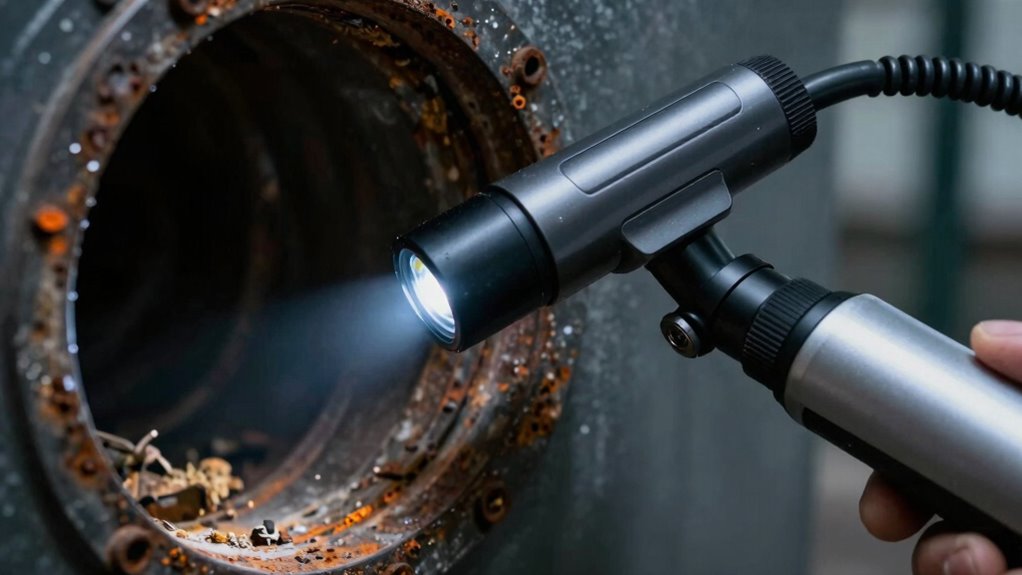
A borescope with dual camera gives you a forward view plus a side view, helping inspect walls, pipes, engines, and other tight spaces without repeatedly repositioning the probe. My best overall pick is the DEPSTECH NTC55 2K, while the Teslong NTS300 stands out as a dedicated inspection-camera option and the Acoath is a strong choice if steering the probe matters most. The main tradeoffs are between image detail, articulation, probe length, and a built-in screen; no single model leads in every area. A longer probe reaches farther, but it can be harder to guide, while an articulating probe offers control at the cost of added complexity. Continue reading for the full breakdown and advice on matching a dual-lens borescope to the spaces you inspect.

Get business pricing on tools and workshop supplies
- Business-only prices and quantity discounts
- Tax-exempt purchasing
- Multiple users, one account, clear invoices
Complete the kit

Key Takeaways
- The DEPSTECH NTC55 2K is my best overall choice because its stated 2K resolution gives it a clear role for buyers who prioritize image detail in a dual-lens format.
- Articulation separates specialist tools from straightforward inspection cameras: the Acoath and Teslong articulating models are aimed at steering around obstacles, while fixed probes favor simpler operation.
- Built-in screens suit quick, standalone checks: the 5-inch 1080P model and the T TAKMLY with a 4.3-inch display do not make a phone the center of the workflow.
- Probe lengths cluster around 16.4 to 16.5 feet across several picks, so handling, flexibility, and the space available for coiling may matter more than a small length difference.
- Dual lenses do not replace good positioning: a side-facing view helps inspect nearby surfaces, but buyers still need to check probe diameter, lighting, and access to the target area.
| DEPSTECH NTC55 2K Dual-Lens Endoscope Camera |  | Best for High-Detail Phone-Based Inspections | Resolution: 2560 × 1440 pixels (2K) | Lenses: Front and side | Probe diameter: 7.9 mm (0.31 in) | VIEW ON AMAZON | See Our Full Breakdown |
| 5-Inch 1080P Dual-Lens Endoscope Camera with 16.4-Foot Waterproof Probe | 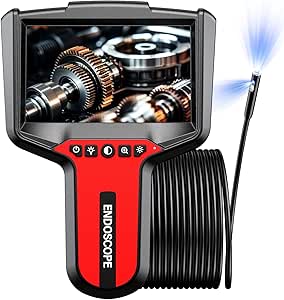 | Best for Simple, Screen-Based Inspections | Display: 5 inches | Resolution: 1080P | Lens configuration: Dual lens with front and side views | VIEW ON AMAZON | See Our Full Breakdown |
| Teslong NTS300 Dual-Lens Borescope Inspection Camera |  | Best for Long Sessions with a Standalone Screen | Display: 5-inch IPS | Camera lenses: Dual: forward and side | Cable: 16.5 ft, semi-rigid | VIEW ON AMAZON | See Our Full Breakdown |
| Acoath 5 ft Two-Way Articulating Dual-Lens Borescope with 4.3-Inch Screen |  | Best for Steering Around Obstructions | Articulation: 210° | Lenses: Dual: 70° main lens and 60° side lens | Display: 4.3-inch IPS | VIEW ON AMAZON | See Our Full Breakdown |
| Elecshion Dual-Lens Endoscope Camera with Light, 1920P HD, 16.5 ft Semi-Rigid Cable, IP67 Waterproof, USB-C | 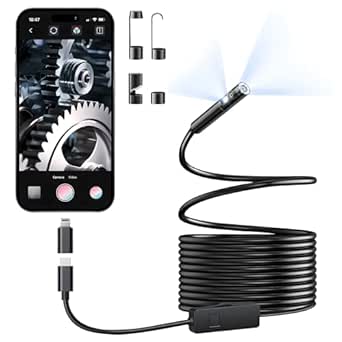 | Best for Long-Reach USB-C Inspections | Camera lenses: Dual | Resolution: 1920×1440; 2 MP sensor | Probe diameter: 8 mm | VIEW ON AMAZON | See Our Full Breakdown |
| DEPSTECH DS300 Dual-Lens Endoscope Camera, 16.5 ft |  | Best Long-Reach Recording Pick | Camera views: Dual lens: front and side | Screen: 4.3-inch TFT IPS | Video resolution: 1080p | VIEW ON AMAZON | See Our Full Breakdown |
| Dual-Lens Endoscope Camera with Light, 16.5 ft Cable |  | Best for Live-View Inspections | Camera views: Dual lens with three viewing modes | Screen: 4.3-inch IPS | Cable length: 16.5 ft | VIEW ON AMAZON | See Our Full Breakdown |
| T TAKMLY Dual-Lens Endoscope Camera with Light, 4.3-Inch Display, 1080p, IP67 Waterproof, 16.4-Foot Cable |  | Best for Broad Focus Range | Display: 4.3-inch HD IPS | Camera views: Front and side | Resolution: 1920 × 1080 | VIEW ON AMAZON | See Our Full Breakdown |
| Teslong Articulating Borescope with Dual-Lens Endoscope and LED Lights |  | Best for Steering Around Obstructions | Probe length: 5 ft | Probe type: Semi-rigid, articulating | Camera views: Front and side | VIEW ON AMAZON | See Our Full Breakdown |
| Dual-Lens Articulating Borescope Camera with 0.25-Inch Probe |  | Best Articulating All-Rounder | Probe diameter: 0.25 inches | Probe length: 5.3 ft | Articulation: 210° bi-directional | VIEW ON AMAZON | See Our Full Breakdown |
| borescope with dual camera | Water resistance | Lighting | Resolution | Probe diameter |
|---|---|---|---|---|
| DEPSTECH NTC55 2K Dual-Lens En | IP67 | 8 adjustable LEDs plus 1 auxiliary LED | 2560 × 1440 pixels (2K) | 7.9 mm (0.31 in) |
| 5-Inch 1080P Dual-Lens Endosco | IP67 | — | 1080P | — |
| Teslong NTS300 Dual-Lens Bores | — | 7 LEDs: 6 front and 1 side, with brightness control | 720p video; 2 MP stills | 8 mm |
| Acoath 5 ft Two-Way Articulati | — | — | — | — |
| Elecshion Dual-Lens Endoscope | IP67; underwater up to 3.28 ft for 1 hour | 8+1 adjustable LED lights | 1920×1440; 2 MP sensor | 8 mm |
| DEPSTECH DS300 Dual-Lens Endos | IP67 | 7 adjustable LEDs with 3 brightness levels | — | — |
| Dual-Lens Endoscope Camera wit | IP67 | 8 adjustable LEDs | — | 7.9 mm |
| T TAKMLY Dual-Lens Endoscope C | — | 8 adjustable LEDs | 1920 × 1080 | — |
| Teslong Articulating Borescope | IP67 | — | — | — |
| Dual-Lens Articulating Boresco | — | — | — | 0.25 inches |
More Details on Our Top Picks
DEPSTECH NTC55 2K Dual-Lens Endoscope Camera
I’d choose the DEPSTECH NTC55 when image detail matters and connecting an existing phone is preferable to carrying a separate monitor. Its 2K resolution exceeds the 720p video of the Teslong NTS300, while the front-and-side lens arrangement lets you inspect ahead and check nearby surfaces without relying on a single viewing angle. The 7.9 mm semi-rigid probe is also slightly narrower than the Teslong’s 8 mm probe, a small advantage in tight openings.
The tradeoff is a phone-dependent setup: you need the DEPSTECHCAM app and a compatible device, with OTG support enabled on Android. Unlike the 5-inch-screen models, it cannot serve as a standalone viewer. Its 5 m IP67 cable, adjustable lighting, and retrieval attachments suit plumbing and general maintenance, but buyers who want onboard recording should check that their phone setup meets their needs.
Pros:- 2K video provides more detail than the Teslong NTS300’s 720p video.
- Front and side lenses help inspect both the path ahead and nearby surfaces.
- Slim 7.9 mm semi-rigid probe reaches narrow, curved spaces.
- IP67 probe, adjustable LEDs, hook, and magnet support wet inspections and small-item retrieval.
Cons:- Requires the DEPSTECHCAM app and a compatible phone or tablet.
- Android devices must support and have OTG enabled for connection.
Best for: Phone users who need detailed front-and-side views through narrow openings and are comfortable installing an inspection app.
Not ideal for: Buyers who want a self-contained screen, or Android users whose devices lack OTG support.
- Resolution:2560 × 1440 pixels (2K)
- Lenses:Front and side
- Probe diameter:7.9 mm (0.31 in)
- Cable:5 m (16.5 ft), semi-rigid
- Water resistance:IP67
- Lighting:8 adjustable LEDs plus 1 auxiliary LED
- Connectivity and compatibility:USB Type-C with Lightning adapter; iOS 11.0+ and Android 9.0+; Android requires OTG support
- Zoom and file formats:2× digital zoom; JPEG photos and MP4 video
Our verdict“Choose the NTC55 for higher-resolution dual-view inspection on a compatible phone; choose a screen-equipped model if you want to work without an app.”
5-Inch 1080P Dual-Lens Endoscope Camera with 16.4-Foot Waterproof Probe
This handheld model suits buyers who want to start inspecting without pairing a phone or setting up an app. Its built-in 5-inch screen shows front or side views directly, and the 16.4-foot semi-rigid probe reaches farther than the Acoath’s 5-foot cable. That extra reach is more useful for long pipe runs and deep engine compartments; the Acoath, by contrast, can steer its probe through angles with articulation.
The clearest compromise is that this camera cannot take photos or record video, so it is a viewing tool rather than a documentation system. Its 1080P image specification is paired with fixed focus, with a stated 1.2–4-inch focus range, making distance placement part of getting a clear view. IP67 protection and adjustable LEDs fit damp, dim work, while the rechargeable battery is specified for 3–4 hours of runtime.
Pros:- Built-in 5-inch screen avoids phone, app, and Wi-Fi setup.
- 16.4-foot semi-rigid probe reaches farther than the Acoath’s 5-foot cable.
- Front-and-side lenses switch viewing direction for different inspection angles.
- IP67 probe and adjustable LEDs suit damp, dark work areas.
Cons:- Does not capture photos or record video for later review or documentation.
- Fixed 1.2–4-inch focus range limits how far the camera can sit from a target.
Best for: Homeowners and mechanics who need a standalone viewer for live inspections and do not need to save images or video.
Not ideal for: Technicians who must share inspection footage, or buyers who need probe articulation for viewing around bends.
- Display:5 inches
- Resolution:1080P
- Lens configuration:Dual lens with front and side views
- Probe:16.4 ft, semi-rigid
- Water resistance:IP67
- Focus range:1.2–4 inches
- Battery:2000mAh; 3–4 hours runtime
- Photo and video capture:Not supported
Our verdict“Pick this model for straightforward live viewing with a long probe, but choose a recording-capable option if you need to keep or share inspection evidence.”
Teslong NTS300 Dual-Lens Borescope Inspection Camera
The Teslong NTS300 makes the most sense when an inspection calls for a dedicated viewer and extended time away from a charger. Its 5-inch IPS display avoids the phone compatibility requirements of the DEPSTECH NTC55, and the listed 5000mAh battery supports approximately 4.5 hours of use. A 16.5-foot semi-rigid cable gives it reach comparable to the Elecshion, while forward and side cameras cover two useful viewing directions.
Its main compromise is image detail: the NTS300 records video at 720p, below the NTC55’s 2K specification and the Elecshion’s 1920×1440. That difference matters if you need finer recorded detail, though the built-in screen keeps live inspection simple. The IP67 probe and adjustable lighting suit dim or wet spaces, and the case’s hook, magnet, and mirror add practical options. Charging takes about five hours, so it rewards planning rather than quick top-ups.
Pros:- Standalone 5-inch IPS display works without a phone, app, or Wi-Fi.
- 5000mAh battery is specified for approximately 4.5 hours of use.
- 16.5-foot semi-rigid cable reaches deep cavities and holds its shape.
- IP67 probe, adjustable lighting, and included hook, magnet, and mirror support varied inspections.
Cons:- 720p video is lower resolution than the NTC55 and Elecshion options.
- Approximately five-hour charging time makes short breaks less useful for recharging.
Best for: Mechanics, maintenance workers, and homeowners who want a standalone display, long probe, and several hours of inspection time.
Not ideal for: Buyers who prioritize high-resolution video or need a fast recharge between jobs.
- Display:5-inch IPS
- Camera lenses:Dual: forward and side
- Cable:16.5 ft, semi-rigid
- Probe diameter:8 mm
- Probe water resistance:IP67
- Lighting:7 LEDs: 6 front and 1 side, with brightness control
- Battery:5000mAh; approximately 4.5 hours battery life and 5 hours charging time
- Resolution:720p video; 2 MP stills
- Included accessories:Hard carrying case, hook, magnet, and mirror
Our verdict“Choose the NTS300 for long standalone inspections and useful included accessories, not for the highest video resolution.”
Acoath 5 ft Two-Way Articulating Dual-Lens Borescope with 4.3-Inch Screen
The Acoath earns its place through 210° probe articulation, a feature that solves a different problem from simply adding cable length. When the target sits around an internal corner, steering the dual-lens tip can be more useful than the 16.5-foot straight-reaching Elecshion or Teslong NTS300 probes. It also has a 4.3-inch IPS screen and records 1080p video to an included 32GB card, so it works without a phone and can retain inspection footage.
The tradeoff is reach: its 5-foot cable is much shorter than the other long-probe options in this group, limiting access down extended pipes or far into vehicle cavities. The 0.33-inch probe is also wider than the DEPSTECH NTC55’s 7.9 mm probe, which can matter in especially tight openings. For nearby targets that need directional control, its IP67 rating, adjustable LEDs, and supplied retrieval accessories make it a more maneuverable alternative than a long, non-articulating probe.
Pros:- 210° articulation helps aim the probe around obstructions.
- Built-in 4.3-inch screen and 32GB card support standalone viewing and recording.
- 1080p video offers greater detail than the Teslong NTS300’s 720p video.
- IP67 protection, adjustable LEDs, and included hook, magnet, and mirror suit varied repair tasks.
Cons:- Five-foot cable offers much less reach than the 16.5-foot Elecshion and Teslong NTS300.
- 0.33-inch probe is wider than the DEPSTECH NTC55’s 7.9 mm probe.
Best for: Automotive and home-repair users who need to steer a camera around nearby corners and save 1080p footage without a phone.
Not ideal for: Plumbing or industrial users who need to reach deep along long passages, or anyone working through very narrow openings.
- Articulation:210°
- Lenses:Dual: 70° main lens and 60° side lens
- Display:4.3-inch IPS
- Video resolution:1920 × 1080 (1080p)
- Cable and probe diameter:5 ft cable; 0.33 in probe
- Focus range:2–10 cm
- Water resistance and lighting:IP67; 8 adjustable LEDs with 4 brightness levels
- Storage:Built-in 32GB TF card
- Included accessories:Protective case, magnet, hook, mirror, and protective cap
Our verdict“Choose the Acoath when steering and recording matter more than long reach or the smallest probe diameter.”
Elecshion Dual-Lens Endoscope Camera with Light, 1920P HD, 16.5 ft Semi-Rigid Cable, IP67 Waterproof, USB-C
The Elecshion is a practical fit for buyers who want a long dual-lens probe and image capture through a compatible USB-C phone or tablet. Its 16.5-foot semi-rigid cable reaches as far as the Teslong NTS300’s and considerably farther than the Acoath’s 5-foot probe. The stated 1920×1440 capture resolution also exceeds the Teslong’s 720p video specification, while front-and-side lenses and 8+1 adjustable LEDs help with changing angles and dark spaces.
Unlike the Teslong, this is a phone-connected tool rather than a self-contained inspection system, so device compatibility is part of the buying decision. Its 8 mm probe is also wider than the DEPSTECH NTC55’s 7.9 mm tip, which may matter in very narrow access points. IP67 protection supports brief underwater use within the stated limits, but the probe is not heat-resistant; keep it away from hot engines and other heated equipment.
Pros:- 16.5-foot semi-rigid cable reaches deep spaces and holds its shape.
- Dual lenses and 1920×1440 capture support versatile, detailed inspection.
- IP67 probe is specified for underwater use up to 3.28 ft for 1 hour.
- 8+1 adjustable LEDs help light dark inspection areas.
Cons:- Requires a compatible USB-C phone or tablet rather than providing its own screen.
- Probe is not heat-resistant and must not be used around hot engines.
- At 8 mm, the probe is slightly wider than the DEPSTECH NTC55’s 7.9 mm tip.
Best for: USB-C phone or tablet owners who need a long, semi-rigid dual-view probe for plumbing, dark cavities, or brief underwater inspection.
Not ideal for: Users who need a standalone screen, a slimmer probe, or inspections around hot engines.
- Camera lenses:Dual
- Resolution:1920×1440; 2 MP sensor
- Probe diameter:8 mm
- Cable:16.5 ft (5 m), semi-rigid
- Lighting:8+1 adjustable LED lights
- Water resistance:IP67; underwater up to 3.28 ft for 1 hour
- Compatibility:USB-C iPhone, iPad, and Android phones
- File formats:JPEG and MP4
- Probe heat resistance:Not heat-resistant
Our verdict“Pick the Elecshion for long-reach, phone-based inspection in wet or dark areas, provided your device is compatible and the probe will stay away from heat.”
DEPSTECH DS300 Dual-Lens Endoscope Camera, 16.5 ft
The DS300 pairs a 16.5-foot semi-rigid cable with front and side lenses, making it a strong fit when the inspection point is far inside a pipe, vehicle, or HVAC run and you want to record what you find. Its 1080p video and 2 MP photos provide a useful record, unlike the Dual-Lens Endoscope Camera with Light, which does not support photo storage. The 4.3-inch screen keeps viewing independent of a phone, while adjustable LEDs and an IP67-rated camera suit dim or wet work. The tradeoff is that a TF card is not included, so recording requires a separate purchase, and the battery lasts about four hours. Compared with the shorter Teslong Articulating Borescope, the DS300 prioritizes reach over probe steering.
Pros:- Front and side views reduce the need to reposition the probe.
- 1080p video and 2 MP photos support documentation.
- 16.5-foot semi-rigid cable reaches deep inspection areas.
- IP67 camera and adjustable LEDs suit wet, dark spaces.
Cons:- TF card is not included, adding a separate storage requirement.
- About four hours of battery life may fall short for extended jobs.
Best for: DIY mechanics and maintenance workers who need a long probe and want to save inspection photos or video.
Not ideal for: Buyers who need to steer the camera around bends; its cable is semi-rigid but not articulating, and recording requires a separate TF card.
- Camera views:Dual lens: front and side
- Screen:4.3-inch TFT IPS
- Video resolution:1080p
- Still image resolution:2 MP
- Cable length:16.5 ft
- Water resistance:IP67
- Lighting:7 adjustable LEDs with 3 brightness levels
- Battery life:About 4 hours
Our verdict“Choose the DS300 when long reach and saved inspection footage matter more than an articulating probe.”
Dual-Lens Endoscope Camera with Light, 16.5 ft Cable
This model is for buyers who need to inspect a space in real time, not keep a record of it. Its three viewing modes, dual-lens probe, 4.3-inch IPS screen, and 16.5-foot semi-rigid cable make it practical for tracing pipes or checking an automotive cavity from outside the opening. Eight adjustable LEDs and IP67 water resistance add flexibility in dark, damp areas. Compared with the DEPSTECH DS300, it gives up photo and video capture, so it cannot document a defect for a later repair estimate or comparison. Its fixed focus also asks the user to keep the target within the stated 2–10 cm range; buyers wanting a broader focus range can look at the T TAKMLY model. The appeal here is a straightforward live inspection setup rather than recording features.
Pros:- Three viewing modes offer flexibility when checking confined spaces.
- 16.5-foot semi-rigid cable reaches deep inspection points.
- Eight adjustable LEDs help illuminate dark areas.
- IP67 rating suits wet-area inspections.
Cons:- Does not take or store photos or video.
- Fixed focus limits working distance flexibility.
Best for: Plumbers and DIY vehicle owners who need a screen-based live inspection and do not need saved images or video.
Not ideal for: Technicians who must document findings or inspect targets at varied distances, because it has no photo storage and fixed focus.
- Camera views:Dual lens with three viewing modes
- Screen:4.3-inch IPS
- Cable length:16.5 ft
- Probe diameter:7.9 mm
- Video resolution:1080p
- Focusing distance:2–10 cm
- Lighting:8 adjustable LEDs
- Water resistance:IP67
Our verdict“Pick this for long-reach live viewing when documentation and adjustable focus are not requirements.”
T TAKMLY Dual-Lens Endoscope Camera with Light, 4.3-Inch Display, 1080p, IP67 Waterproof, 16.4-Foot Cable
The T TAKMLY stands out for its stated 0.6–4.0-inch focus range, which gives live inspections more room to work across near and farther targets than the fixed-focus Dual-Lens Endoscope Camera with Light. Its front and side cameras, 4.3-inch HD IPS display, and 16.4-foot semi-rigid cable suit common engine, vent, and pipe checks, while eight adjustable LEDs help reveal details in dark spaces. The compromise is substantial: it cannot capture photos or video, so findings must be viewed on the spot. Compared with the DEPSTECH DS300, it offers a wider stated focus span but loses documentation capability. The listed standby time is up to five hours, which is not the same as a guaranteed continuous working runtime.
Pros:- Stated 0.6–4.0-inch focus range accommodates varied target distances.
- Switchable front and side views support inspection from different angles.
- 16.4-foot semi-rigid cable reaches into deep spaces.
- IP67 rating and adjustable LEDs suit wet, low-light work.
Cons:- Cannot capture photos or videos for records or follow-up.
- Up to five hours is listed as standby time, not a confirmed continuous runtime.
Best for: Home mechanics and maintenance staff who inspect targets at different distances but only need live viewing.
Not ideal for: Users who need to save evidence, share findings, or track changes with photos or video.
- Display:4.3-inch HD IPS
- Camera views:Front and side
- Resolution:1920 × 1080
- Camera diameter:8.0 mm
- Cable length:16.4 ft
- Focus range:0.6–4.0 inches
- Lighting:8 adjustable LEDs
- Battery:2000 mAh; up to 5 hours standby
Our verdict“Choose the T TAKMLY for live inspections where its broad stated focus range matters more than recording.”
Teslong Articulating Borescope with Dual-Lens Endoscope and LED Lights
The Teslong earns its place through a feature the long, fixed-direction probes here lack: an articulating semi-rigid probe. That steering can help direct the camera around an obstruction without repeatedly withdrawing and repositioning it, while front and side views add another angle once the probe is in place. Its 4.5-inch IPS screen works without an app, and included 32 GB Micro SD storage supports photo and video capture. The main tradeoff is reach: at five feet, it is much shorter than the 16.5-foot DEPSTECH DS300. Image detail is also more limited, with 720p video and 1 MP stills compared with the DS300’s 1080p video and 2 MP photos. This is the more maneuverable choice, not the better option for deep or detail-heavy recording.
Pros:- Articulating probe improves camera positioning around obstacles.
- Front and side views provide multiple inspection angles.
- On-device screen works without an app.
- Includes 32 GB Micro SD storage for photo and video capture.
Cons:- Five-foot probe may not reach deep inspection points.
- 720p video and 1 MP stills offer less detail than the DEPSTECH DS300.
Best for: Automotive technicians and equipment inspectors who need to steer around internal obstructions and save findings without using a phone app.
Not ideal for: Buyers inspecting deep pipes or needing finer recorded detail; the probe is five feet long and video is 720p.
- Probe length:5 ft
- Probe type:Semi-rigid, articulating
- Camera views:Front and side
- Screen:4.5-inch IPS LCD
- Video resolution:720p
- Still resolution:1 MP
- Storage:32 GB Micro SD included
- Water resistance:IP67
Our verdict“Choose the Teslong when steering and app-free recording matter more than long reach or higher resolution.”
Dual-Lens Articulating Borescope Camera with 0.25-Inch Probe
This articulating model combines 210° bi-directional steering with front, side, and split-screen viewing, giving users several ways to check a confined space without relying on a fixed probe angle. Its 5.3-foot semi-rigid probe is shorter than the DEPSTECH DS300’s 16.5-foot cable, but steering makes it better suited to maneuvering around internal obstacles. It also records 1080p video and 2.07 MP stills, unlike the live-view-only T TAKMLY. A 4.3-inch IPS display and included accessories add to its ready-to-use inspection setup. The reach remains limited for deep runs, and the product data provides no warranty details. At 1.3 pounds, it is also heavier than a simple cable-and-screen setup may suggest.
Pros:- 210° bi-directional articulation helps aim around obstructions.
- Front, side, and split-screen modes offer flexible viewing.
- 1080p video and 2.07 MP stills support documentation.
- IP67 probe and included carrying case and inspection accessories.
Cons:- 5.3-foot probe is much shorter than the DEPSTECH DS300’s 16.5-foot cable.
- No warranty details are provided in the product information.
Best for: Automotive and equipment inspectors who need an articulating probe, multiple viewing modes, and saved images or video.
Not ideal for: Users checking long pipe runs or requiring clear warranty information before buying; its probe is 5.3 feet and no warranty details are listed.
- Probe diameter:0.25 inches
- Probe length:5.3 ft
- Articulation:210° bi-directional
- Camera views:Front-facing and side-view
- Display:4.3-inch IPS
- Video resolution:1080p
- Still resolution:2.07 MP
- Battery:3000 mAh; up to 5 hours
Our verdict“Choose this model when articulation and recorded detail matter more than reaching far into a long run.”
How We Picked
I compared these ten options around the job a dual-camera borescope must do: show both the path ahead and nearby surfaces while remaining manageable in a confined space. The ranking weighs stated image resolution, probe length and type, articulation, display setup, lighting, and waterproof ratings where those details were provided. I also considered whether the design favors quick, uncomplicated checks or more controlled steering through bends and cavities.
The order reflects how broadly each model appears suited to common inspection tasks, with specialist advantages called out where they matter more than general versatility. The DEPSTECH NTC55 leads for its stated 2K image resolution; models with built-in displays rank well for users who want a self-contained setup, while articulating picks are better for directional control. Product names and specifications alone cannot establish image quality in every lighting condition, so I distinguish stated features from performance claims and flag tradeoffs such as probe handling, workflow, and missing specification details.
| borescope with dual camera | Water resistance | Camera views |
|---|---|---|
| DEPSTECH NTC55 2K Dual-Lens En | IP67 | — |
| 5-Inch 1080P Dual-Lens Endosco | IP67 | — |
| Teslong NTS300 Dual-Lens Bores | — | — |
| Acoath 5 ft Two-Way Articulati | — | — |
| Elecshion Dual-Lens Endoscope | IP67; underwater up to 3.28 ft for 1 hour | — |
| DEPSTECH DS300 Dual-Lens Endos | IP67 | Dual lens: front and side |
| Dual-Lens Endoscope Camera wit | IP67 | Dual lens with three viewing modes |
| T TAKMLY Dual-Lens Endoscope C | — | Front and side |
| Teslong Articulating Borescope | IP67 | Front and side |
| Dual-Lens Articulating Boresco | — | Front-facing and side-view |
Factors to Consider When Choosing Borescope With Dual Camera
Before choosing a dual-camera borescope, start with the inspection itself rather than the headline resolution. The right pick depends on whether you need to see ahead, inspect a nearby wall, steer around a bend, or work without a phone. These points help avoid paying for capabilities that do not suit your access route.
Choose the right view for the inspection
A dual-lens probe usually combines a forward-facing camera with a side-facing camera, but the usefulness of that arrangement depends on the target. The forward view helps locate openings and follow a passage, while the side view can reveal deposits, cracks, or fittings along a wall. A second view does not automatically provide a full panorama, so check how the camera switches between lenses and whether both views can be seen at once. For a long, straight cavity, forward vision may do most of the work; for a cylinder wall or pipe interior, side vision can save repeated probe repositioning. Avoid choosing by the word “dual” alone when the task depends on inspecting a particular direction.
Match probe length and stiffness to access
A longer probe can reach farther, but it also needs room to feed, coil, and retrieve. The many 16.4- to 16.5-foot models in this roundup suit jobs where the target is well inside a cavity, though that reach may be unnecessary for appliance checks or shallow access. A semi-rigid cable can hold a route better than a limp cable, yet it may resist tight bends and require more space to maneuver. Probe diameter matters too: a long cable is no help if its camera head cannot pass through the opening. Measure the entry point and estimate bends before buying, rather than treating maximum length as a universal advantage.
Pay for articulation only when steering matters
Articulation can direct the camera around obstructions and toward a specific surface, which is useful in branching or curved spaces. It also adds controls and can make operation less immediate than a fixed probe, especially if the user must manage the display and cable at the same time. A short articulating probe such as the Acoath is a different kind of tool from a long, fixed 16.5-foot probe: it favors controlled movement over reach. Before paying for articulation, ask whether the probe must turn after insertion or whether rotating a simpler cable will provide enough coverage. For occasional, straight-ahead inspections, a fixed dual-lens model may be easier to manage.
Pick a display workflow you will actually use
A built-in screen makes a borescope more self-contained and can be convenient when a phone is unavailable, shared, or awkward to operate near the work area. Screen size and resolution matter for viewing fine details, but a larger display can add bulk to the handheld unit. Phone-connected designs can simplify saving or sharing inspection images, though they depend on device compatibility and a stable connection. Check whether the product includes the display or relies on a separate device, and verify the connection type against your equipment. A screen is not automatically better: choose the workflow that lets you monitor the probe while keeping a free hand for the job.
Treat resolution and lighting as a pair
Higher stated resolution can preserve more detail, but it cannot compensate for poor lighting, a dirty lens, or a camera positioned too close to a reflective surface. Adjustable LEDs help adapt to dark spaces, while excessive brightness can wash out shiny metal or wet surfaces. The DEPSTECH NTC55’s stated 2K resolution is a meaningful point of difference, but buyers should still think about the material and distance they need to inspect. Waterproof ratings can matter for damp environments, yet a rating such as IP67 applies under specified conditions and does not make every part of a device suitable for every liquid or cleaning method. Check the lens and probe care instructions before using the camera in dirty or wet areas.
Frequently Asked Questions
Does a dual-camera borescope show both views at the same time?
Not necessarily. “Dual camera” often means the probe has a forward-facing lens and a side-facing lens, with the operator switching between their views rather than seeing a split screen. That distinction affects how quickly you can compare the path ahead with a nearby surface. Check the product’s display behavior and controls before buying if simultaneous views are a requirement. For many inspections, switching views is sufficient, but it may slow work when you need constant awareness of both directions.
Should I choose a built-in screen or a phone-connected borescope?
Choose a built-in screen if you want a standalone tool that is ready to use without setting up a phone or app. A phone-connected model may fit better if saving, reviewing, or sharing images is central to your work, but compatibility and connection reliability become part of the setup. Also think about where you will hold the display: a separate phone can be convenient on a bench but awkward in a cramped work area. The 5-inch and 4.3-inch screen models in this roundup represent the self-contained route. Compare the complete workflow, not just screen size.
Is an articulating probe worth choosing over a longer fixed probe?
It depends on whether reach or steering is the harder problem. A long fixed probe is more useful when the target is far away along a mostly direct route, while articulation helps aim around a bend or inspect a specific surface. The Acoath’s five-foot articulating format illustrates the control-first approach, unlike the several roughly 16.5-foot fixed-cable options. More reach does not guarantee that the camera can turn toward the area you need to see. Map the route and target before deciding which capability matters most.
Can I use an IP67 dual-camera borescope in any wet or dirty space?
No. An IP67 rating is tied to defined test conditions and does not mean the full device can be submerged, exposed to every fluid, or cleaned with any method. The probe may have a different level of protection from the screen, controls, or cable connections. Confirm which parts carry the rating and follow the manufacturer’s cleaning and drying instructions after use. For oil, chemicals, or contaminated spaces, check material compatibility as well as water protection. Do not treat an IP rating as a blanket guarantee for every inspection environment.
What should I check before buying a dual-lens borescope for a narrow opening?
Start with the probe’s outside diameter, since the camera head must pass through the opening before any other feature can help. Then check the cable’s bend behavior and the probe’s ability to turn once inside; a long, semi-rigid cable may need more space than expected. Think about the camera head’s length as well as its diameter, especially when the entry has a lip or tight angle. Confirm that the side-facing lens can view the target at the distance available. If the product listing does not state probe diameter, seek that detail before ordering rather than guessing from cable length.
Conclusion
For a broadly useful dual-camera setup, I recommend the DEPSTECH NTC55 2K as best overall, particularly when stated image detail is the priority. The best value direction is a straightforward fixed-probe model that has the length and display workflow your inspections require; compare the Elecshion, DEPSTECH DS300, and similar 16.5-foot options by their exact included features before choosing. For a best premium or specialist pick, look to the Teslong articulating borescope or Acoath when steering the camera is more important than maximum reach. Beginners may prefer the T TAKMLY or 5-inch display model for a self-contained screen and direct controls. If your work demands a very narrow entry, prioritize confirmed probe diameter; if it involves bends, choose articulation; and if it is mainly a long, straight cavity, favor reach and simple handling.
Fall yard work Picks
leaf blowers
As an affiliate, we earn on qualifying purchases.