
If you’re looking for the best Ethernet backhaul mesh Wi-Fi kits for seamless home coverage, I’ve found options supported by latest Wi-Fi standards like Wi-Fi 6 and Wi-Fi 6E. These systems offer extensive coverage, high device capacity, and wired backhaul for faster, more reliable connections. They include models like TP-Link Deco X55, Deco XE75, and Tenda Nova MW6. Keep exploring, and you’ll discover which setups might work best for your home needs.
Key Takeaways
- Look for mesh Wi-Fi kits with multiple Gigabit Ethernet ports per node for reliable wired backhaul connections.
- Prioritize systems supporting high-speed Ethernet backhaul (e.g., 2.5 Gbps ports) for optimal performance.
- Ensure compatibility with existing routers or modems for seamless integration into your home network.
- Choose kits with easy setup and management features, including app control and remote management options.
- Consider systems with advanced security features like WPA3 and VPN support for secure, high-performance connectivity.
TP-Link Deco X55 AX3000 WiFi 6 Mesh System (3-Pack)

If you’re looking for a reliable way to eliminate dead zones and support multiple devices, the TP-Link Deco X55 AX3000 WiFi 6 Mesh System is an excellent choice. Covering up to 6,500 sq.ft., it replaces traditional routers and extenders with seamless, high-performance Wi-Fi 6. Supporting up to 150 devices, it ensures reliable connectivity without buffering. Each unit features three Gigabit Ethernet ports and supports Ethernet backhaul for faster wired speeds. Setting it up is straightforward using the Deco app, and it’s compatible with all major ISPs. With robust security, 24/7 support, and a 2-year warranty, it’s a versatile, future-proof solution for any home network.
Best For: homeowners and small to medium-sized households seeking seamless, high-speed Wi-Fi coverage with reliable device support and easy setup.
Pros:
- Supports Wi-Fi 6 (AX3000) for fast, future-proof connectivity across large areas up to 6,500 sq.ft.
- Easy setup and management via the Deco app with remote access options.
- Compatible with all major ISPs and supports Ethernet backhaul for enhanced wired performance.
Cons:
- Higher price point compared to basic routers or extenders.
- Requires a compatible modem if not provided by your ISP.
- Some advanced features may need a subscription for full access with the HomeShield security suite.
TP-Link Deco WiFi 6 Mesh System (Deco X20)
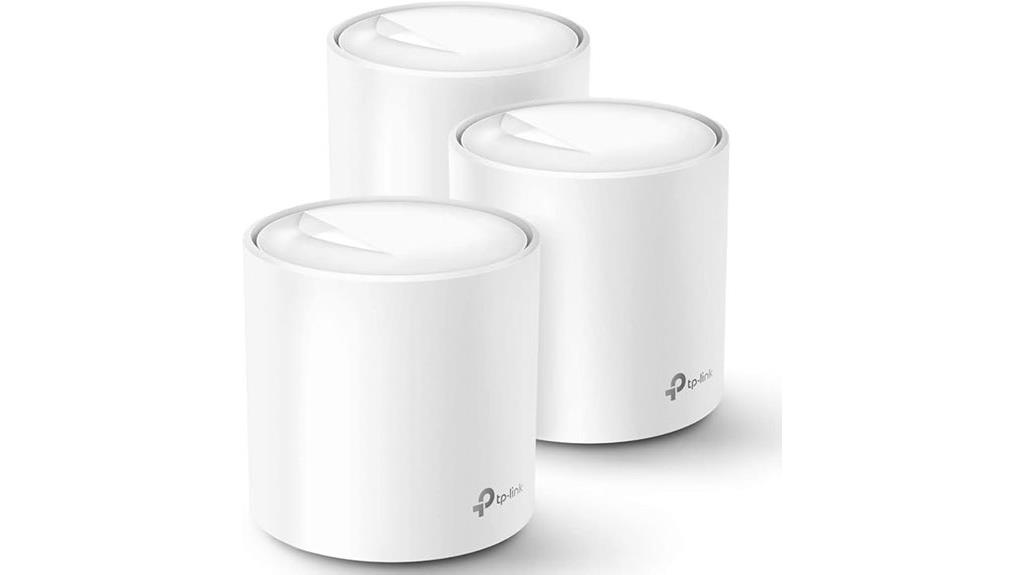
The TP-Link Deco WiFi 6 Mesh System (Deco X20) is an excellent choice for large households or offices that need reliable, high-speed Wi-Fi across extensive areas. It covers up to 5800 sq ft seamlessly, eliminating dead zones and buffering issues. Supporting Wi-Fi 6 AX1800 technology, it handles up to 150 devices simultaneously with strong, stable connections. Each unit features 2 Gigabit Ethernet ports, and wired backhaul enhances speed and stability. Easy to set up via the Deco app, it offers remote management, parental controls, and compatibility with major ISPs and smart home devices. This system delivers high performance and security for demanding environments.
Best For: households or offices requiring extensive, reliable high-speed Wi-Fi coverage across large areas with multiple devices.
Pros:
- Seamless coverage up to 5800 sq ft eliminating dead zones and buffering
- Supports up to 150 devices simultaneously with Wi-Fi 6 technology for efficient connectivity
- Easy setup and management through the Deco app with parental controls and voice control options
Cons:
- Requires a modem for most ISP services, adding to initial setup cost
- The 3-pack may be overkill for smaller spaces or fewer devices
- Limited customization options compared to traditional routers for advanced users
TP-Link Deco BE23 Mesh Wi-Fi System (3-Pack)
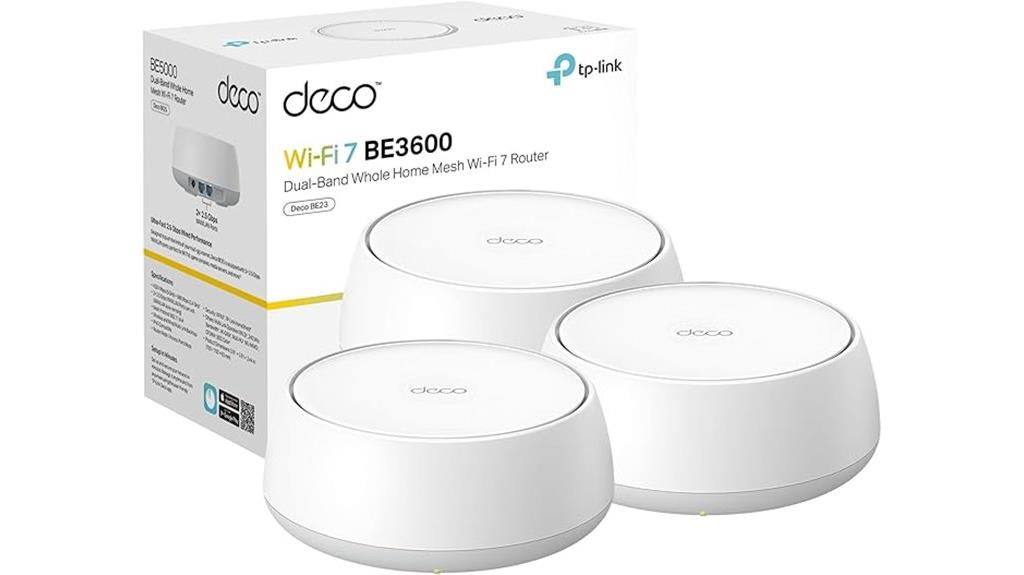
For homeowners seeking reliable, high-speed Wi-Fi coverage across large spaces, the TP-Link Deco BE23 Mesh Wi-Fi System (3-Pack) stands out with its advanced Wi-Fi 7 technology and extensive coverage of up to 6,500 square feet. It delivers speeds up to 3.6 Gbps thanks to 4-stream dual-band capabilities, supporting the latest devices like iPhone 16 Pro and Samsung Galaxy S24 Ultra. With simultaneous wireless and wired backhaul, it ensures stable connections even in remote areas. Its AI-driven Seamless Roaming creates a unified network, while high-gain antennas and 2.5 Gbps ports provide robust connectivity. Security features include WPA3 encryption and VPN support, making it an ideal choice for modern smart homes.
Best For: homeowners and large households seeking high-speed, reliable Wi-Fi coverage across extensive spaces with advanced security and smart home compatibility.
Pros:
- Supports next-generation Wi-Fi 7 technology with speeds up to 3.6 Gbps for fast, lag-free connectivity.
- Covers up to 6,500 sq. ft. and supports 150 devices simultaneously without performance loss.
- Features AI-driven Seamless Roaming and robust security with WPA3 and VPN support.
Cons:
- Requires a modem for internet connection, adding to initial setup costs.
- Higher price point compared to traditional Wi-Fi systems without Wi-Fi 7 capabilities.
- Setup and management might be complex for users unfamiliar with mesh Wi-Fi technology.
TP-Link Deco XE75 WiFi 6E Mesh System (3-Pack)
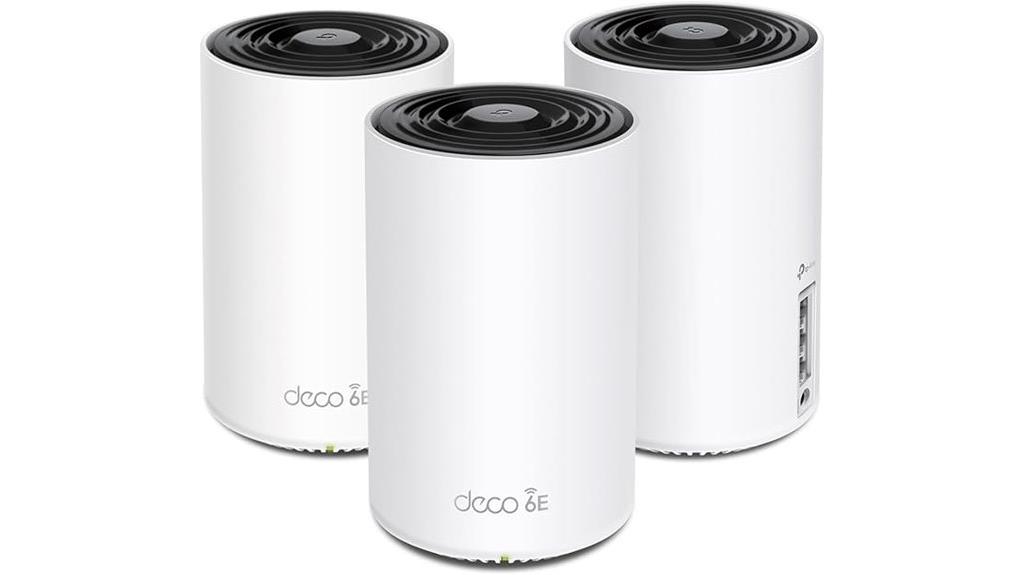
The TP-Link Deco XE75 WiFi 6E Mesh System (3-Pack) is an excellent choice for those needing reliable, high-speed coverage across large homes or spaces with multiple devices. It covers up to 7,200 sq.ft, eliminating dead zones and buffering issues. Its tri-band WiFi 6E technology delivers speeds up to 5,400 Mbps, supporting around 200 devices simultaneously. The new 6 GHz band offers a dedicated backhaul and less interference, enhancing stability and performance. Setup is straightforward via the Deco app, and AI-driven mesh optimizes network conditions automatically. With robust security features and compatibility with major ISPs, this system guarantees fast, secure, and seamless connectivity throughout your home.
Best For: households or large spaces needing reliable, high-speed WiFi coverage for multiple devices, including smart home setups and streaming.
Pros:
- Covers up to 7,200 sq.ft, effectively eliminating dead zones and buffering.
- Supports speeds up to 5,400 Mbps and up to 200 devices simultaneously.
- AI-Driven Mesh technology automatically optimizes network performance and stability.
Cons:
- Requires a modem for most ISPs, adding to setup complexity.
- Higher price point compared to single-router systems.
- Setup and management, while simplified via app, may still be complex for non-technical users.
Hitron HTEM5 MoCA 2.5 Adapter Kit (2-Pack)

If you have a home wired with coax outlets and want to boost your Wi-Fi performance, the Hitron HTEM5 MoCA 2.5 Adapter Kit (2-Pack) is an excellent choice. It converts existing coax wiring into high-speed Ethernet connections supporting 2.5Gbps, perfect for mesh Wi-Fi backhaul, streaming, and gaming. The setup is simple—just connect the adapters to coax outlets, Ethernet, and power. They provide low-latency, Gigabit speeds without needing new wiring or drilling. Compatible with cable TV wiring (not satellite), the adapters enhance network stability and coverage seamlessly, making them ideal for homes with existing coax infrastructure.
Best For: households with existing coax wiring seeking high-speed, reliable Ethernet connections for streaming, gaming, or mesh Wi-Fi expansion without installing new cables.
Pros:
- Supports ultra-fast 2.5Gbps MoCA 2.5 connectivity for high-bandwidth activities
- Easy plug-and-play setup with minimal configuration required
- Compatible with most cable TV wiring systems, enhancing network stability and coverage
Cons:
- Not compatible with satellite TV (DirecTV, DISH) systems
- Requires MoCA-compatible splitters for optimal performance in some setups
- Limited to homes wired for cable TV, not suitable for satellite or fiber-only installations
DBIT AX1500 WiFi 6 Mesh System (3-Pack)

The DBIT AX1500 WiFi 6 Mesh System (3-Pack) is an excellent choice for large homes or spaces that demand reliable, seamless coverage. It covers up to 5,600 sq ft, eliminating dead zones effortlessly. With combined speeds up to 1500Mbps and support for over 120 devices, it handles streaming, gaming, and smart home devices smoothly. Each unit offers four Gigabit Ethernet ports for wired connections, and the mesh technology ensures quick, stable roaming across your property. Setup is straightforward via an app or web GUI, making it a flexible, reliable solution for maintaining fast, secure connectivity throughout your home.
Best For: households or small offices with large spaces seeking reliable, seamless Wi-Fi coverage and support for multiple devices.
Pros:
- Covers up to 5,600 sq ft, eliminating dead zones effectively
- Supports over 120 devices simultaneously, ideal for smart homes and busy households
- Easy setup via mobile app or web GUI with mesh technology for stable roaming
Cons:
- Price may vary; some users might find it higher compared to basic routers
- Limited to a 3-pack, which might require additional nodes for extremely large or complex spaces
- Customer ratings are good but not perfect, indicating potential variability in user experience
Tenda Nova Mesh WiFi System MW6 (3-Pack)

For homeowners seeking reliable, whole-home Wi-Fi coverage without dead zones, the Tenda Nova Mesh WiFi System MW6 (3-Pack) is an excellent choice. It covers up to 4-6 bedrooms and 6,000 sq.ft., replacing traditional routers and extenders for seamless connectivity. The AC1200 dual-band mesh network supports up to 90 devices simultaneously, ensuring fast, stable connections for all your gadgets. Thanks to MU-MIMO and Beamforming technology, it delivers high-capacity, lag-free performance. Easy to set up via the Tenda app, it also offers secure WPA2 encryption and guest networks, making it a versatile and reliable solution for thorough home coverage.
Best For: homeowners seeking reliable, whole-home Wi-Fi coverage with easy setup and strong security features.
Pros:
- Covers up to 6,000 sq.ft. and supports 90 devices simultaneously for comprehensive connectivity
- Seamless roaming and easy expansion with simple steps for adding new nodes
- User-friendly setup via the Tenda app with WPA2 encryption and guest network options
Cons:
- May be overkill for small apartments or homes with minimal Wi-Fi needs
- Limited to AC1200 dual-band speeds, which might not satisfy high-end gaming or 4K streaming requirements
- The 3-pack system could be more expensive compared to traditional routers or other mesh options
NETGEAR Orbi WiFi 6 Mesh System (RBK754P)

The NETGEAR Orbi WiFi 6 Mesh System (RBK754P) is an excellent choice for large households and busy offices that need reliable, high-speed internet coverage across extensive spaces. It offers up to 10,000 sq. ft. of coverage and supports up to 75 devices simultaneously. With AX5200 WiFi 6 technology, it delivers speeds up to 5.2Gbps for smooth streaming, gaming, and web conferencing. The system replaces your existing modem/router and is compatible with any ISP up to 1Gbps. Easy to set up via the Orbi app, it also includes built-in security features and optional wired connections through multiple Gigabit Ethernet ports.
Best For: households or offices that require extensive WiFi coverage, high device capacity, and fast internet speeds across large areas.
Pros:
- Provides up to 10,000 sq. ft. coverage and supports up to 75 devices simultaneously.
- Utilizes AX5200 WiFi 6 technology for speeds up to 5.2Gbps, ideal for streaming and gaming.
- Easy setup and management via the Orbi app, with built-in security features and compatibility with any ISP up to 1Gbps.
Cons:
- Designed for U.S. use only, limiting international compatibility.
- Requires separate purchase of satellites (RBS760) to extend coverage further.
- May be more expensive than basic routers with fewer features or coverage.
Tenda AX3000 WiFi 6 Mesh System Nova MX12

If you’re looking to eliminate dead zones in a large home, the Tenda AX3000 WiFi 6 Mesh System Nova MX12 is an excellent choice, especially since it offers seamless whole-home coverage up to 7,000 square feet. Its 3-pack system delivers consistent, stable Wi-Fi across every corner, supporting over 160 devices simultaneously. Powered by dual-band Wi-Fi 6 (802.11ax), it provides combined speeds up to 2976Mbps, with a 1.7GHz quad-core processor ensuring low latency and reliable performance. Setup is quick via the app or web GUI, and adding nodes is simple—all making it ideal for busy households needing robust, high-speed connectivity.
Best For: households seeking reliable, high-speed whole-home Wi-Fi coverage that can support numerous devices simultaneously.
Pros:
- Provides seamless coverage up to 7,000 sq.ft. with a 3-pack system, eliminating dead zones
- Supports over 160 devices at once with fast speeds up to 2976Mbps using Wi-Fi 6 technology
- Easy to set up and manage via the Tenda Wi-Fi app or web GUI, with simple node expansion
Cons:
- May be more expensive compared to traditional routers or extenders
- Requires compatible devices to fully benefit from Wi-Fi 6 speeds and features
- Some users might experience initial setup issues if unfamiliar with mesh systems
Tenda BE3600 Dual Band WiFi 7 Mesh System (3-Pack)
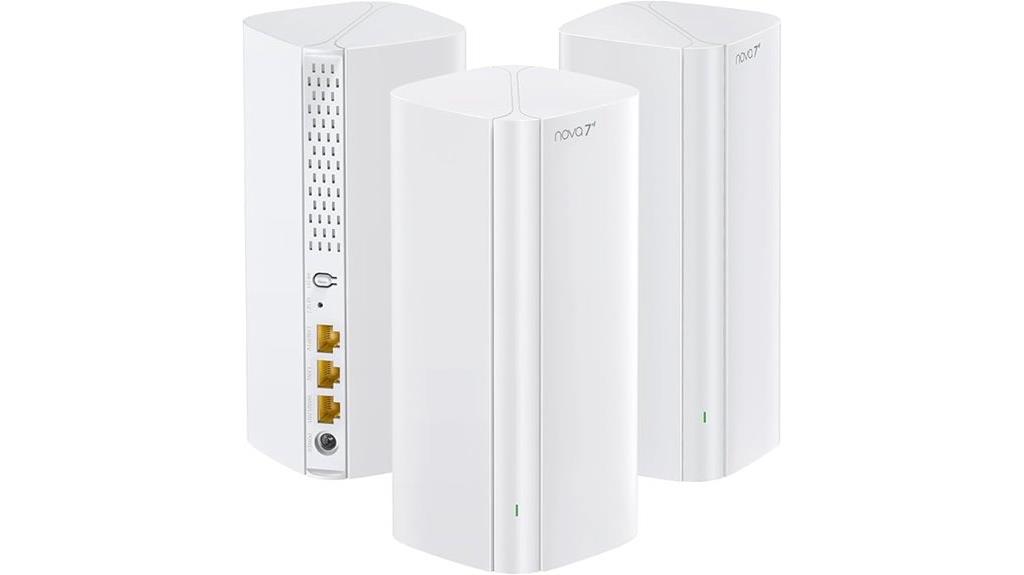
Action-oriented households and remote workers will find the Tenda BE3600 Dual Band WiFi 7 Mesh System (3-Pack) to be an ideal choice, thanks to its powerful mesh technology and fast speeds. Equipped with Wi-Fi 7, it offers dual-band speeds up to 3.6 Gbps, ensuring smooth streaming, gaming, and video calls. The system covers large areas seamlessly, with each node featuring high-gain antennas and smart algorithms that connect devices to the strongest signal, supporting over 160 devices simultaneously. Its plug-and-play setup, gigabit ports, and secure VPN options make it a versatile, reliable solution for busy homes and remote work environments.
Best For: action-oriented households and remote workers seeking fast, reliable, and extensive Wi-Fi coverage with secure remote access options.
Pros:
- Delivers ultra-fast Wi-Fi 7 speeds up to 3.6 Gbps, ideal for high-bandwidth activities like gaming and streaming
- Seamless coverage across large areas with mesh technology and smart device connection algorithms
- Supports over 160 devices simultaneously with stable, high-speed connections and secure VPN options
Cons:
- May be more expensive than standard Wi-Fi 6 or 5 solutions due to advanced technology
- Setup and management might require some technical knowledge for optimal configuration
- Firmware updates are needed to enable features like WireGuard, which might involve additional steps
Tenda Nova Mesh WiFi System (3-Pack)

For homeowners seeking reliable, whole-home Wi-Fi coverage without the hassle of multiple routers or extenders, the Tenda Nova Mesh WiFi System (3-Pack) is an excellent choice. It covers up to 3,500 sq.ft., replacing traditional routers with AC1200 dual-band mesh technology for faster, more stable connections. Supporting up to 40 devices, it eliminates dead zones and offers seamless roaming as you move around. The system is easy to set up using the Tenda app, includes security features like WPA2 encryption, and allows simple expansion with additional nodes. Customer reviews highlight its ease of use and dependable performance, making it a solid option for extensive home Wi-Fi.
Best For: homeowners seeking reliable, whole-home Wi-Fi coverage that is easy to set up and supports multiple devices without dead zones.
Pros:
- Seamless coverage up to 3,500 sq.ft. eliminating dead zones
- Easy setup via the Tenda app with quick expansion options
- Supports up to 40 devices with high stability using dual-band AC1200 technology
Cons:
- Compatible with internet speeds up to 100Mbps; higher speeds may require a different model
- Limited advanced features for tech-savvy users seeking customizable network options
- Non-discontinued product which may have newer alternatives in the market
DBIT AX1800 WiFi 6 Mesh System (D-MAX5, 3-Pack)

The DBIT AX1800 WiFi 6 Mesh System (D-MAX5, 3-Pack) stands out as the ideal choice for large homes or spaces demanding reliable, high-speed wired connections. It delivers dual-band speeds of up to 1.8 Gbps, supporting 4K streaming, gaming, and heavy downloads. Covering 6,500 sq. ft., with extra nodes for outdoor or sprawling areas, it replaces traditional routers and extenders seamlessly. Each unit offers two Gigabit Ethernet ports for stable wired connections, and the system supports up to 150 devices. Easy to set up via a mobile app, it combines speed, coverage, and security, making it a cost-effective, high-performance mesh solution.
Best For: households or small businesses requiring extensive WiFi coverage with high-speed wired connections for streaming, gaming, and smart device management.
Pros:
- Provides up to 1.8 Gbps dual-band WiFi speeds suitable for demanding activities
- Covers up to 6,500 sq. ft. with easy expansion options for large or multi-story spaces
- Supports up to 150 devices with advanced OFDMA and MU-MIMO technology for optimized bandwidth and reduced latency
Cons:
- Customer reviews average only 3.9 out of 5 stars, indicating mixed feedback on performance or reliability
- Listed at a relatively high price point compared to basic routers or extenders
- Requires setup via mobile app or web GUI, which may be less convenient for users unfamiliar with such tools
DBIT AC1200 Whole Home Mesh WiFi System (D-MAC3, 3-Pack)

If you have a large home or complex layout and need reliable, high-speed Wi-Fi throughout, the DBIT AC1200 Whole Home Mesh WiFi System is an excellent choice. It covers up to 6,000 square feet, eliminating dead zones in multi-story or tricky spaces. With speeds up to 1200Mbps, it supports smooth 4K streaming, gaming, and video calls. Each node offers 4 Gigabit Ethernet ports for wired connections, boosting stability. The system supports adding extra nodes wirelessly for outdoor or hard-to-reach areas. Easy to set up via an app, it also features strong WPA3 encryption, guest networks, and parental controls for extensive security and management.
Best For: households with large or multi-story homes seeking reliable, high-speed WiFi coverage and seamless device connectivity.
Pros:
- Covers up to 6,000 sq ft, eliminating dead zones in large or complex spaces
- Supports speeds up to 1200Mbps, ideal for 4K streaming, gaming, and video calls
- Includes 4 Gigabit Ethernet ports per node for stable wired connections and easy expansion
Cons:
- May require additional nodes for very extensive outdoor or remote areas
- Compatibility with some ISP plans could vary, potentially needing setup adjustments
- Setup, while straightforward, may still be challenging for non-technical users unfamiliar with mesh systems
Tenda Nova Mesh WiFi System MW6

Looking to eliminate Wi-Fi dead zones and guarantee seamless coverage across a large home? The Tenda Nova Mesh WiFi System MW6 might be just what you need. It covers up to 4,000 sq.ft., replacing traditional routers and extenders with a sleek 2-pack system that guarantees stable, fast connectivity everywhere. Equipped with MU-MIMO and Beamforming tech, it supports up to 90 devices without lag. Setup is simple through the Tenda app, and expanding your network is straightforward. With strong security features and a single network name, the MW6 delivers high performance, security, and easy management, making it a solid choice for large homes.
Best For: households seeking seamless, high-speed Wi-Fi coverage across large areas with easy setup and robust device support.
Pros:
- Provides up to 4,000 sq.ft. coverage with a 2-pack system, ideal for large homes
- Supports up to 90 devices simultaneously with MU-MIMO and Beamforming technology
- Easy to set up and manage via the Tenda app, with simple network expansion
Cons:
- May be limited in advanced customization options for tech-savvy users
- Lacks some advanced features found in higher-end mesh systems
- The 2-pack system might require additional units for very large or complex spaces
Factors to Consider When Choosing Ethernet Backhaul Mesh Wi‑Fi Kits

When choosing an Ethernet backhaul mesh Wi-Fi kit, I consider factors like the number of Ethernet ports and the types of backhaul options available, since these affect setup flexibility. I also look at device compatibility, speed, bandwidth limits, and coverage area to guarantee the system meets my needs. Understanding these points helps me pick a kit that offers reliable, fast, and seamless Wi-Fi throughout my space.
Ethernet Port Count
Ever wondered how the number of Ethernet ports on a mesh Wi-Fi kit impacts your network? More Ethernet ports mean you can connect more wired devices directly to the nodes, boosting network stability and reducing wireless congestion. If each unit has at least two Ethernet ports, you can daisy-chain multiple devices or expand wired connections without extra switches. Kits offering 4 or more ports on each unit provide even greater flexibility, supporting smart home hubs, gaming consoles, and smart TVs simultaneously. A higher port count also simplifies creating a wired backbone, which enhances overall speed and reliability. If your home has many wired devices or demands a robust, stable connection, choosing a kit with ample Ethernet ports is a smart move, ensuring seamless performance across all your connected gear.
Backhaul Type Options
Choosing the right Ethernet backhaul option is vital for maximizing your mesh Wi-Fi network’s performance, especially in large or high-demand environments. Wired Ethernet backhaul connects mesh nodes via Ethernet cables, offering lower latency and higher throughput than wireless options. This setup guarantees a more stable and faster connection, essential for streaming, gaming, or heavy data use. When selecting a kit, consider the number of Ethernet ports on each node, as this determines how many wired devices you can connect directly. Additionally, the quality and length of Ethernet cables matter—poor quality or overly long cables can reduce speed and reliability. Overall, a wired backhaul provides a robust backbone for your network, markedly improving stability and performance in demanding settings.
Compatibility With Devices
Ensuring your mesh Wi-Fi kit is compatible with your existing devices is essential for a smooth setup and reliable performance. First, verify that the system supports Ethernet backhaul connections, including necessary ports and standards like Gigabit Ethernet, to maximize speed and stability. Check that your routers, switches, and other network hardware support Ethernet speeds of 1 Gbps or higher, ensuring ideal data transfer. It’s also important to confirm compatibility with your ISP’s modem or gateway to avoid conflicts during integration. Additionally, review whether the mesh system works with your smart home devices and adheres to your preferred security protocols, maintaining a secure and dependable wired network. Being thorough in these checks helps prevent issues and guarantees seamless connectivity across your entire home network.
Speed and Bandwidth Limits
When selecting an Ethernet backhaul mesh Wi-Fi kit, it’s essential to take into account the speed and bandwidth limits to guarantee your network can handle high-demand activities. Ethernet backhaul typically supports faster data transfer speeds between nodes, often matching or surpassing wired port speeds like 1Gbps or 2.5Gbps. The overall network bandwidth is limited by the slowest link, so using high-speed Ethernet ensures full Wi-Fi speeds across your home. Some kits feature multi-gigabit ports or link aggregation, which boost backhaul capacity further. This is critical for seamless 4K streaming, gaming, and large file transfers. To maximize performance, choose a system supporting the latest standards, such as Cat6 or higher cabling, capable of multi-gigabit speeds over longer distances.
Coverage Area Capabilities
The coverage area of an Ethernet backhaul mesh Wi-Fi kit depends largely on the number of nodes and how you position them. Systems with Ethernet backhaul generally offer more consistent and wider coverage than wireless-only options, making them ideal for larger or multi-story homes. The effective range can span from around 3,500 square feet to over 10,000 square feet, depending on the setup. Adding more nodes with Ethernet ports allows for flexible placement and helps expand coverage seamlessly. Properly configured Ethernet backhaul enhances signal stability and speed, especially in complex layouts. Ultimately, the size of your coverage area determines how many nodes you’ll need to ensure reliable, seamless connectivity throughout your home.
Security and Encryption Features
Security and encryption are crucial considerations when selecting an Ethernet backhaul mesh Wi-Fi kit, as they protect your network from unauthorized access and data breaches. Look for systems that support WPA3 encryption, which offers the highest level of wireless security. It’s also important to verify that the kit includes built-in security features like network isolation, guest networks, and automatic firmware updates to patch vulnerabilities. Choose kits with advanced protocols such as WPA2-PSK or WPA3 to secure data transmission over wired and wireless connections. Additionally, security management tools like parental controls, IoT device protection, and VPN support can enhance your privacy and safeguard smart home devices. Prioritizing these features ensures your network remains protected and resilient against potential threats.
Setup and Management Ease
Choosing a mesh Wi-Fi kit that’s easy to set up and manage can save you a lot of time and frustration. I recommend looking for systems with user-friendly mobile apps or web interfaces that make setup quick and straightforward. Ideally, the kit should support one-click or simple step-by-step procedures for adding and configuring nodes, reducing technical hurdles. Management features like remote control, network monitoring, and easy parental or guest network adjustments are essential for ongoing convenience. Clear instructions and minimal technical knowledge requirements help speed up installation. Additionally, automatic device discovery and seamless roaming features simplify ongoing network management, ensuring your home Wi-Fi stays reliable and easy to control without constant tinkering. This approach keeps your network running smoothly with minimal effort.
Frequently Asked Questions
How Does Ethernet Backhaul Improve Wi-Fi Network Stability?
Ethernet backhaul improves Wi-Fi network stability by providing a dedicated, wired connection between mesh nodes, bypassing potential wireless interference. This guarantees consistent data transfer, reduces lag, and maintains strong signal strength across your home. I’ve found that with Ethernet backhaul, my network is more reliable, especially with multiple devices streaming or gaming. It’s like giving your Wi-Fi a direct highway instead of relying on congested roads.
Can Existing Routers Support Ethernet Backhaul Mesh Systems?
Most existing routers can’t support Ethernet backhaul mesh systems directly, especially if they’re not designed for mesh networking. However, you can often connect compatible mesh nodes to your router via Ethernet, effectively turning your current setup into a wired backhaul system. Check your router’s specs or consider upgrading to a mesh-compatible router if you want seamless, stable connectivity with Ethernet backhaul.
What Are the Costs Associated With Setting up Ethernet Backhaul?
Think of setting up Ethernet backhaul as planting a sturdy seed for a stronger network tree. Costs vary, but I’d say you’ll spend between $150 and $300, covering mesh nodes and Ethernet cables. If you already have some cables or routers, the expense drops. Remember, investing in quality gear guarantees reliable, fast connections—so it’s worth considering the long-term benefits over initial savings.
Is Ethernet Backhaul Compatible With Wi-Fi 6 and Wi-Fi 6E?
Yes, Ethernet backhaul is compatible with Wi-Fi 6 and Wi-Fi 6E. I’ve found that most modern mesh systems supporting these standards also offer Ethernet backhaul options, which substantially improve network stability and speed. When setting up, I connect my nodes via Ethernet, ensuring a seamless, fast connection across my home. Just make sure your mesh kit explicitly states support for Ethernet backhaul and Wi-Fi 6 or 6E.
How to Troubleshoot Ethernet Backhaul Connection Issues Effectively?
First, I check all cables are securely plugged in and undamaged. Then, I restart my router and mesh nodes to refresh connections. I verify firmware is up-to-date and confirm settings match recommended configurations. If issues persist, I test the Ethernet cable on another device or port. Finally, I consult the manufacturer’s troubleshooting guide or customer support to identify any hardware or compatibility problems.
Conclusion
Ultimately, choosing the right Ethernet backhaul mesh Wi-Fi kit depends on your home’s size and needs. Whether you’re a tech wizard or just looking for reliable coverage, there’s a perfect system out there—like having your own time machine to the internet age. Don’t let dead zones get the best of you; upgrade now and enjoy seamless connectivity everywhere. Trust me, your Wi-Fi will thank you—no flux capacitor required!