Finding the right gaming accessories can significantly enhance your gameplay experience, whether you’re a casual gamer or a competitive eSports player. The best picks balance performance, comfort, and value, but tradeoffs are inevitable. The HUANUO FlowLift™ Dual Monitor Stand stands out as the top choice for flexibility and ergonomic setup, while the Logitech G PRO X2 SUPERSTRIKE offers premium wireless performance for serious gamers. The main challenge lies in balancing features and budget—higher-end gear provides better performance but at a steep cost, while budget options may lack durability or advanced features. Continue reading for a detailed breakdown of each product and how to choose the best gaming accessories for your needs.

Get business pricing on tools and workshop supplies
- Business-only prices and quantity discounts
- Tax-exempt purchasing
- Multiple users, one account, clear invoices
Complete the kit


Key Takeaways
- Flexibility and adjustability in monitor mounts greatly improve ergonomic comfort during long gaming sessions.
- Large, high-quality mouse pads like the BladeHawks RGB model enhance precision and reduce wrist fatigue.
- Wired vs. wireless mice remain a key tradeoff: wireless offers convenience but can introduce latency if not high-end.
- Sound quality and speaker placement significantly impact gaming immersion, with dedicated gaming speakers offering notable advantages.
- Choosing accessories that complement your setup and play style leads to a more cohesive and comfortable gaming environment.
| HUANUO FlowLift™ Dual Monitor Stand, Fully Adjustable Gaming Monitor Desk Mount for 13–32″ Computer Screens, Full Motion VESA 75×75/100×100 with C-Clamp & Grommet Base, Each Arm Holds 4.4 to 19.8 lbs |  | Best Overall Dual Monitor Mount for Gaming and Productivity | Mounting Type: C-clamp or Grommet | Movement Type: Tilt, Swivel, Rotate, Height Adjustment | Compatible Devices: 13-32 inches monitors | VIEW ON AMAZON | See Our Full Breakdown |
| BladeHawks RGB Gaming Mouse Pad Extra Large Extended 31.5×12 Inch – Black | 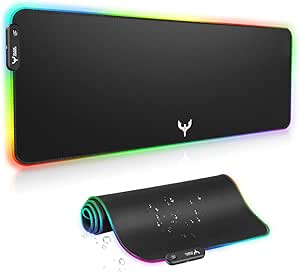 | Best RGB Large Gaming Mouse Pad for Enhanced Peripherals Space | Size: 31.5 x 12 inches | Lighting Modes: 7 static, 7 dynamic | Material: Micro-textured cloth | VIEW ON AMAZON | See Our Full Breakdown |
| AOC Computer Speakers for Desktop PC, Laptop, and Monitor, Gaming Speakers |  | Best Versatile Gaming and Multimedia Speakers with Touch Controls | Power Output: 10W (5W*2) | Connectivity: USB, Bluetooth | Lighting Modes: 6 | VIEW ON AMAZON | See Our Full Breakdown |
| Logitech G305 Lightspeed Wireless Gaming Mouse – Black |  | Best Wireless Gaming Mouse for Precision and Long Battery Life | Sensor: HERO optical | DPI: 12,000 | IPS: 400 | VIEW ON AMAZON | See Our Full Breakdown |
| DIGSOM Gaming Mouse Pad, Black with White Topographic Line, 31.5×11.8 inches |  | Best Minimalist Large Mouse Pad for Style and Function | Size: 31.5 x 11.8 inches | Thickness: 3 mm | Material: Soft fabric with spill-proof coating | VIEW ON AMAZON | See Our Full Breakdown |
| Logitech G PRO X2 SUPERSTRIKE Wireless Gaming Mouse – Black/White |  | Best for Competitive Esports Players | Sensor: HERO 2 | DPI: 44,000 | IPS: 888 | VIEW ON AMAZON | See Our Full Breakdown |
| gaming accessorie | Material |
|---|---|
| HUANUO FlowLift™ Dual Monitor | Alloy Steel |
| BladeHawks RGB Gaming Mouse Pa | Micro-textured cloth |
| AOC Computer Speakers for Desk | — |
| Logitech G305 Lightspeed Wirel | — |
| DIGSOM Gaming Mouse Pad | Soft fabric with spill-proof coating |
| Logitech G PRO X2 SUPERSTRIKE | — |
More Details on Our Top Picks
HUANUO FlowLift™ Dual Monitor Stand, Fully Adjustable Gaming Monitor Desk Mount for 13–32″ Computer Screens, Full Motion VESA 75×75/100×100 with C-Clamp & Grommet Base, Each Arm Holds 4.4 to 19.8 lbs
This monitor arm excels by combining full motion flexibility with robust stability, making it ideal for gamers who frequently switch viewing angles or streamers requiring a multi-screen setup. Unlike the simpler BladeHawks RGB Gaming Mouse Pad, which focuses on peripheral surface quality, the HUANUO stand provides an ergonomic upgrade that can boost comfort during long gaming sessions. Its full tilt, swivel, and rotation features allow for personalized setup, but it involves a more complex installation process and is limited to wooden desks with specific thicknesses—so it’s best for dedicated gaming stations with compatible furniture. The dual C-clamp and grommet options offer secure attachment, ensuring your monitors stay steady during intense play. Lifting screens off the desk not only saves space but reduces neck strain, especially when paired with adjustable height. The cable management guides keep cords tidy, preventing clutter that can distract during critical moments. Overall, this stand offers a comprehensive solution for gamers and streamers who want durability and versatility in their setup, though it requires careful desk compatibility checks.
Pros:- Full motion adjustments including tilt, swivel, and rotation for personalized viewing angles
- Secure dual C-clamp and grommet mounting options for stability on compatible desks
- Raises monitors off the desk to improve ergonomics and free up workspace
- Built-in cable management for a tidy setup
Cons:- Installation complexity may be daunting for non-technical users
- Limited to wooden desks within specific thickness ranges
Best for: Gamers and streamers seeking a fully adjustable, space-saving dual monitor setup with ergonomic benefits
Not ideal for: Users with glass or plastic desks or those who prefer a simple, plug-and-play monitor stand without installation hassle
- Mounting Type:C-clamp or Grommet
- Movement Type:Tilt, Swivel, Rotate, Height Adjustment
- Compatible Devices:13-32 inches monitors
- Maximum Tilt Angle:85 degrees
- Color:Black
- Maximum Supported Screen Size:32 inches
- Minimum Supported Screen Size:13 inches
- Maximum Weight per arm:19.8 lbs
- Material:Alloy Steel
Our verdict“This mount is perfect for gamers and professionals who need a durable, fully adjustable dual monitor setup with ergonomic and space-saving features.”
BladeHawks RGB Gaming Mouse Pad Extra Large Extended 31.5×12 Inch – Black
This expansive mouse pad provides an ideal surface for high-precision gaming, especially when paired with the Logitech G305 mouse, which benefits from the smooth, micro-textured cloth surface. Its 31.5 x 12-inch size comfortably accommodates keyboard, mouse, and other peripherals, reducing the need to reposition during intense gaming sessions. The RGB lighting with 14 modes adds a vibrant aesthetic, customizable to match your setup, but the requirement of a USB connection can add cable clutter and limit placement options—particularly if your desk is already crowded. The anti-slip rubber base keeps the pad firmly in place, even during rapid movements, and its waterproof coating guards against accidental spills. While the lighting modes are versatile, some users may find the complexity overwhelming or unnecessary for pure performance. For gamers seeking a large, stylish, and stable surface, this pad offers significant value, but it’s less suited for minimalist setups or those prioritizing cable simplicity.
Pros:- Large size fits keyboard, mouse, and peripherals comfortably
- Multiple RGB lighting modes for personalization
- Non-slip rubber base for stability during rapid movements
- Waterproof surface prevents damage from spills
Cons:- Requires USB connection, potentially adding cable clutter
- Lighting modes may be complex for some users
Best for: Gamers who want a large, stable surface with customizable RGB lighting to complement high-precision mice
Not ideal for: Players who prefer minimal cable clutter or have limited desk space for extensive lighting setups
- Size:31.5 x 12 inches
- Lighting Modes:7 static, 7 dynamic
- Material:Micro-textured cloth
- Base:Anti-slip rubber
- Waterproof:Yes
- Power:USB
Our verdict“This oversized RGB mouse pad is perfect for gamers who value a spacious, customizable surface that enhances precision and style.”
AOC Computer Speakers for Desktop PC, Laptop, and Monitor, Gaming Speakers
The AOC gaming speakers deliver a balanced stereo sound with 10W output, supporting both USB and Bluetooth, making them more flexible than the wired-only Logitech G305 mouse for audio connectivity. Their detachable 2-in-1 design allows easy customization of your desktop setup, and touch-controlled lighting adds a lively visual element to your gaming environment. However, the Bluetooth mode relies on USB power, which could limit placement options or add clutter if your desk is already crowded. The 6 lighting modes create customizable ambiance, but the build quality and durability details are somewhat limited, making it less ideal for rough handling. These speakers are well-suited for gamers who want a simple, versatile audio solution with aesthetic flair, but they might fall short for users seeking premium durability or maximum audio power.
Pros:- Supports both USB and Bluetooth for flexible connectivity
- Detachable, customizable design for desktop setup
- Touch-controlled lighting with multiple modes
- Clear stereo sound with decent bass
Cons:- Bluetooth mode requires USB power, limiting placement options
- Limited details on build quality or long-term durability
Best for: Gamers and multimedia users desiring flexible, stylish speakers with touch-controlled lighting
Not ideal for: Users who prioritize durability over style or need high-powered, premium audio systems
- Power Output:10W (5W*2)
- Connectivity:USB, Bluetooth
- Lighting Modes:6
- Cable Length:39.3 inches
- Control Features:Touch lighting, rotary volume
Our verdict“These versatile speakers are suitable for gamers seeking stylish, flexible audio with immersive lighting, but they may lack the durability needed for rough handling.”
Logitech G305 Lightspeed Wireless Gaming Mouse – Black
The Logitech G305 Lightspeed stands out with its high-precision HERO sensor offering 12,000 DPI, making it a top choice for competitive gamers. Its lightweight 3.4 oz design ensures swift, accurate movements across your mouse pad, such as the DigSom Mouse Pad. The ultra-fast 1 ms report rate ensures minimal latency, rivaling wired mice for responsiveness. While the battery life of up to 9 months reduces the need for frequent replacements, the reliance on a single AA battery can be inconvenient and may limit total customization compared to wired or rechargeable models. Its straightforward design favors performance over extensive customization, making it ideal for gamers who prioritize responsiveness and portability. However, users seeking extensive programmable buttons or a more luxurious feel might find it somewhat basic.
Pros:- High-precision HERO sensor with 12,000 DPI
- Lag-free 1 ms report rate for competitive play
- Long battery life up to 9 months on a single AA battery
- Lightweight and portable design
Cons:- Requires AA battery replacement, not rechargeable
- Limited customization options compared to premium wired mice
Best for: Competitive gamers and mobility-focused users who want a reliable, high-precision wireless mouse with long battery life
Not ideal for: Users who want extensive customization options or rechargeable batteries for convenience
- Sensor:HERO optical
- DPI:12,000
- IPS:400
- Wireless Technology:Lightspeed
- Battery Life:Up to 9 months
- Weight:3.4 oz
Our verdict“This wireless mouse offers excellent precision and battery longevity, making it a prime choice for competitive gamers and on-the-go users.”
DIGSOM Gaming Mouse Pad, Black with White Topographic Line, 31.5×11.8 inches
The DIGSOM mouse pad combines a stylish minimalistic design with a large surface, providing ample room for both mouse and keyboard movements, similar to the BladeHawks RGB pad but with a cleaner look. Its 31.5 x 11.8-inch size is ideal for gamers and work-from-home setups that need generous space without the clutter of RGB lighting. Made of soft fabric with a spill-proof coating, it offers a smooth glide for precise control, while the non-slip rubber base keeps it firmly in place during gameplay. The 3 mm thickness contributes to durability and comfort, but the lack of anti-fray features or multiple color options might limit long-term use and appeal. Its minimalist elegance makes it suitable for users who prefer understated style over flashy accessories, although those seeking vibrant lighting or multiple color options should look elsewhere.
Pros:- Large size accommodates extensive mouse and keyboard movement
- Water-resistant, spill-proof coating for protection
- Smooth fabric surface for precise control
- Non-slip rubber base for stability
Cons:- No anti-fray or long-term durability features
- Limited color and design options
Best for: Gamers and professionals looking for a stylish, large mouse pad that balances function and subtle design
Not ideal for: Players who want extensive RGB lighting or highly colorful setups
- Size:31.5 x 11.8 inches
- Thickness:3 mm
- Material:Soft fabric with spill-proof coating
- Design:Black with White Topographic Line
Our verdict“This large, minimalist mouse pad is perfect for users seeking a stylish, functional surface without the distraction of lighting or overly flashy design.”
Logitech G PRO X2 SUPERSTRIKE Wireless Gaming Mouse – Black/White
The Logitech G PRO X2 SUPERSTRIKE stands out for its focus on customization and precision, making it ideal for serious gamers who demand control and responsiveness. Unlike the G305 Lightspeed, which offers excellent wireless performance at a lower price, the SUPERSTRIKE pushes further with adjustable actuation points and advanced haptic feedback, providing a more tailored feel. While its HERO 2 sensor ensures pinpoint accuracy, the high price and reliance on Logitech G HUB software might deter casual users or those who prefer plug-and-play setups. The long battery life of up to 90 hours supports marathon gaming sessions, but the need for separate wireless charging systems like POWERPLAY adds extra cost and complexity. Overall, this model is best suited for competitive players who prioritize customization and precision, and are willing to invest in advanced features.
Pros:- Highly customizable with adjustable actuation points and trigger resets
- Long battery life supporting extended gaming sessions
- Advanced haptic feedback enhances immersion and control
- High-precision HERO 2 sensor for accurate tracking
Cons:- Requires Logitech G HUB software for full functionality
- Separate wireless charging system like POWERPLAY is an extra purchase
- Premium price may be prohibitive for casual players
Best for: Esports athletes and competitive PC gamers seeking high customization and accuracy.
Not ideal for: Casual gamers or budget-conscious users who prefer simpler, plug-and-play mice without extensive software dependencies.
- Sensor:HERO 2
- DPI:44,000
- IPS:888
- G-force:88
- Battery Life:60-90 hours
- Connectivity:LIGHTSPEED Wireless
- Compatibility:PC and Mac
- Weight:Lightweight
- Additional Features:Haptic Feedback, 10-level actuation, 5-level rapid trigger reset, USB-C charging, POWERPLAY compatible
Our verdict“This mouse makes the most sense for competitive gamers who want tailored feel and long-lasting performance despite the higher price.”

How We Picked
The products in this roundup were evaluated based on performance, build quality, usability, and value for money. We prioritized accessories that improve gaming comfort, responsiveness, and immersion, since these are critical for both casual and competitive players. Compatibility and ease of setup also played a key role, especially for accessories like monitor mounts and wired/wireless peripherals. Products were ranked to balance premium features with affordability, ensuring options for different budgets and needs. Our selections aim to highlight versatility, durability, and how well each product enhances the gaming experience without unnecessary complexity or cost.| gaming accessorie | Material |
|---|---|
| HUANUO FlowLift™ Dual Monitor | Alloy Steel |
| BladeHawks RGB Gaming Mouse Pa | Micro-textured cloth |
| AOC Computer Speakers for Desk | — |
| Logitech G305 Lightspeed Wirel | — |
| DIGSOM Gaming Mouse Pad | Soft fabric with spill-proof coating |
| Logitech G PRO X2 SUPERSTRIKE | — |
Factors to Consider When Choosing Gaming Accessories
When selecting gaming accessories, it’s important to consider how each item will fit into your overall setup and play style. The right gear can boost performance, reduce fatigue, and increase immersion, but choosing the wrong accessories might lead to discomfort or frustration. Beyond brand reputation and specs, understanding key factors like ergonomics, compatibility, and durability helps ensure you make a smart investment. This guide covers critical considerations to help you choose accessories that truly enhance your gaming experience.Ergonomics and Comfort
Comfort should be a top priority, especially for long gaming marathons. Adjustable monitor mounts, ergonomic mice, and large mouse pads can reduce strain and improve posture. Be wary of accessories that lack customization options, as they may not fit your body or setup properly. Investing in ergonomic gear often pays off in the form of less fatigue and discomfort over time, making it worth considering higher-quality options even if they cost more initially.
Compatibility and Size
Ensure that accessories like monitor mounts and speakers fit your existing setup. Check VESA compatibility for monitor mounts and measure your space before choosing large mouse pads or speakers. Oversized mouse pads are great for sweeping movements but may be cumbersome in smaller desks. Compatibility issues can lead to frustration, so verifying dimensions and connection types beforehand saves time and money.
Build Quality and Durability
Gaming accessories endure heavy use, so durability matters. Look for sturdy materials, solid construction, and quality components, especially with mice and monitor mounts. Cheaper options often sacrifice longevity, which can lead to frequent replacements and added costs. Investing in well-made gear ensures consistent performance and a better experience over the long term, even if it requires a higher upfront investment.
Performance and Responsiveness
For mice and speakers, responsiveness directly impacts gameplay. High-DPI mice with low latency are essential for competitive gaming, while quality speakers or headphones bring clarity and immersive sound. Be cautious of products claiming high specs without real-world reliability—reviewers’ feedback on responsiveness and latency can provide valuable insights. Remember, a responsive mouse can be the difference between a win and a frustrating miss.
Value and Budget
Balancing features against cost is key. Premium accessories offer advanced performance and durability, but budget options can still deliver decent improvements if chosen wisely. Look for products that match your needs without paying for unnecessary extras. Consider how often you’ll use the gear and whether investing more now will save money on replacements later. The right value depends on your gaming habits and priorities, whether performance or affordability is more critical.
Frequently Asked Questions
Is it better to get a wired or wireless gaming mouse?
Choosing between wired and wireless mice depends on your priorities. Wired mice generally offer lower latency and are more reliable, making them preferable for competitive gaming. Wireless mice, like the Logitech G305 Lightspeed, provide greater freedom of movement and less clutter, which can enhance comfort during extended sessions. However, quality wireless options now match wired performance, so if convenience matters most to you, a high-end wireless mouse is a solid choice without sacrificing responsiveness.
How important is a large mouse pad for gaming?
Large mouse pads, such as the BladeHawks RGB or DIGSOM models, provide ample space for sweeping movements and consistent tracking, especially in fast-paced games. They also help protect your desk surface and reduce wrist fatigue by offering a uniform surface. However, they take up more space, so if your setup is tight, a smaller or standard-sized mouse pad might be more practical. The key is to find a size that balances comfort with your available space and play style.
Are gaming speakers worth upgrading from regular PC speakers?
Dedicated gaming speakers are designed to deliver clearer, more immersive sound, with features like surround sound and enhanced bass that standard PC speakers often lack. They can significantly improve your gaming experience, especially in titles where sound cues are critical. While they might be an extra expense, investing in quality speakers makes sense for gamers who prioritize audio immersion or prefer not to wear headphones during gameplay. For casual players, upgrading may be less necessary.
What should I look for in a gaming monitor mount?
The most important factors include VESA compatibility, adjustability, and build quality. A fully adjustable mount allows you to set the monitor at the most comfortable angle and height, reducing neck strain. Check the weight capacity to ensure it can support your monitor, and consider mounting options like C-Clamp or grommet base based on your desk type. A sturdy, well-made mount prevents wobbling and ensures safety, especially with larger or heavier screens.
When is it worth investing in premium gaming accessories?
Premium accessories become worthwhile when you value durability, responsiveness, and advanced features like customizable buttons or high DPI. If gaming is a serious hobby or competitive pursuit, investing more can lead to better performance and comfort. However, for casual players, mid-range gear often provides sufficient performance without the steep price. Consider your gaming frequency, goals, and budget before opting for high-end gear, as the investment should match your actual needs.
Conclusion
For most gamers, the HUANUO FlowLift™ Dual Monitor Stand offers unmatched flexibility and ergonomic benefits, making it the best overall choice. If budget is a concern, the BladeHawks RGB Mouse Pad and DIGSOM Mouse Pad provide excellent value to improve your setup without breaking the bank. Serious competitors or those seeking premium performance should consider the Logitech G PRO X2 SUPERSTRIKE Wireless Mouse for top-tier responsiveness, while casual players or newcomers will find the Logitech G305 Lightspeed a reliable, versatile wireless option. Each choice aligns with different priorities, helping you build a gaming setup tailored to your needs and budget.