If you’re looking for the best interactive STEM robots that make learning exciting, I recommend exploring options like Thames & Kosmos’ mega hydraulics kits, programmable robotic pets like Coding Chameleon, and versatile options like the Sphero Mini. These robots combine hands-on building, coding, and natural biomimicry to engage kids of various ages. Continued exploration uncovers even more innovative options that turn STEM education into a fun adventure.
Key Takeaways
- These robots offer hands-on STEM learning through coding, mechanics, and biomimicry, making complex concepts engaging for kids.
- Features include interactive gestures, programmable actions, and autonomous movements to foster creativity and problem-solving skills.
- Suitable for various ages, from beginner-friendly kits for young children to advanced robots for teens and enthusiasts.
- Many models support multiple control methods like action cards, apps, and physical programming, enhancing versatility and engagement.
- They promote active learning with real-world engineering principles, social interaction, and outdoor play options.
Thames & Kosmos Mega Cyborg Hand STEM Experiment Kit

If you’re looking for a hands-on STEM kit that truly brings robotics and engineering to life, the Thames & Kosmos Mega Cyborg Hand STEM Experiment Kit is an excellent choice. I love how it lets you build a wearable mechanical hand operated solely by fingers, using hydraulic pistons for movement. The kit includes different configurations—right hand, left hand, and claw—to suit various hands and experiments. Without motors or batteries, it demonstrates how fluid power drives industrial robotics. It’s a fantastic way to explore pneumatic and hydraulic systems, making complex engineering concepts accessible and engaging through real, tactile experience.
Best For: educators, students, and robotics enthusiasts interested in hands-on learning about pneumatics, hydraulics, and mechanical engineering.
Pros:
- Provides a realistic, wearable mechanical hand operated solely by fingers for an engaging learning experience
- Demonstrates fluid power principles used in industrial robotics without the need for motors or batteries
- Highly adjustable with multiple configurations to fit different hand sizes and enhance customization
Cons:
- May require adult supervision or assistance for younger children during assembly
- Limited to mechanical and hydraulic principles, lacking electronic or motorized components for advanced robotics
- The hands-on setup might be time-consuming for some users to complete and fully understand
Thames & Kosmos My Robotic Pet Coding Chameleon STEM Kit
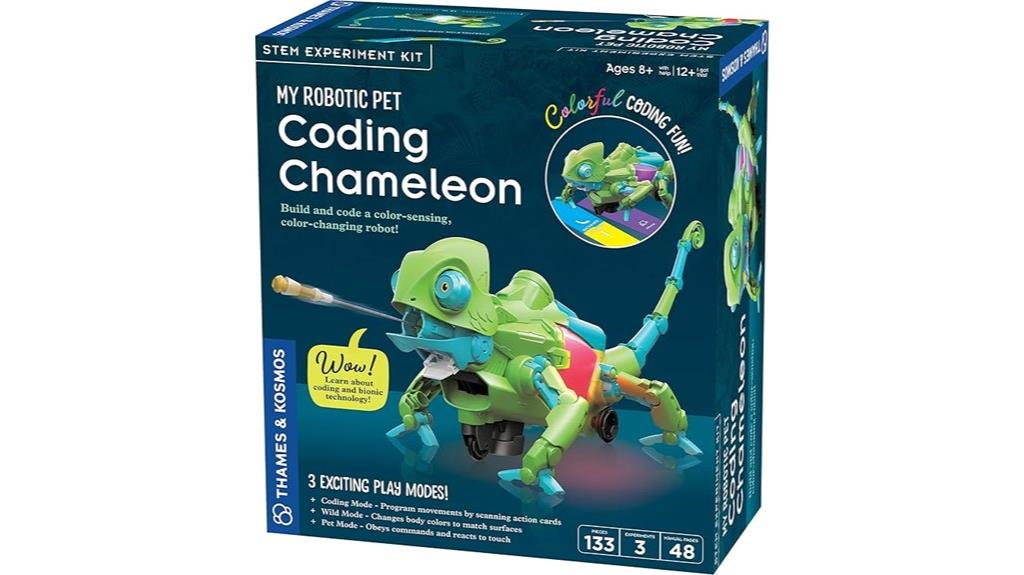
The Thames & Kosmos My Robotic Pet Coding Chameleon STEM Kit stands out as an excellent choice for kids aged 8 and up who enjoy hands-on learning and creative play. This 15-inch robotic chameleon responds to gestures, changes colors, and uses sensors to act autonomously, making it highly interactive. Kids can program its movements using action cards in Coding Mode or watch it camouflage and stalk prey in Wild Mode. The kit’s detailed manual teaches robotics, sensor use, and biomimicry, fostering problem-solving and creativity. With realistic joints and multiple play modes, it offers an engaging way for children to explore robotics and natural inspiration firsthand.
Best For: children aged 8 and up who enjoy engaging, hands-on STEM activities that combine robotics, coding, and natural biomimicry.
Pros:
- Encourages creative learning through physical coding with action cards, eliminating the need for screens or software.
- Features realistic movement and multiple play modes, enhancing interactive and imaginative play.
- Teaches fundamental robotics principles, sensor use, and biomimicry in a comprehensive, easy-to-follow manual.
Cons:
- Requires adult assistance for younger children during assembly and initial setup.
- Limited to a specific age range, which may reduce long-term engagement for older kids.
- The physical coding method may be less versatile than digital programming for advanced users.
Sphero Mini (Red) Coding Robot Ball for Kids and Teens

Designed for kids and teens aged 8 and up, the Sphero Mini (Red) stands out as an interactive STEM robot that combines compact size with powerful features. About the size of a ping pong ball, it includes gyroscope, accelerometer, and colorful LED lights, making it engaging and fun. Controlled via Bluetooth using the free Sphero Edu app, users can code through drawing, drag-and-drop blocks, or JavaScript. Its drive modes include joystick, slingshot, and tilt, and it doubles as a game controller. With accessories like traffic cones and bowling pins, it encourages obstacle courses and hands-on learning, fostering creativity and problem-solving skills in a playful way.
Best For: kids and teens aged 8 and above interested in learning coding, robotics, and engaging in interactive STEM activities.
Pros:
- Compact, lightweight design makes it portable and easy to handle for small hands.
- Supports multiple coding methods including drawing, block-based, and JavaScript, catering to different skill levels.
- Includes accessories like traffic cones and bowling pins to promote creative obstacle course play.
Cons:
- Requires a Bluetooth-enabled device and the free app, which may limit use if device compatibility issues arise.
- Limited to basic programmable functions, which may not satisfy advanced robotics learners.
- Battery life and connectivity can sometimes be affected by interference or device limitations.
ENERGIZE LAB Eilik Interactive Robot Pet for Kids and Adults

Eilik’s engaging emotional expressions and responsive interactions make it an ideal choice for both kids and adults seeking a fun, companionship-focused robot. Its compact design fits perfectly on desks or shelves, offering endless entertainment without needing WiFi or Bluetooth. You can lift or tap Eilik’s head to change its mood, making each interaction feel personal. It also features mini-games and a variety of expressions that keep engagement high. When multiple Eilik units connect, they chat, play, or even quarrel, creating a lively social environment. Frequent firmware updates introduce new features, ensuring Eilik stays fresh, fun, and engaging for everyone.
Best For: kids and adults seeking a fun, interactive, and companionship-focused robot that can be enjoyed at home or work without the need for WiFi or Bluetooth.
Pros:
- Engages users with expressive emotions, animations, and mini-games for endless entertainment
- Compact design suitable for desks, shelves, and gifting, making it versatile and portable
- Supports social interactions with multiple units, including chatting, playing, and group activities
Cons:
- May have limited functionalities without firmware updates or additional accessories
- Interaction relies on physical taps and lifts, which might not appeal to all users
- Group interactions require multiple units, which could be cost-prohibitive for some users
Wonder Workshop Dash Robot for Kids 6

If you’re looking for a STEM robot that sparks curiosity and helps kids aged 6 to 11 learn coding through hands-on play, the Wonder Workshop Dash Robot is an excellent choice. It arrives ready to use, with no assembly needed, and offers up to five hours of active play on a single charge. Kids can make Dash sing, dance, navigate obstacles, and respond to voice commands, all while learning core coding concepts like sequencing, loops, and algorithms. Compatible with five apps across multiple platforms, Dash makes coding accessible and fun. Used in over 40,000 schools worldwide, it’s a proven tool for engaging children in STEM learning.
Best For: kids aged 6 to 11 who want to explore coding and robotics through engaging, hands-on play in educational or home settings.
Pros:
- Ready to use out of the box with no assembly required
- Up to five hours of active play on a single charge
- Compatible with multiple apps across various platforms for versatile learning
Cons:
- Limited to children within the age range of 6-11, may not suit older or younger kids
- Requires a compatible device (tablet or smartphone) to access the apps
- May need additional accessories or updates for advanced features or extended use
Smart Robot Dog with Voice & Remote Control, 30+ Lifelike Actions

The Smart Robot Dog with Voice & Remote Control is an ideal choice for kids who love interactive toys that combine fun with learning. Its lifelike movements and cool design, made from durable, non-toxic materials, make it safe and engaging. With over 30 actions like shaking hands, swimming, and performing tricks, kids can command it via remote or voice. It also features sound effects and LED eyes for added excitement. Perfect for outdoor play within a 25-meter range, it supports programming by recording sequences to create custom actions. Ready to use straight out of the box, it’s a fantastic gift that promotes creativity, problem-solving, and tech skills.
Best For: children aged 6-12 who enjoy interactive, educational toys that combine fun with creativity and problem-solving.
Pros:
- Over 30 lifelike actions and sound effects for engaging play
- Supports customizable programming to enhance creativity and logic skills
- Durable, impact-resistant materials and safe design suitable for kids
Cons:
- Requires charging for at least 1 hour before extended use
- May be less suitable for children under 6 due to complexity of programming features
- Limited to a 25-meter control range, restricting outdoor play distance
Misa AI-Powered Smart Robot for Kids
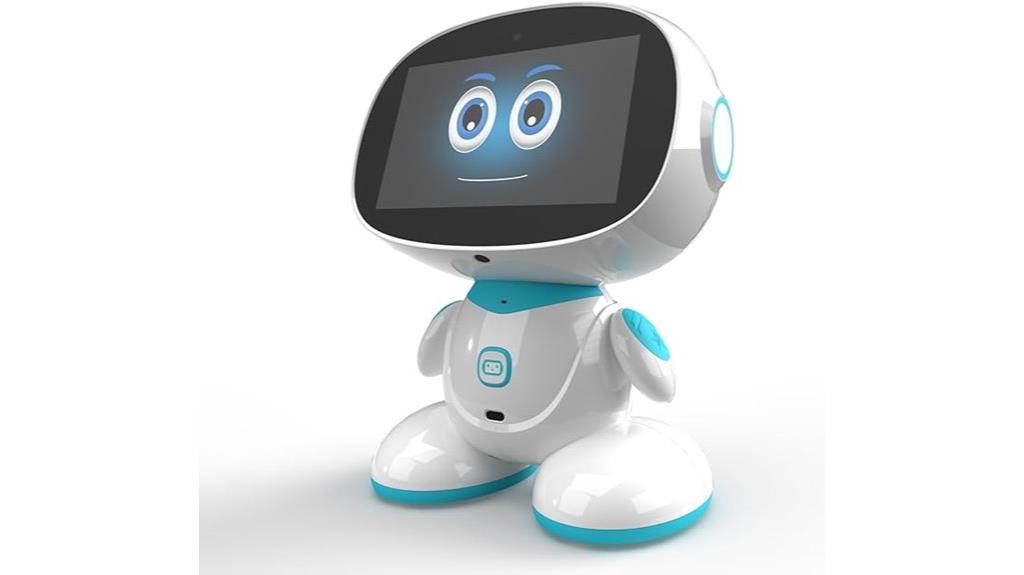
Misa AI-Powered Smart Robot for Kids stands out as an ideal choice for children aged 5 to 12 who thrive on interactive learning and creative play. I love how it combines education with entertainment through stories, AI games, and STEM activities in science, technology, engineering, art, and math. Powered by GPT-4 AI, MISA adapts to each child’s pace, offers personalized responses, and helps with homework and language learning in over 12 languages. It also promotes emotional intelligence with social-emotional activities, calming exercises, and meaningful conversations. Plus, its social features let kids connect remotely with family, making learning fun and meaningful.
Best For: children aged 5 to 12 who enjoy interactive learning, creative play, and connecting with family through technology.
Pros:
- Combines educational content with entertainment, including stories, games, and STEM activities
- Powered by GPT-4 AI, offering personalized responses and adaptive learning
- Supports multiple languages and promotes emotional intelligence and social skills
Cons:
- Requires a compatible device and internet connection for full functionality
- May be expensive compared to basic toys or traditional learning tools
- Needs parental supervision and control via the app to ensure safety and appropriate use
Robo Pets Robot Dog Toy for Kids

A standout choice for young robotics enthusiasts is the Robo Pets Robot Dog Toy, especially for kids aged 3 and up who love interactive play. This remote-controlled robot dog barks, sits, dances, performs tricks, and walks, providing endless fun. It features Gesture Mode for hand motion control and Adventure Mode for autonomous navigation, making playtime dynamic. The LED eyes light up during programming, adding visual excitement. Designed to encourage STEM learning, kids can create move sequences by feeding treats and using programming activities. Its durable, engaging design promotes safe, easy, and imaginative play, fostering motor skills and creativity.
Best For: young children aged 3 and above who enjoy interactive and educational robot toys that promote creativity, motor skills, and STEM learning.
Pros:
- Features engaging activities like dancing, tricks, walking, and autonomous navigation for endless entertainment.
- Supports STEM education through programming activities and hand gesture control, encouraging learning through play.
- Durable and safe design suitable for young children, with visual effects like LED eyes that enhance interactive experiences.
Cons:
- Requires 2 AAA batteries for the remote control, which are not included, adding to the initial setup cost.
- Playtime is approximately 40 minutes per 1.5-hour charge cycle, which may require frequent recharging for prolonged play.
- Some children might need adult assistance to understand and utilize the programming and gesture features fully.
Learning Resources Botley the Coding Robot

For kids aged 5 and up who are just starting to explore coding, Learning Resources Botley the Coding Robot offers an engaging, screen-free way to develop essential STEM skills. With its 45-piece activity set, children can program Botley to follow loops, navigate obstacles, and perform up to 80 steps using coding cards and remote commands. Its features like detachable arms, lights, sounds, and black-line follow mode make learning interactive and fun. Designed to grow with kids, Botley challenges them to think critically, solve problems, and experiment creatively, making STEM learning accessible and exciting without needing screens or prior tech experience.
Best For: Kids aged 5 and up who are beginning to explore coding and STEM concepts through interactive, screen-free play.
Pros:
- Encourages critical thinking, problem-solving, and creativity without the need for screens
- Features like detachable arms, lights, sounds, and black-line follow mode enhance interactive learning
- Suitable for children to program up to 80 steps with loops and if/then logic, fostering foundational programming skills
Cons:
- Requires 5 AAA batteries (not included), which may be an additional purchase
- The 45-piece set may be overwhelming for some younger children or beginners
- Some users may find the learning curve challenging when trying to master advanced features like loops and conditional commands
Ozobot Evo Entry Kit: Interactive Coding Robot for Kids

The Ozobot Evo Entry Kit is an excellent choice for educators and parents seeking to introduce kids to coding through interactive play. It includes the Evo robot, markers, a charging cable, and a zip case, along with access to over 700 STEM lessons. Designed for children K-12, it offers online coding through Ozobot Blockly with five skill levels, from beginner to advanced, plus screen-free options using Color Codes. The kit promotes critical thinking, problem-solving, and long-term engagement. Its durable design and simple setup make it ideal for classroom and home use, making learning both fun and accessible for beginners and experienced coders alike.
Best For: educators, parents, and children K-12 seeking an engaging, beginner-friendly way to learn coding and STEM skills through interactive play and versatile learning options.
Pros:
- Offers both online Blockly coding and screen-free Color Code play, catering to various learning preferences.
- Includes access to over 700 free STEM lessons, supporting comprehensive educational experiences.
- Durable design with easy setup makes it suitable for classroom and home environments.
Cons:
- Requires some initial setup and familiarization, which might be challenging for very young children without adult assistance.
- Limited to the features and capabilities of the Evo robot and included accessories, which may not satisfy advanced coders.
- The need for charging and the physical markers could be a constraint in very busy or resource-limited settings.
Smartivity Robotic Mechanical Hand STEM Toy for Kids

Smartivity Robotic Mechanical Hand STEM Toy stands out as an excellent choice for kids aged 8 to 14 who love hands-on building and engineering challenges. I find this kit perfect for sparking curiosity about science and mechanics, all while having fun offline. It promotes creativity, problem-solving, and confidence as kids assemble their own robotic hand using high-quality, eco-friendly materials. The instructions are straightforward, making setup hassle-free. Recognized with awards like the Parents Choice Award, it’s trusted by families worldwide. Plus, with a lifetime supply of replacement parts, kids can enjoy endless building sessions, making STEM learning both engaging and sustainable.
Best For: kids aged 8 to 14 who enjoy hands-on engineering projects, STEM learning, and offline creative play.
Pros:
- Promotes STEM education through engaging, real-world building activities
- Made from high-quality, eco-friendly materials ensuring safety and durability
- Includes a lifetime supply of replacement parts for continuous fun and learning
Cons:
- May require adult supervision during assembly for younger children
- Slightly complex instructions might be challenging for some users without guidance
- Limited to building a robotic hand, which may not appeal to all interests in STEM topics
14-in-1 Solar Robot Kit for Kids
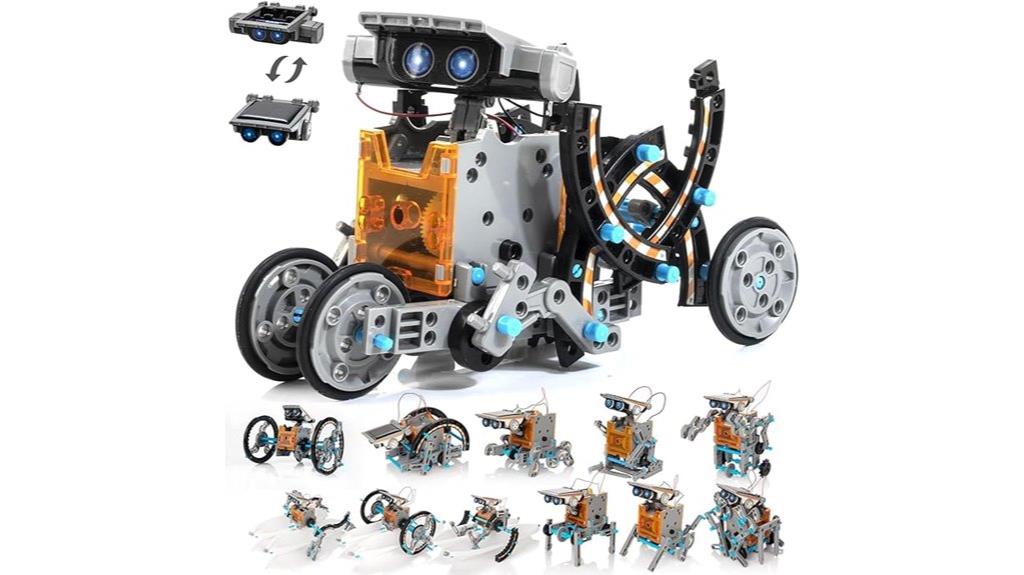
Looking for a hands-on way to introduce kids to robotics and renewable energy? The 14-in-1 Solar Robot Kit for Kids is perfect. It lets children build 14 different robots, from wagging-tail dogs to walking crabs, using gears, wheels, and shafts made of durable ABS plastic. Powered by sunlight or batteries, these robots can walk, float, or roll, encouraging outdoor and indoor play. The kit promotes STEM learning by boosting problem-solving, creativity, and coordination. Easy-to-follow instructions and blueprints make assembly accessible for kids aged 8 and up. It’s an engaging, educational gift that sparks curiosity about robotics and renewable energy.
Best For: Kids aged 8-12 who are interested in learning about robotics, renewable energy, and STEM through hands-on building and experimentation.
Pros:
- Promotes STEM education by enhancing problem-solving, creativity, and coordination skills.
- Includes a variety of robot designs and easy-to-follow instructions suitable for beginners.
- Made with durable ABS plastic and powered by solar energy or batteries for versatile outdoor and indoor play.
Cons:
- Assembly may require adult supervision for younger children.
- Solar-powered functionality depends on sunlight availability, which may limit indoor use.
- Some smaller parts might pose a choking hazard for very young children if not handled carefully.
Miko 3 AI-Powered Smart Robot for Kids

Miko 3 stands out as an ideal choice for parents seeking an engaging, educational robot that combines STEAM learning with emotional development for children aged 5-12. It features a touchscreen for hands-on adventures and sensors that guarantee safe, active play. Miko 3 offers exclusive content from Disney and other brands, tracking progress with badges and milestones. Its empathetic personality encourages social-emotional growth through conversations and empathy activities. The robot promotes physical activity with games like Freeze Dance and uses the Miko Parent App to monitor and customize learning. Certified safe with kidSAFE COPPA+, Miko 3 makes learning fun, safe, and emotionally enriching for kids.
Best For: parents seeking an engaging, safe, and educational robot that promotes STEAM learning, emotional growth, and active play for children aged 5-12.
Pros:
- Offers a rich variety of exclusive content from Disney, Paramount, and Kidoodle.TV to keep kids engaged.
- Supports emotional development through meaningful conversations, empathy activities, and a warm personality.
- Includes safety features and parental controls via the Miko Parent App, ensuring a secure learning environment.
Cons:
- Requires a Wi-Fi connection for full functionality and content access.
- Subscription costs for Miko Max and content access may add up over time.
- Larger device size may be less suitable for small spaces or travel.
Sphero Mini Activity Kit – App-Enabled Coding Robot

The Sphero Mini Activity Kit is an excellent choice for kids aged 8 and up who want to explore coding and robotics through hands-on play. It includes a clear-shelled robot, bumper cover, construction pieces, activity cards, and more, encouraging creative building and problem-solving. Kids can build mazes, obstacle courses, or even play croquet, controlling the robot via different drive modes using the Sphero Play app. The kit also introduces coding through drag-and-drop Blocks and advanced programming with JavaScript and Swift using the Sphero Edu app. It’s perfect for inspiring STEM learning and nurturing creativity in a fun, interactive way.
Best For: kids aged 8 and up who are interested in exploring coding, robotics, and STEM activities through hands-on, creative play.
Pros:
- Includes a variety of building and activity components for versatile play and learning.
- Supports beginner to advanced coding with drag-and-drop blocks and programming in JavaScript and Swift.
- Encourages creativity, problem-solving, and STEM skills through interactive challenges and building projects.
Cons:
- Requires a compatible smartphone or tablet with the Sphero Play and Sphero Edu apps, which may not be available on all devices.
- Some users might find the assembly and construction pieces less durable over time with frequent use.
- Advanced programming features may have a learning curve for younger children or beginners.
Factors to Consider When Choosing Interactive STEM Robots for Kids
When choosing an interactive STEM robot for kids, I focus on factors like age suitability, safety, and ease of use to guarantee the best fit. I also consider the quality of educational content and how flexible the programming options are to keep kids engaged and learning. Durability matters too, so the robot can withstand active play while remaining safe for children.
Age Appropriateness
Choosing the right interactive STEM robot depends heavily on the child’s age and developmental stage. It’s vital to match the robot’s age recommendation to guarantee safe and effective learning. For younger kids aged 3-6, opt for simple, durable robots with basic controls and visual cues; these are designed to be intuitive and sturdy. For kids aged 7-12, look for robots offering more complex coding, sensor features, and problem-solving challenges that match their growing skills. Consider whether the robot provides adjustable difficulty levels or multiple learning modes to accommodate different ages within the range. Additionally, verify safety features like non-toxic materials and a sturdy design to prevent accidents and provide peace of mind during play.
Educational Content Quality
How can you tell if an interactive STEM robot offers meaningful learning? Look for content that aligns with age-appropriate standards and covers core subjects like coding, engineering, and physics. Engaging lessons and challenges that adapt to a child’s skill level keep them motivated and foster gradual skill growth. Check if the robot comes with thorough manuals, activity guides, or lesson plans—these support both independent exploration and guided learning. Content backed by reputable educational organizations or aligned with curriculum standards adds credibility and value. Additionally, regular updates and fresh content ensure the learning remains relevant, helping kids build on their knowledge as they grow. High-quality educational content truly turns play into meaningful, skill-building experiences.
Ease of Use
Selecting an interactive STEM robot that’s easy for kids to use can make a big difference in their learning experience. Look for models with simple controls and intuitive interfaces suited to your child’s age and skill level. Visual programming options like drag-and-drop or action cards can make coding approachable and fun. The setup process should be straightforward, ideally with minimal assembly or technical steps. Check if the software or app is user-friendly, with clear instructions and accessible features that don’t frustrate beginners. Prioritize robots with responsive sensors and controls that allow kids to interact naturally, without needing complex calibration. An easy-to-use robot keeps children engaged, encourages exploration, and makes learning STEM concepts an enjoyable adventure rather than a frustrating challenge.
Programming Flexibility
To guarantee kids can grow with their STEM robots, it’s important to contemplate their programming flexibility. I look for robots that support multiple programming methods, like drag-and-drop, block coding, or text-based coding, so kids can progress at their own pace. Compatibility with platforms such as Scratch, JavaScript, or Python is also essential for more advanced learners. A variety of programming modes—from beginner to expert—helps children develop their skills gradually. I also consider whether the robot offers physical programming options, like action cards or gesture controls, providing screen-free alternatives. Lastly, open-source firmware or customizable code environments encourage creativity and allow kids to modify and extend their robots’ capabilities, fostering a deeper understanding of coding concepts.
Durability and Safety
When choosing an interactive STEM robot for kids, prioritizing durability and safety is vital to guarantee a positive and worry-free experience. I look for robots made from impact-resistant, non-toxic materials like ABS plastic, ensuring they can handle rough handling. Rounded edges and the absence of small, detachable parts are essential to prevent choking hazards. I also verify that the robot complies with safety standards such as ASTM F963 or EN71, which ensure it meets child safety regulations. Stability and balance matter too, as they help prevent tipping over or falling, reducing injury risks. Features like auto-shutoff and power management are important to prevent overheating and conserve batteries. Overall, these safety and durability factors give peace of mind during play and learning.
Frequently Asked Questions
How Durable Are These Interactive STEM Robots for Active Play?
These interactive STEM robots are surprisingly durable, designed to withstand active play and rough handling. I’ve seen kids drop, bump, and even step on them without major issues, thanks to sturdy materials and reinforced construction. Of course, gentle use prolongs their lifespan, but overall, I’d say they’re built to last through hours of energetic fun. You won’t have to worry about frequent replacements, making them great investments for active young learners.
Are These Robots Suitable for All Age Groups Within the Recommended Range?
Well, it’s a bit like trying to fit a square peg in a round hole; not all robots suit every age within the recommended range. Most are designed with adjustable features, making them adaptable for different ages and skill levels. I find that younger kids enjoy simple programming, while older ones can handle more complex tasks. So, yes, they’re generally suitable, but choosing the right one depends on the specific age and interest of the child.
Do These Robots Support Multiple Programming Languages or Only Specific Ones?
Most of these robots support multiple programming languages, which really broadens their educational potential. For example, many are compatible with block-based coding like Scratch, as well as text-based languages such as Python or JavaScript. I find that this flexibility allows children to progress from simple to more advanced coding skills, making learning both fun and challenging. So, you’re often not limited to just one language when exploring these engaging STEM robots.
What Safety Features Are Included to Prevent Accidents or Injuries?
Safety is a top priority, and these robots are designed with gentle features to keep little hands secure. They include rounded edges, soft materials, and secure battery compartments to prevent accidental openings. Plus, built-in sensors help avoid collisions, and age-appropriate guidelines guarantee safe play. I feel confident recommending these robots because they blend engaging learning with thoughtful safety features, making playtime both fun and worry-free for kids and parents alike.
Can These Robots Be Used Collaboratively for Group Learning Activities?
I find that these robots are perfect for group activities. They foster collaboration, communication, and teamwork as kids work together to program or solve challenges. I’ve seen children share ideas, take turns, and learn from each other while engaging with these interactive robots. It makes learning more dynamic and fun, encouraging social skills alongside STEM knowledge. I highly recommend using them for group projects to boost engagement and cooperative learning.
Conclusion
Choosing the right interactive STEM robot can truly spark a child’s curiosity and creativity. For example, I once saw a young girl transform her Sphero Mini into a mini race car, boosting her confidence in coding. By considering factors like age, interests, and skill level, you can find the perfect robot that makes learning fun and engaging. It’s amazing how these tools can turn curiosity into lifelong passion for STEM.