

If you’re looking to maximize your iPad Pro’s potential, selecting the right accessories is essential. The best overall choice balances protection, usability, and price, making it suitable for most users. The Apple Pencil (USB-C) stands out for artists and note-takers, while the Magic Keyboard Cases offer versatile typing and protection. However, tradeoffs often involve balancing cost against features like durability or compatibility. Keep reading for a detailed breakdown of the top accessories and what makes each one unique.

Get business pricing on tools and workshop supplies
- Business-only prices and quantity discounts
- Tax-exempt purchasing
- Multiple users, one account, clear invoices
Complete the kit


Key Takeaways
- The OtterBox Defender Series provides rugged protection but adds bulk and weight, making it less portable for frequent travelers.
- Apple‘s Magic Keyboard Cases deliver a seamless typing experience but come at a premium price, especially for larger models.
- The Apple Pencil (USB-C) offers high precision but requires careful handling and charging, which can be inconvenient during work sessions.
- The iPad Pro USB-C Hub expands connectivity but introduces additional cables and potential clutter, affecting portability.
- Choosing accessories depends heavily on how you plan to use your iPad—whether for work, creative projects, or portability.
| OtterBox Defender Series Case for iPad Pro 13-inch (M4 and M5) (2024) – Black |  | Best Rugged Protection for Active Users | Compatible With: iPad Pro 13-inch (M4 and M5) | Drop Height: 2X military-grade drop protection (MIL-STD-810G 516.6) | Dimensions: 11.85 in x 9.31 in x 0.81 in / 300.90 mm x 236.48 mm x 20.69 mm | VIEW ON AMAZON | See Our Full Breakdown |
| Apple Pencil (USB-C) |  | Best Precision and Convenience for Creative Users | Compatibility: iPad Pro 13-inch (M4, M5), 12.9-inch (3rd-6th gen), 11-inch (M4, M5, 1st-4th gen), iPad Air (M2, M3, M4), iPad (A16, 10th gen), iPad mini (A17 Pro, 6th gen) | Connectivity: USB-C | Features: Tilt sensitivity, low latency, magnetic attachment | VIEW ON AMAZON | See Our Full Breakdown |
| Apple iPad Magic Keyboard Case for iPad Pro 13-inch (M4 and M5), Black | 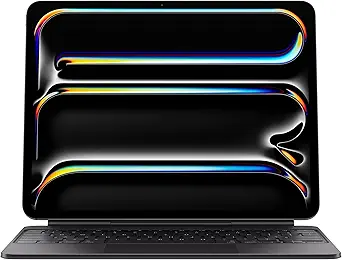 | Best Keyboard for Productivity and Portability | Compatibility: iPad Pro 13-inch (M4 and M5) | Features: Glass trackpad with haptic feedback, backlit keys, function row, USB-C pass-through charging | Protection: Front and back cover | VIEW ON AMAZON | See Our Full Breakdown |
| Apple iPad Magic Keyboard Case for iPad Pro 11-inch (M4 and M5), Black |  | Best Compact Keyboard for Smaller iPads | Compatibility: iPad Pro 11-inch (M4 and M5) | Features: Glass trackpad with haptic feedback, backlit keys, function row, USB-C pass-through charging | Protection: Front and back cover | VIEW ON AMAZON | See Our Full Breakdown |
| tomtoc Portfolio Case for 2026 13-Inch iPad Air M4, M3 & M2, iPad Pro M5/M4, 12.9-Inch iPad Pro M2/M1 |  | Best for Travel and Daily Protection with Extra Storage | Compatible Models: 2026 iPad Air M4, M3 & M2, iPad Pro 13-inch M5/M4, 12.9-inch iPad Pro M2/M1 | Material: EVA hard shell, microfiber lining | Water Resistance: Water-repellent fabric | VIEW ON AMAZON | See Our Full Breakdown |
| Apple Pencil Pro (Latest Model) |  | Best for Creative Professionals and Precision Note-Taking | Compatibility: iPad Pro 13-inch (M4, M5), iPad Pro 11-inch (M4, M5), iPad Air 11-inch (M2, M3, M4), iPad Air 13-inch (M2, M3, M4), iPad mini (A17 Pro) | Features: Gesture controls, haptic feedback, tilt and pressure sensitivity, low latency, hover support, magnetic attachment and charging | Dimensions: 8.25 x 2.25 x 0.75 inches | VIEW ON AMAZON | See Our Full Breakdown |
| iPad Pro USB-C Hub, 7-in-1 Adapter for iPad Pro and iPad Air |  | Best for Expanding Connectivity and Multitasking | Hardware Interface: HDMI, MicroSD, USB, USB 3.0, USB Type C | Additional Features: Fast Charging, Fast Data Transfer, Lightweight, Plug and Play, Portable | Compatible Devices: Tablets, Projectors, USB Flash Drives | VIEW ON AMAZON | See Our Full Breakdown |
| ipad pro accessorie | Dimensions | Compatibility | Features |
|---|---|---|---|
| OtterBox Defender Series Case | 11.85 in x 9.31 in x 0.81 in / 300.90 mm x 236.48 mm x 20.69 mm | — | — |
| Apple Pencil | 6.1 x 0.3 x 0.3 inches | iPad Pro 13-inch (M4, M5), 12.9-inch (3rd-6th gen), 11-inch (M4, M5, 1st-4th gen), iPad Air (M2, M3, M4), iPad (A16, 10th gen), iPad mini (A17 Pro, 6th gen) | Tilt sensitivity, low latency, magnetic attachment |
| Apple iPad Magic Keyboard Case | Not specified | iPad Pro 13-inch (M4 and M5) | Glass trackpad with haptic feedback, backlit keys, function row, USB-C pass-through charging |
| Apple iPad Magic Keyboard Case | — | iPad Pro 11-inch (M4 and M5) | Glass trackpad with haptic feedback, backlit keys, function row, USB-C pass-through charging |
| tomtoc Portfolio Case for 2026 | Fits 13-inch and 12.9-inch tablets | — | — |
| Apple Pencil Pro | 8.25 x 2.25 x 0.75 inches | iPad Pro 13-inch (M4, M5), iPad Pro 11-inch (M4, M5), iPad Air 11-inch (M2, M3, M4), iPad Air 13-inch (M2, M3, M4), iPad mini (A17 Pro) | Gesture controls, haptic feedback, tilt and pressure sensitivity, low latency, hover support, magnetic attachment and charging |
| iPad Pro USB-C Hub | — | — | — |
More Details on Our Top Picks
OtterBox Defender Series Case for iPad Pro 13-inch (M4 and M5) (2024) – Black
The OtterBox Defender Series case stands out for offering military-grade drop protection with a multi-layer design that absorbs impacts, making it ideal for users who work in demanding environments. Compared to the thinner Apple Magic Keyboard cases, this model prioritizes durability over sleekness, adding significant bulk and weight. Its built-in screen protector, port covers, and dual lanyard attachment points make it a highly reliable choice for those who need to safeguard their device from drops, dust, and rough handling. However, the heavy-duty build can reduce portability and may be cumbersome for everyday carry. The case’s black-only color and bulkier profile are tradeoffs for ruggedness, making it less appealing to users seeking slim, stylish solutions.Pros:- Provides military-grade drop protection (MIL-STD-810G 516.6)
- Multi-layer defense system absorbs impacts effectively
- Includes convenient features like Apple Pencil storage and multiple stand positions
- Durable and reliable for high-impact environments
Cons:- Bulkier design adds weight, reducing portability
- Heavy-duty build may feel cumbersome for daily use
- Limited color options (only black)
Best for: Active professionals or students who need maximum protection in rugged settings.
Not ideal for: Casual users or those prioritizing slimness and portability over protection.
- Compatible With:iPad Pro 13-inch (M4 and M5)
- Drop Height:2X military-grade drop protection (MIL-STD-810G 516.6)
- Dimensions:11.85 in x 9.31 in x 0.81 in / 300.90 mm x 236.48 mm x 20.69 mm
- Weight:1.39 lbs | 629.28 g
- Materials:Polycarbonate, Thermoplastic Elastomer slipcover
- Case Features:Multi-layer defense, built-in screen protector, port covers, 4-position stand, Apple Pencil storage, dual lanyard points
Our verdict“This case is perfect for those who need rugged protection despite added bulk and weight.”
Apple Pencil (USB-C)
The Apple Pencil (USB-C) makes this list for its pixel-perfect precision and tilt sensitivity, which are essential for detailed drawing or note-taking on compatible iPads like the M4 and M5 models. It compares favorably against third-party styluses that often lack low latency or seamless magnetic charging; however, its compatibility is limited to recent iPads, which excludes older or non-Apple tablets. The magnetic attachment allows for quick storage and effortless charging, streamlining the user experience. Still, it doesn’t include pressure sensitivity or hover features across all models, which might be a drawback for professional artists seeking advanced capabilities. This stylus delivers a smooth writing experience but is best suited for users within the Apple ecosystem who prioritize precision over additional features.Pros:- High precision and tilt sensitivity for natural drawing and writing
- Magnetic attachment for easy storage and charging
- Compatible with a wide range of recent iPads
- Low latency enhances user experience
Cons:- Requires compatible iPad models, limiting universality
- No pressure sensitivity or hover support on all models
- Limited to Apple ecosystem, no third-party support
Best for: Digital artists, note-takers, or professionals who want high accuracy and seamless integration with recent iPads.
Not ideal for: Users with older iPads or those seeking advanced pressure or hover features on all models.
- Compatibility:iPad Pro 13-inch (M4, M5), 12.9-inch (3rd-6th gen), 11-inch (M4, M5, 1st-4th gen), iPad Air (M2, M3, M4), iPad (A16, 10th gen), iPad mini (A17 Pro, 6th gen)
- Connectivity:USB-C
- Features:Tilt sensitivity, low latency, magnetic attachment
- Dimensions:6.1 x 0.3 x 0.3 inches
- Weight:0.88 ounces
- Batteries:1 Lithium Ion (included)
Our verdict“This stylus is ideal for creative users who want seamless integration and high accuracy with their latest iPads.”
Apple iPad Magic Keyboard Case for iPad Pro 13-inch (M4 and M5), Black
The Magic Keyboard for iPad Pro 13-inch earns a spot for its exceptional typing experience, with backlit keys and a glass trackpad that supports Multi-Touch gestures, rivaling traditional laptops. Its adjustable viewing angles and pass-through charging make it highly versatile for work on the go. Unlike the OtterBox Defender, this case prioritizes productivity over protection, offering a sleek, slim profile that doesn’t add much bulk. However, the accessory is sold separately, and compatibility can vary between iPad generations, which could be frustrating for some users. The limited color options and the need for an additional purchase mean this solution suits those who want a seamless, keyboard-first experience but are okay with extra costs and potential compatibility issues.Pros:- Excellent typing experience with backlit keys
- Adjustable viewing angles with a sturdy hinge
- Built-in glass trackpad supports gestures
- Supports pass-through charging without pairing
Cons:- Accessories sold separately, increasing overall cost
- Compatibility varies by iPad generation
- Limited color options
Best for: Professionals or students seeking a portable, laptop-like experience for productivity on recent iPad Pro models.
Not ideal for: Heavy-duty users or those who require rugged protection for rough environments.
- Compatibility:iPad Pro 13-inch (M4 and M5)
- Features:Glass trackpad with haptic feedback, backlit keys, function row, USB-C pass-through charging
- Protection:Front and back cover
- Color:Black
- Dimensions:Not specified
Our verdict“This keyboard case is perfect for users seeking a high-quality typing experience with portable convenience, despite extra costs.”
Apple iPad Magic Keyboard Case for iPad Pro 11-inch (M4 and M5), Black
The Magic Keyboard for 11-inch iPad Pro offers a compact, portable design with a glass trackpad and backlit keys, making it ideal for users who prioritize mobility. Its adjustable hinge provides multiple viewing angles, and the pass-through charging feature simplifies power management. Compared with the 13-inch version, this model is lighter and more manageable for on-the-go use. Nonetheless, it shares compatibility limitations and the need for separate purchase, which could be a drawback for budget-conscious buyers. The limited color options and the fact that it’s sold separately mean it’s best suited for those who want a premium typing and navigation experience in a smaller form factor.Pros:- Thin and portable with lightweight design
- Built-in glass trackpad with haptic feedback
- Adjustable viewing angles with a sturdy hinge
- Backlit keys for comfortable typing
Cons:- Accessories sold separately, adding to cost
- Compatibility varies by generation
- Limited color options
Best for: Travelers or students who want a portable keyboard solution for their 11-inch iPad Pro.
Not ideal for: Users needing rugged protection or those with older iPad models incompatible with the latest keyboard cases.
- Compatibility:iPad Pro 11-inch (M4 and M5)
- Features:Glass trackpad with haptic feedback, backlit keys, function row, USB-C pass-through charging
- Protection:Front and back cover
- Color:Black
Our verdict“This case is well-suited for those seeking a premium, portable keyboard for their smaller iPad Pro, despite extra costs.”
tomtoc Portfolio Case for 2026 13-Inch iPad Air M4, M3 & M2, iPad Pro M5/M4, 12.9-Inch iPad Pro M2/M1
The tomtoc Portfolio Case earns recognition for durable protection and practical storage, making it ideal for frequent travelers or those who carry multiple accessories. Its rugged EVA shell, microfiber lining, and water-repellent fabric provide reliable defense against bumps, drops, and rain, surpassing simpler sleeves or cases like the Apple Silicone Cover. The multiple compartments, mesh pockets, and elasticized segments turn this into a mini travel kit—though this bulkier design might be inconvenient for those seeking a slim profile. It doesn’t include accessories like cables or pens, which could be an extra expense. Overall, this case balances protection and storage, suited for users who prioritize versatility and ruggedness.Pros:- Excellent protection against bumps and drops
- Includes multiple compartments for accessories
- Water-repellent fabric adds rain resistance
- Rugged EVA hard shell enhances durability
Cons:- Bulkier when fully loaded, impacting portability
- Cables, pens, and accessories are not included
- Limited color options
Best for: Travelers or students who carry multiple accessories and need rugged, all-in-one protection.
Not ideal for: Minimalists or those who prefer slim, lightweight cases for casual daily use.
- Compatible Models:2026 iPad Air M4, M3 & M2, iPad Pro 13-inch M5/M4, 12.9-inch iPad Pro M2/M1
- Material:EVA hard shell, microfiber lining
- Water Resistance:Water-repellent fabric
- Additional Storage:Mesh pockets, elasticized segments
- Closure:YKK zippers
- Dimensions:Fits 13-inch and 12.9-inch tablets
Our verdict“This portfolio case is ideal for users seeking rugged, organized protection for their device and accessories while traveling.”
Apple Pencil Pro (Latest Model)
The Apple Pencil Pro stands out as the most advanced stylus option for iPad Pro users who need pixel-perfect precision, tilt and pressure sensitivity, and low latency for detailed drawing or note-taking. Compared with the standard Apple Pencil, this model offers gesture controls and haptic feedback that elevate the creative experience, making it ideal for artists and designers. However, its compatibility is limited to newer iPad Pro and iPad Air models, and it comes at a premium price point. The magnetic attachment and wireless charging streamline daily use, but buyers should consider that the stylus is sold separately, adding to the overall cost. This pick makes the most sense for users who want the most refined input device, willing to invest in top-tier performance.
Pros:- High precision with tilt and pressure sensitivity
- Seamless gesture controls and haptic feedback
- Magnetic attachment and wireless charging
Cons:- Requires compatible iPad models, limiting versatility
- Sold separately, increasing total cost
Best for: Professional artists, designers, and serious note-takers needing precision and advanced features.
Not ideal for: Casual users or those with older iPads — compatibility and high cost may outweigh benefits.
- Compatibility:iPad Pro 13-inch (M4, M5), iPad Pro 11-inch (M4, M5), iPad Air 11-inch (M2, M3, M4), iPad Air 13-inch (M2, M3, M4), iPad mini (A17 Pro)
- Features:Gesture controls, haptic feedback, tilt and pressure sensitivity, low latency, hover support, magnetic attachment and charging
- Dimensions:8.25 x 2.25 x 0.75 inches
- Weight:0.68 ounces
- Batteries:1 Lithium Ion battery (included)
- First Available:May 7, 2024
Our verdict“This stylus is ideal for creative professionals seeking maximum precision, but its price and compatibility limit accessibility for casual users.”
iPad Pro USB-C Hub, 7-in-1 Adapter for iPad Pro and iPad Air
The iPad Pro USB-C Hub transforms your tablet into a portable workstation, offering multiple ports including HDMI, USB 3.0, SD/microSD card readers, and high-speed charging. This makes it a better choice than simpler adapters like the Apple USB-C to Digital AV Multiport Adapter, especially if you need to connect multiple peripherals simultaneously. Its support for 4K HDMI output and 100W charging caters well to multimedia professionals or anyone who wants to use the iPad for presentations or editing. The lightweight aluminum design ensures portability, though it can feel slightly loose in ultra-thin cases, which might impact stability. Limited compatibility with thicker cases may be a concern for some users. This hub is best suited for those who need versatile connectivity on the go, but not for users with bulky cases or who prefer a minimal setup.
Pros:- Supports 4K HDMI output for high-quality video
- High-speed 100W pass-through charging
- Multiple ports for versatile connectivity
- Lightweight and portable design
Cons:- May feel loose when used with ultra-thin cases
- Limited compatibility with thick cases
Best for: Content creators, business travelers, and multitaskers needing multiple ports and high-quality video output.
Not ideal for: Users with thick or rugged cases that might interfere with the connector fit or those seeking a single-purpose adapter.
- Hardware Interface:HDMI, MicroSD, USB, USB 3.0, USB Type C
- Additional Features:Fast Charging, Fast Data Transfer, Lightweight, Plug and Play, Portable
- Compatible Devices:Tablets, Projectors, USB Flash Drives
- Total USB Ports:7
- Data Transfer Rate:5 gigabits_per_second
- Color:Space Grey
- Enclosure Material:Aluminum
- Item Dimensions:3.8″L x 1.1″W x 0.35″H
Our verdict“This hub offers a robust set of ports for professionals needing expanded connectivity, though case compatibility could be a drawback for some.”

How We Picked
Our selection process focused on evaluating performance, build quality, usability, and value. We considered how well each accessory integrates with the latest iPad Pro models, prioritizing products that enhance functionality without sacrificing portability. Durability, ease of use, and compatibility were key factors, along with user feedback and overall design quality. The ranking reflects a balance between premium features and affordability, aiming to recommend options suitable for various user needs and budgets.| ipad pro accessorie | Compatibility | Features |
|---|---|---|
| OtterBox Defender Series Case | — | — |
| Apple Pencil | iPad Pro 13-inch (M4, M5), 12.9-inch (3rd-6th gen), 11-inch (M4, M5, 1st-4th gen), iPad Air (M2, M3, M4), iPad (A16, 10th gen), iPad mini (A17 Pro, 6th gen) | Tilt sensitivity, low latency, magnetic attachment |
| Apple iPad Magic Keyboard Case | iPad Pro 13-inch (M4 and M5) | Glass trackpad with haptic feedback, backlit keys, function row, USB-C pass-through charging |
| Apple iPad Magic Keyboard Case | iPad Pro 11-inch (M4 and M5) | Glass trackpad with haptic feedback, backlit keys, function row, USB-C pass-through charging |
| tomtoc Portfolio Case for 2026 | — | — |
| Apple Pencil Pro | iPad Pro 13-inch (M4, M5), iPad Pro 11-inch (M4, M5), iPad Air 11-inch (M2, M3, M4), iPad Air 13-inch (M2, M3, M4), iPad mini (A17 Pro) | Gesture controls, haptic feedback, tilt and pressure sensitivity, low latency, hover support, magnetic attachment and charging |
| iPad Pro USB-C Hub | — | — |
Factors to Consider When Choosing Ipad Pro Accessories
When choosing iPad Pro accessories, it’s important to consider how each item complements your specific usage habits. Factors like protection, input method, expandability, and portability play a significant role in making the right purchase. A well-chosen accessory can enhance productivity, creative output, or device longevity, but tradeoffs often involve cost, size, and compatibility. Understanding these considerations helps you avoid common pitfalls and select accessories that truly add value.Protection and Durability
Investing in a sturdy case or cover is vital for safeguarding your iPad Pro against drops, scratches, and daily wear. Rugged options like the OtterBox Defender excel in durability but can add bulk, making your device less sleek and portable. Consider your lifestyle—if you’re frequently on the go, prioritize a case that balances protection with portability. Also, check if the case offers proper access to ports and buttons to avoid inconvenience.
Input and Creative Tools
The Apple Pencil is a cornerstone accessory for artists, designers, and note-takers. The latest USB-C model offers high precision and seamless integration, but it requires careful handling and charging. For creative work, investing in a high-quality stylus can significantly boost productivity, yet it’s worth considering whether your workflows justify the expense. Additional accessories like screen protectors can also improve drawing accuracy and reduce glare.
Keyboard and Typing Experience
For productivity, the Magic Keyboard Cases transform the iPad into a laptop-like device, offering a comfortable typing experience and built-in trackpad. They tend to be expensive, especially for larger models, and can add weight, impacting portability. If typing is a core part of your daily use, these cases are worth the investment, but for casual browsing or media consumption, a simpler or more affordable folio might suffice.
Connectivity and Expandability
Expanding your iPad’s ports with a USB-C hub allows connection to external displays, drives, and accessories. While this boosts versatility, it also introduces additional cables and potential clutter, which may detract from portability. Consider whether you need multiple ports regularly or just occasionally. Higher-quality hubs with power delivery and reliable connections tend to be more cost-effective in the long run.
Value and Compatibility
Matching accessories to your specific iPad Pro model and intended use can save money and frustration. For example, some cases or keyboards are tailored to certain sizes or generations, ensuring proper fit and functionality. Beware of generic or incompatible options that might not align perfectly, possibly leading to issues like poor fit or limited features. Balancing features with price helps you get the best value for your investment.
Frequently Asked Questions
Can I use a standard iPad case for my iPad Pro?
While some standard iPad cases might fit the smaller 11-inch iPad Pro, they often won’t provide the same level of protection or access to features for the 12.9-inch model. It’s best to choose a case specifically designed for your model to ensure proper fit, access to ports, and compatibility with accessories like keyboards or Apple Pencil. Using the correct case can also prevent accidental damage and improve overall usability.
Is the Apple Pencil (USB-C) compatible with all iPad Pro models?
The latest Apple Pencil (USB-C) is designed specifically for iPad Pro models with USB-C ports, such as the M4 and M5 series. Compatibility is generally straightforward, but it’s important to verify that your device is supported before purchasing. Older Apple Pencil models or styluses designed for the Lightning port won’t work with newer iPad Pro models, so double-check compatibility to avoid disappointment.
Do I need a keyboard case, or can I just use a Bluetooth keyboard?
Using a dedicated keyboard case, like the Magic Keyboard, offers a seamless, integrated experience with the iPad Pro, including a trackpad and better stability. However, Bluetooth keyboards are more versatile and often less expensive, allowing you to switch devices easily. The choice depends on whether you prioritize convenience and integration or flexibility and cost savings. For heavy typing and frequent use, a keyboard case provides a more stable setup.
Are USB-C hubs safe for my iPad Pro?
High-quality USB-C hubs with proper power delivery and reliable build quality are generally safe for your iPad Pro. Cheaper or poorly made hubs may cause connection issues or even damage your device over time. Look for hubs from reputable brands that specify compatibility with iPadOS and include features like pass-through charging. Properly chosen hubs can greatly expand your iPad’s capabilities without risking damage.
How do I choose the right protective case without sacrificing style?
Balancing protection with aesthetics involves selecting a case that offers durability while matching your personal style. Many brands now offer slim, sleek designs that don’t compromise on protection, often with transparent or minimalist options. Consider the level of protection you need—if you’re prone to drops, a rugged case might be necessary, but if style is your priority, look for slim models that still offer basic safeguards. Reading reviews can help identify cases that combine form and function effectively.
Conclusion
For most users, the OtterBox Defender Series Case offers the best protection without sacrificing too much portability, making it ideal for those who prioritize durability. The Apple Pencil (USB-C) remains the top choice for creative professionals who need precise input, while the Magic Keyboard Cases are perfect for anyone transforming their iPad into a laptop replacement. Budget-conscious buyers should consider versatile but affordable options like third-party USB-C hubs or styluses. Ultimately, your choice depends on your primary use—whether for work, creative pursuits, or everyday portability—and balancing features with cost.


