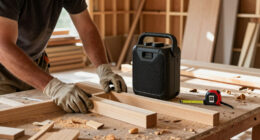
To build a protective charging shelf above your workbench, start by selecting sturdy materials like plywood or metal that can handle device weight and environmental factors. Measure your space carefully and plan for wireless charging pads embedded or mounted on the shelf with protective covers. Make certain safe electrical wiring with surge protectors and proper hardware, then install the shelf level and secure with anchors. Adding cable management and safety features like lips or barriers keeps your devices secure; keep going to find out more details.

Get business pricing on tools and workshop supplies
- Business-only prices and quantity discounts
- Tax-exempt purchasing
- Multiple users, one account, clear invoices
Key Takeaways
- Measure available space accurately and select sturdy, durable materials like plywood or metal for the shelf.
- Embed or mount wireless charging pads onto the shelf surface, ensuring compatibility and protection from dust.
- Plan and install electrical wiring with safety features such as circuit breakers and surge protectors.
- Incorporate cable management solutions like grommets, clips, and labels for neatness and safety.
- Securely mount the shelf with level alignment, a front lip, and proper hardware for stability and device safety.

If you often work with power tools and electronic devices, installing a protective charging shelf above your workbench can keep your workspace organized and safe. This setup allows you to charge your devices conveniently while minimizing clutter and reducing the risk of accidents. To start, you’ll need a sturdy shelf that can support the weight of your devices and withstand the environment of your workshop. Use materials like plywood or metal, depending on your preference for durability and ease of installation. Measure the space above your workbench carefully, ensuring enough clearance for your devices and easy access for charging.
Next, consider integrating wireless charging pads into your shelf. Wireless charging simplifies the process—no more fumbling with cables or worrying about wear and tear. By embedding wireless charging stations into your shelf surface, you keep your devices powered up without cluttering your workspace with cords. When planning this, make sure the charging pads are compatible with your devices and positioned for easy access. You can create cutouts or mount the pads directly onto the shelf surface, sealing them in with a protective cover to prevent dust and debris from interfering with charging. Proper planning for workshop safety can help you avoid potential electrical hazards. Including electrical safety measures, such as circuit breakers or surge protectors, can further protect your equipment. Additionally, understanding electrical wiring is essential for ensuring a safe and effective setup.
Cable management is another critical aspect. Even with wireless charging, you’ll need to connect the charging stations to power sources. Use cable clips, conduits, or ties to route the cords neatly along the back or underside of the shelf, keeping them out of the way. This not only preserves a tidy look but also prevents cords from tangling or catching on tools. Incorporate grommets into the shelf design to allow cords to pass through cleanly without damaging the shelf material. Label the cables if you have multiple devices, making it easier to identify and troubleshoot if needed. Additionally, choosing durable materials like metal or high-quality plywood can help ensure your shelf withstands the workshop environment and supports your devices safely. Properly securing the shelf with appropriate hardware and ensuring the weight capacity is not exceeded will help prevent accidents or damage.
When attaching the shelf, secure it firmly to the wall using appropriate anchors and screws for your wall type. Make sure it’s level to prevent devices from sliding off. Add a protective barrier or lip at the front edge of the shelf to prevent devices from falling, especially if your workspace is busy or if you work with heavy or vibrating tools. For additional safety, consider using surge protectors or circuit breakers to safeguard your electronics from power fluctuations. Properly installing and maintaining your workspace accessories not only improves safety but also enhances overall efficiency. Regular inspections and maintenance can help identify potential issues before they become hazards.
wireless charging pad for workbench
As an affiliate, we earn on qualifying purchases.
As an affiliate, we earn on qualifying purchases.
Frequently Asked Questions
What Materials Are Best for a Durable Charging Shelf?
For a durable charging shelf, you should choose sturdy materials like hardwood or metal, which offer excellent material durability. These materials can support electrical wiring safely and withstand daily wear. Avoid flimsy options like thin plywood or plastic. Using robust materials guarantees your shelf remains stable and secure, protecting your devices and wiring. Properly secured electrical wiring also enhances safety and prolongs the lifespan of your charging setup.
How High Should the Shelf Be Installed?
You should install the shelf about 12 to 18 inches above your workbench, ensuring easy access for cable management and device charging. This height keeps cords organized and prevents clutter from interfering with your work. Also, consider shelf aesthetics by choosing a design that complements your workspace. Proper height allows you to easily connect and disconnect devices while maintaining a clean, professional look, enhancing both functionality and appearance.
Can I Customize the Shelf for Multiple Device Sizes?
Absolutely, you can customize your shelf for multiple device sizes. Think of it as tailoring a suit—adjusting compartments for perfect fit. Use adjustable dividers or add removable panels to enhance device organization and cable management. This way, each device stays securely in place, preventing clutter and tangling. Customization makes your charging station flexible, accommodating various gadgets and keeping your workspace neat and efficient.
What Safety Precautions Are Necessary During Installation?
During installation, prioritize electrical safety by turning off power at the circuit breaker to prevent shocks. Use insulated tools and wear rubber gloves if necessary. Make certain the shelf is securely anchored to prevent it from falling, which can cause fire hazards. Double-check all wiring and connections for proper insulation and grounding. These precautions help prevent electrical fires and keep you safe while building your charging shelf.
How Do I Prevent Overheating of Devices on the Shelf?
Like a careful gardener tending delicate plants, you’ll want to monitor your devices’ heat levels closely. Use ventilation techniques such as small fans or vents to allow air circulation, preventing heat buildup. Regular temperature monitoring helps you spot overheating early. Keep devices spaced out and avoid stacking them tightly. These steps guarantee your devices stay cool, working efficiently without risk of overheating or damage.
protective charging shelf for workshop
As an affiliate, we earn on qualifying purchases.
As an affiliate, we earn on qualifying purchases.
Conclusion
Building a protective charging shelf above your workbench not only keeps your workspace organized but also safeguards your devices from potential damage. With a few simple steps, you can create a functional and safe area for all your charging needs. Isn’t it worth investing a little time now to save frustration later? Once you’ve finished, you’ll enjoy a tidier, more efficient workspace that’s ready for any project. Ready to get started?
cable management clips and grommets
As an affiliate, we earn on qualifying purchases.
As an affiliate, we earn on qualifying purchases.
surge protector power strip for workshop
As an affiliate, we earn on qualifying purchases.
As an affiliate, we earn on qualifying purchases.
Halloween Picks
halloween
As an affiliate, we earn on qualifying purchases.