Maintaining your DEWALT power tools is essential for ensuring their longevity, optimal performance, and safety during use. Whether you’re a professional contractor or a DIY enthusiast, knowing how to properly care for and troubleshoot your tools can save you time and money. This comprehensive guide covers routine maintenance, common issues, and practical troubleshooting steps to keep your DEWALT tools functioning at their best.

Get business pricing on tools and workshop supplies
- Business-only prices and quantity discounts
- Tax-exempt purchasing
- Multiple users, one account, clear invoices
From cleaning and battery care to fixing minor mechanical problems, you’ll learn the essential procedures to keep your equipment in top condition. Always prioritize safety and follow manufacturer instructions to avoid accidents or damage to your tools.
Key Takeaways
| Routine Cleaning | Regular cleaning prevents dust and debris buildup that can impair performance. |
| Battery Care | Proper charging and storage extend battery life and ensure consistent power. |
| Common Issues | Identify and troubleshoot typical problems like sluggish operation or overheating. |
| Maintenance Tools | Use recommended tools and parts for repairs to avoid further damage. |
| Safety First | Always disconnect power, wear safety gear, and follow safety protocols during maintenance. |
Routine Cleaning and Inspection
- Unplug or remove the battery from your DEWALT tool before starting any maintenance.
- Use a soft, dry cloth or a brush to remove dust, dirt, and debris from vents, switches, and moving parts.
- Check for any loose screws, bolts, or parts and tighten them securely.
- Inspect the chuck, blades, or bits for signs of wear or damage, and replace if necessary.
- Clean the battery contacts with a dry cloth to ensure good electrical connection.
Perform this routine after each use or at least weekly if used frequently. Keeping your tools clean prevents overheating and mechanical failures, and ensures smooth operation.
Battery Maintenance and Troubleshooting
Proper battery care is crucial for reliable operation. Always use the correct charger model for your DEWALT batteries and avoid overcharging. Keep batteries in a cool, dry place, and avoid exposing them to extreme temperatures.
If your tool shows reduced runtime or doesn’t turn on, first check the battery charge level using the LED indicator. If the battery is depleted, charge it fully. If the battery doesn’t hold a charge or shows signs of swelling, replace it with a new one.
For troubleshooting, clean the battery contacts and ensure they are free of debris. If problems persist, test the battery with another compatible tool or replace it altogether.
Mechanical and Electrical Troubleshooting
- For tools that run sluggish or stop mid-task, check the brushes (if applicable) and replace them if worn down.
- Inspect the motor and gear assembly for debris or damage. Clear out any obstructions carefully.
- If the trigger feels unresponsive, examine the wiring for loose connections or corrosion.
- Test the switch and replace if faulty, following the manufacturer’s instructions.
- Use a multimeter to verify electrical continuity in the wiring and motor components.
If you’re unsure or uncomfortable performing these steps, consult a professional repair service or contact DEWALT support.
Lubrication and Moving Parts Care
Lubrication helps reduce wear and prolong the life of moving parts. Use only manufacturer-approved lubricants. Apply a few drops to gears, hinges, and other moving components, following the user manual’s instructions.
Avoid over-lubricating, as excess oil can attract dust and debris, impairing the tool’s function. Regular lubrication combined with cleaning minimizes mechanical failures and maintains smooth operation.
Troubleshooting Common Problems
- Tool not turning on: Check the battery charge, inspect contacts, or test with a different battery.
- Overheating: Allow the tool to cool down, clean vents, and avoid prolonged use without breaks.
- Reduced power: Clean or replace worn brushes, check for gear damage, or replace the battery.
- Unusual noises: Inspect gears and moving parts for damage or debris, and lubricate as needed.
Always consult your user manual for specific troubleshooting steps related to your model.
The Products in This Guide

DEWALT 20V MAX Cordless Drill and Impact Driver
- ✔ Battery Capacity: 2 x 5Ah
- ✔ Charger Included: Yes
- ✔ Tool Weight: Lightweight
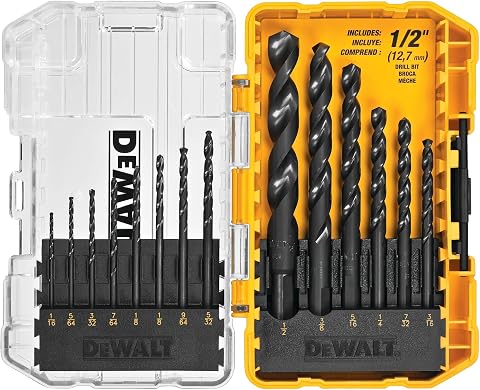
DEWALT Drill Bit Set
- ✔ Bit Material: High-Speed Steel
- ✔ Number of Bits: 14
- ✔ Coating: Black and Gold
DEWALT 20V MAX Cordless Drill and Impact Driver
The DEWALT 20V MAX Cordless Drill and Impact Driver set offers reliable performance with a lightweight design perfect for tight spaces. Its brushless motor ensures durability and efficiency, while the ergonomic grip and bright LED improve usability in various work environments.
Pros:
- Compact and lightweight design
- Brushless motor for efficiency
- Includes 2 batteries and charger
- Ergonomic comfort grip
Cons:
- Battery life may vary under heavy use
- No additional accessories included
- Limited to 20V MAX system
Best for: Ideal for DIY projects, home repairs, and professional tasks requiring precision.
Not ideal for: Not suited for heavy-duty industrial applications or prolonged use without extra batteries.
Bottom line: A reliable, versatile cordless drill set perfect for a range of projects.
DEWALT Drill Bit Set
Complement your DEWALT drill with this 14-piece drill bit set, featuring high-speed steel and a 135-degree split point tip for reduced walking. Ideal for plastic, wood, and metal, it offers durability and quick size identification.
Pros:
- High-speed steel construction
- Includes 14 versatile bits
- Split point design reduces walking
- Size markings on shanks
Cons:
- Limited to general-purpose drilling
- No carrying case included
- Best used with compatible power tools
Best for: Perfect for DIYers and professionals needing reliable bits for various materials.
Not ideal for: Not suitable for heavy industrial drilling or specialized materials.
Bottom line: A durable, versatile drill bit set that enhances your drilling tasks.
Frequently Asked Questions
How often should I clean my DEWALT power tools?
It’s best to clean your tools after each use, especially if used in dusty or dirty environments. Regular cleaning prevents buildup that can impair performance.
Can I use any charger with my DEWALT batteries?
Only use chargers compatible with your specific DEWALT battery model to ensure safe and efficient charging. Using incompatible chargers can damage the battery or pose safety risks.
What should I do if my drill overheats?
Allow the drill to cool down completely, clean the vents to ensure proper airflow, and avoid prolonged continuous use. Check for any mechanical issues before resuming work.
How do I replace the brushes in my DEWALT drill?
Consult your user manual for specific instructions. Generally, you need to remove the brush caps, take out worn brushes, and insert new ones, ensuring correct orientation.
What’s the best way to store DEWALT batteries?
Store batteries in a cool, dry place away from extreme temperatures. Keep them partially charged (around 50%) if storing for an extended period to preserve lifespan.
Keeping Your DEWALT Tools in Prime Condition
Effective maintenance and troubleshooting are key to maximizing the lifespan and performance of your DEWALT power tools. Regular cleaning, proper battery care, and addressing issues early can prevent costly repairs and downtime. Always prioritize safety, follow manufacturer guidelines, and don’t hesitate to seek professional help if needed. With the right care, your DEWALT tools will serve you reliably for years to come.
Affiliate disclosure: As an Amazon Associate we earn from qualifying purchases. Prices and availability are accurate as of the time of publishing.