For most buyers, I’d start with the Homey Pro mini: it combines Matter, Thread, Zigbee, and Ethernet in a compact hub, though it suits people willing to build around a capable platform. The Aqara Hub M3 stands out for broad protocol support and infrared control, while Hubitat Elevation C-8 Pro is a stronger fit for people who want hands-on control over automations. Choosing among premium home automation hubs means balancing device compatibility, local control, setup effort, and whether you need a screen, lighting specialist, or general-purpose controller. No single hub supports every device or workflow equally well. Read on for the full comparison and help matching each option to your home.

Get business pricing on tools and workshop supplies
- Business-only prices and quantity discounts
- Tax-exempt purchasing
- Multiple users, one account, clear invoices
Complete the kit

Key Takeaways
- Homey Pro mini leads as a compact multi-protocol pick: Matter, Thread, Zigbee, and Ethernet make it a flexible starting point, but its platform approach may take more setup than a simple lighting hub.
- Aqara’s newer hubs serve different needs: M3 offers Matter, Thread, Zigbee, and IR control, while M200 adds Wi-Fi and PoE, giving placement and network options a bigger role in the choice.
- Hubitat and Aeotec suit control-focused households: they appeal to buyers prioritizing automation and device integration over a wall-mounted interface or a narrow, plug-and-play use case.
- Specialists can beat general-purpose hubs for focused systems: Lutron Caséta is aimed at lighting and shade control, while Philips Hue Bridge Pro is centered on Hue lighting rather than every smart-home device.
- Protocol lists do not guarantee an easy setup: the Echo Hub emphasizes a visible control panel, while hubs such as Hubitat reward buyers prepared to configure routines and check device compatibility carefully.
| Homey Bridge Smart Home Hub – Z‑Wave Plus, Zigbee, Wi‑Fi, BLE & Infrared; Works with Alexa & Google Home |  | Best for Mixed-Protocol Homes | Supported protocols: Z-Wave Plus, Zigbee, Wi-Fi, Bluetooth Low Energy, infrared | Voice control: Amazon Alexa, Google Assistant, Siri Shortcuts | Included subscription: Three months of Homey Premium | VIEW ON AMAZON | See Our Full Breakdown |
| Legrand adorne with Netatmo Smart Home Gateway in Graphite |  | Best for Integrated Smart Lighting | Model: WNAH1G1 | Color: Graphite | Compatibility: Legrand adorne and radiant with Netatmo smart devices | VIEW ON AMAZON | See Our Full Breakdown |
| Aqara Smart Hub M100 Matter Controller with Thread and Zigbee |  | Best Compact Matter Bridge | Supported protocols: Aqara Zigbee and Thread | Device capacity: Up to 20 Aqara Zigbee devices and 20 Thread devices | Matter bridging: Bridges compatible Aqara Zigbee products to Matter ecosystems | VIEW ON AMAZON | See Our Full Breakdown |
| Philips Hue Bridge Pro Smart Lighting Hub |  | Best Premium Lighting Hub | Connectivity: Zigbee, Matter | Maximum lights: 150+ | Maximum accessories: 50+ | VIEW ON AMAZON | See Our Full Breakdown |
| Lutron Caséta Smart Hub, Compatible with Alexa, Apple HomeKit, Google Assistant, and More | 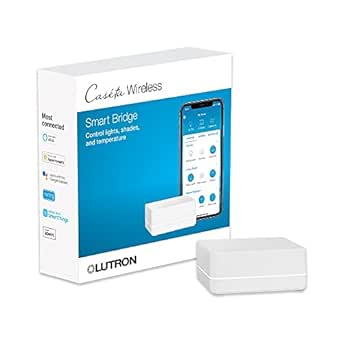 | Best for Reliable Lighting and Shades | Model: L-BDG2-WH | Supported devices: Up to 75 Caséta devices | Connectivity: Clear Connect; connects to a Wi-Fi router | VIEW ON AMAZON | See Our Full Breakdown |
| Aqara Smart Home Hub M3 with Matter, Zigbee, Thread, and IR Control |  | Best for Aqara-Centered Homes | Model: HM-G01E | Protocols: Zigbee, Thread, Matter, Bluetooth, Wi-Fi | Aqara Zigbee capacity: Up to 127 devices | VIEW ON AMAZON | See Our Full Breakdown |
| TP-Link Tapo H110 Matter-Certified Smart IR Hub with Chime |  | Best for IR Appliance Control | Model: H110 | Connectivity: 2.4 GHz Wi-Fi | Smart home compatibility: Matter; Alexa, Google Assistant, and Apple Home via Matter | VIEW ON AMAZON | See Our Full Breakdown |
| Homey Pro mini Smart Home Hub with Zigbee, Ethernet, Matter, and Thread |  | Best for Local Multi-Brand Automation | Model: HOMEY-PRO-MINI-US-01 | Connectivity: Zigbee, Matter, Thread, Ethernet | Compatible brands: More than 1,000 | VIEW ON AMAZON | See Our Full Breakdown |
| Amazon Echo Hub Smart Home Control Panel |  | Best for Wall-Mounted Alexa Control | Display: 8 inches | Connectivity: Wi-Fi, Bluetooth, Zigbee, Matter, Sidewalk, Thread | Built-in hub: Yes | VIEW ON AMAZON | See Our Full Breakdown |
| SONOFF Bridge Max Smart Home Hub (Bridge-M) |  | Best for Hands-On Matter and Home Assistant Integration | Model: Bridge-M | Connectivity: Wi-Fi, Ethernet, Zigbee | Wi-Fi standards: IEEE 802.11a/b/g/n/ac/ax | VIEW ON AMAZON | See Our Full Breakdown |
| Samsung SmartThings Hub 3rd Generation, White |  | Best for Mixed Zigbee and Z-Wave Homes | Manufacturer: Samsung | Model: GP-U999SJVLGDA | Connectivity: Zigbee, Z-Wave, cloud-to-cloud | VIEW ON AMAZON | See Our Full Breakdown |
| Aqara Hub M1S Gen 2 Smart Home Hub |  | Best for Aqara Sensor Automations | Connectivity: 2.4 GHz Wi-Fi; Zigbee 3.0 | Supported device capacity: Up to 128 Aqara devices with Zigbee repeaters | Compatible platforms: Apple HomeKit, Google Assistant, Alexa, IFTTT | VIEW ON AMAZON | See Our Full Breakdown |
| Aeotec Smart Home Hub 2 V4 with Matter and Zigbee |  | Best for Matter and Zigbee on SmartThings | Brand: Aeotec | Model: V4 – Smart Home Hub 2 (2025) | Model number: GP-AEOHUBV4US | VIEW ON AMAZON | See Our Full Breakdown |
| Hubitat Elevation C-8 Pro Smart Home Hub |  | Best for Advanced Local Automation | Model: C-8 Pro | Protocols: Matter 1.5, Z-Wave 800 Series, Zigbee 3.0, Bluetooth | Voice assistant compatibility: Amazon Alexa, Google Home, Apple HomeKit | VIEW ON AMAZON | See Our Full Breakdown |
| Aqara Smart Hub M200 Matter Controller with Zigbee, Wi-Fi, IR, Thread, and PoE |  | Best for Advanced Matter, Thread, and IR Setups | Model: HM-G03E | Connectivity: Zigbee, Thread, Bluetooth, dual-band Wi-Fi (2.4/5 GHz), PoE, USB-C | Device capacity: Up to 40 Aqara Zigbee devices and 40 Thread devices | VIEW ON AMAZON | See Our Full Breakdown |
| premium home automation hub | Model | Connectivity |
|---|---|---|
| Homey Bridge Smart Home Hub | — | — |
| Legrand adorne with Netatmo Sm | WNAH1G1 | — |
| Aqara Smart Hub M100 Matter Co | — | — |
| Philips Hue Bridge Pro Smart L | — | Zigbee, Matter |
| Lutron Caséta Smart Hub | L-BDG2-WH | Clear Connect; connects to a Wi-Fi router |
| Aqara Smart Home Hub M3 with M | HM-G01E | — |
| TP-Link Tapo H110 Matter-Certi | H110 | 2.4 GHz Wi-Fi |
| Homey Pro mini Smart Home Hub | HOMEY-PRO-MINI-US-01 | Zigbee, Matter, Thread, Ethernet |
| Amazon Echo Hub Smart Home Con | — | Wi-Fi, Bluetooth, Zigbee, Matter, Sidewalk, Thread |
| SONOFF Bridge Max Smart Home H | Bridge-M | Wi-Fi, Ethernet, Zigbee |
| Samsung SmartThings Hub 3rd Ge | GP-U999SJVLGDA | Zigbee, Z-Wave, cloud-to-cloud |
| Aqara Hub M1S Gen 2 Smart Home | — | 2.4 GHz Wi-Fi; Zigbee 3.0 |
| Aeotec Smart Home Hub 2 V4 wit | V4 – Smart Home Hub 2 (2025) | — |
| Hubitat Elevation C-8 Pro Smar | C-8 Pro | — |
| Aqara Smart Hub M200 Matter Co | HM-G03E | Zigbee, Thread, Bluetooth, dual-band Wi-Fi (2.4/5 GHz), PoE, USB-C |
More Details on Our Top Picks
Homey Bridge Smart Home Hub – Z‑Wave Plus, Zigbee, Wi‑Fi, BLE & Infrared; Works with Alexa & Google Home
The Homey Bridge is the most flexible pick here for households whose devices use several different radio protocols. Its support for Z-Wave Plus, Zigbee, Wi-Fi, Bluetooth Low Energy, and infrared can bring more existing gear into one app than the lighting-focused Legrand gateway or Philips Hue Bridge Pro. Alexa, Google Assistant, and Siri Shortcuts add voice-control options, while the privacy-focused approach may appeal to buyers wary of unnecessary data sharing. The tradeoff is that this breadth is not the same as a fully open, no-cost system: advanced features and support for more than five devices require Homey Premium, with three months included. Setup can also take more effort than a hub centered on one product family. Pick it for protocol variety, not for a completely free path to full functionality.
Pros:- Supports five connection types, including Z-Wave Plus and infrared.
- Works with Alexa, Google Assistant, and Siri Shortcuts.
- Privacy-focused design is a useful distinction for cloud-conscious buyers.
- Includes three months of Homey Premium for trying advanced automation.
Cons:- More than five devices and full functionality require a paid Homey Premium subscription.
- Initial setup may take extra effort for new smart-home users.
- Voice assistants and some compatible accessories are sold separately.
Best for: Households with a mix of Z-Wave, Zigbee, Wi-Fi, Bluetooth, and infrared devices that want one app and several voice-control options.
Not ideal for: Buyers who want advanced automation without a subscription, or beginners seeking the simplest setup for a single brand of devices.
- Supported protocols:Z-Wave Plus, Zigbee, Wi-Fi, Bluetooth Low Energy, infrared
- Voice control:Amazon Alexa, Google Assistant, Siri Shortcuts
- Included subscription:Three months of Homey Premium
- Dimensions:5 x 5 x 3 inches
- Weight:1.19 pounds
- Manufacturer:Athom B.V.
Our verdict“Choose Homey Bridge if your household needs broad protocol coverage and you accept a subscription for its more advanced features.”
Legrand adorne with Netatmo Smart Home Gateway in Graphite
The Legrand adorne with Netatmo Gateway suits a renovation or a home already built around Legrand adorne or radiant controls. Rather than adding another small hub to a shelf, it installs in the wall and creates a dedicated mesh network for compatible lighting devices. Its Home + Control app supports schedules, groups, scenes, and energy management, with Alexa, Google Assistant, and Apple HomeKit compatibility. That focused design is a different proposition from the Homey Bridge, which supports a much broader mix of device protocols, or the Philips Hue Bridge Pro, which manages a large Hue lighting system. Legrand’s limitation is its ecosystem: this is not a general-purpose hub for assorted brands, and in-wall installation makes it a poor fit for renters or anyone avoiding electrical work. It rewards buyers who want a discreet, built-in lighting control point.
Pros:- In-wall placement keeps the gateway out of sight.
- Dedicated mesh network is designed for compatible smart lighting.
- Supports Alexa, Google Assistant, and Apple HomeKit.
- Home + Control offers scheduling, groups, scenes, and energy management.
Cons:- Designed for Legrand adorne and radiant with Netatmo devices rather than broad third-party device support.
- Requires in-wall installation.
- Less suitable as a general automation hub than Homey Bridge.
Best for: Homeowners installing or expanding Legrand adorne or radiant with Netatmo lighting who want a discreet gateway and app-based scenes.
Not ideal for: Renters, buyers seeking a broad multi-brand hub, or anyone who does not want to replace an existing in-wall switch or outlet.
- Model:WNAH1G1
- Color:Graphite
- Compatibility:Legrand adorne and radiant with Netatmo smart devices
- Smart home platforms:Amazon Alexa, Google Assistant, Apple HomeKit
- Voltage:120 volts
- Material:Polycarbonate
- Certification:ENERGY STAR
- Item weight:3.84 ounces
Our verdict“Choose this gateway when Legrand lighting is the center of your system and built-in installation matters more than broad device support.”
Aqara Smart Hub M100 Matter Controller with Thread and Zigbee
The Aqara M100 is a compact way to connect compatible Aqara Zigbee devices with Matter ecosystems, including Apple Home, Alexa, and Home Assistant. Its local automation support lets supported routines run without relying on Wi-Fi or cloud access, a meaningful distinction for buyers who want core control to remain local. It also supports Thread devices, although its Zigbee compatibility is limited to Aqara products. That makes it more focused than the Homey Bridge, which covers a wider set of protocols and brands, but potentially more useful than a lighting-specific hub if your home already uses Aqara sensors or switches. The stated capacity of up to 20 Aqara Zigbee devices and 20 Thread devices suits a modest setup, not an expanding whole-home system. No power adapter is included, so plan to supply a compatible USB-A source.
Pros:- Bridges compatible Aqara Zigbee devices to Matter ecosystems.
- Supports local automation without Wi-Fi or cloud access.
- Supports Thread devices alongside Aqara Zigbee products.
- USB-A power and an adjustable shaft allow flexible placement.
Cons:- Does not support third-party Zigbee devices.
- Power adapter is not included.
- Capacity is limited to up to 20 Aqara Zigbee and 20 Thread devices.
Best for: Aqara device owners who want a compact Matter bridge, local automation, and Thread support for a small or medium setup.
Not ideal for: Buyers with third-party Zigbee devices, large device fleets, or no spare compatible USB-A power adapter.
- Supported protocols:Aqara Zigbee and Thread
- Device capacity:Up to 20 Aqara Zigbee devices and 20 Thread devices
- Matter bridging:Bridges compatible Aqara Zigbee products to Matter ecosystems
- Wi-Fi:2.4 GHz Wi-Fi 6 (802.11ax)
- Security:WPA3
- Power connection:USB-A; requires a 5V, 0.5A adapter, not included
- Adjustable shaft range:210 degrees
- Operating system:Linux
Our verdict“Choose the M100 for a compact, local-first Aqara setup, but skip it if you need broad third-party Zigbee support.”
Philips Hue Bridge Pro Smart Lighting Hub
The Philips Hue Bridge Pro is the specialist choice for a substantial Hue lighting installation. It manages more than 150 lights and 50 accessories, stores up to 500 scenes and automations, and supports Matter alongside Apple Home, Alexa, Google, and Samsung SmartThings. That capacity gives it a clear advantage over the Legrand gateway for buyers building out a large, feature-rich lighting system, while the Homey Bridge remains the broader choice for mixed protocols and unrelated device brands. Hue’s MotionAware feature can detect movement without separate sensors, but it requires at least three Hue devices, so it is not an immediate benefit in a very small setup. This bridge also needs corded power. Its strengths are depth and scale within Hue, not universal device control; buyers who do not plan to build around Hue may get more flexibility from another hub.
Pros:- Manages more than 150 lights and 50 accessories.
- Supports Matter and Apple Home, Alexa, Google, and Samsung SmartThings.
- Stores up to 500 scenes and automations.
- MotionAware can detect movement without separate sensors when at least three Hue devices are present.
Cons:- MotionAware requires at least three Hue devices.
- Uses corded electric power.
- Its strongest benefits center on Philips Hue rather than broad mixed-brand control.
Best for: Hue households with many lights and accessories that want extensive scene capacity, major platform support, and MotionAware functionality.
Not ideal for: Buyers seeking a general-purpose hub for mixed brands, a small Hue installation, or a device without corded power.
- Connectivity:Zigbee, Matter
- Maximum lights:150+
- Maximum accessories:50+
- Scene capacity:Up to 500 scenes and automations
- Smart home compatibility:Apple Home, Alexa, Google, Samsung SmartThings
- Processor:1.7 GHz quad-core Cortex-A35
- Memory:4 GB DDR4 SDRAM
- Power source:Corded electric
- Dimensions:3.68 x 3.68 x 1.06 inches
Our verdict“Choose Hue Bridge Pro if your priority is a large, automation-rich Philips Hue system rather than a hub for devices across many brands.”
Lutron Caséta Smart Hub, Compatible with Alexa, Apple HomeKit, Google Assistant, and More
The Lutron Caséta Smart Hub is a strong fit when dependable control of compatible switches, lights, and Serena shades matters more than support for every device protocol. Its Clear Connect technology operates apart from Wi-Fi traffic, which can help keep lighting commands from competing with a crowded wireless network. It supports up to 75 Caséta devices and connects with Alexa, Apple HomeKit, Google Assistant, Ring, Sonos, and Serena shades. Compared with the Philips Hue Bridge Pro, Caséta is less about managing a large Hue bulb-and-scene setup; compared with the Homey Bridge, it covers a narrower range of device types. The practical catch is ecosystem commitment: Caséta dimmers, switches, and accessories are sold separately, and setup needs both a router and the Lutron app. It makes the most sense when those controls are already part of the plan.
Pros:- Supports up to 75 Caséta devices.
- Clear Connect operates separately from Wi-Fi devices.
- Compatible with Alexa, Apple HomeKit, Google Assistant, Ring, Serena shades, and Sonos.
- Plugs into an outlet and connects to a router.
Cons:- Caséta dimmers, switches, and coordinating accessories are sold separately.
- Requires a router and the Lutron app for setup.
- Supports a narrower device ecosystem than Homey Bridge.
Best for: Homeowners standardizing on Caséta switches and dimmers who also want supported voice-assistant, shade, and entertainment integrations.
Not ideal for: Buyers who want a standalone hub with broad protocol coverage or do not plan to purchase Caséta-compatible devices.
- Model:L-BDG2-WH
- Supported devices:Up to 75 Caséta devices
- Connectivity:Clear Connect; connects to a Wi-Fi router
- Smart home compatibility:Amazon Alexa, Apple HomeKit, Google Assistant, Ring, Serena shades, Sonos, and others
- Operating voltage:120 volts
- Dimensions:1.44 x 2.94 x 4.69 inches
- Material:Plastic
- Included items:One smart hub
Our verdict“Choose the Caséta Hub if you are building around Lutron lighting and shades and value a dedicated control network over broad protocol support.”
Aqara Smart Home Hub M3 with Matter, Zigbee, Thread, and IR Control
The Aqara Hub M3 is the strongest fit here for households building around Aqara sensors and controls but wanting a route into Matter ecosystems. It can bridge Aqara Zigbee and Thread devices, run local automations, and migrate devices from older Aqara hubs, giving an established setup more room to grow. Compared with the SONOFF Bridge Max, the M3 adds a 360° IR blaster with status feedback and PoE alongside Wi-Fi, while SONOFF puts more emphasis on MQTT and Home Assistant integration. The M3’s 8GB encrypted local storage and local control suit privacy-minded automation, but third-party Zigbee devices are not supported and some cloud notifications still need internet access. I’d also factor in the missing USB power adapter when planning its placement.
Pros:- Bridges Aqara Zigbee and Thread devices to Matter-compatible ecosystems.
- Supports local automation and migration from older Aqara hubs.
- 360° IR control includes status feedback.
- PoE, dual-band Wi-Fi, and encrypted local storage offer flexible installation and local data handling.
Cons:- Does not support third-party Zigbee devices.
- Some cloud notifications require an internet connection.
- USB power adapter is not included.
Best for: Aqara device owners who want local automation, Matter bridging, and IR control in one hub.
Not ideal for: Buyers who want broad third-party Zigbee support, fully internet-independent notifications, or a hub ready to power without sourcing an adapter.
- Model:HM-G01E
- Protocols:Zigbee, Thread, Matter, Bluetooth, Wi-Fi
- Aqara Zigbee capacity:Up to 127 devices
- Thread capacity:Up to 127 devices
- Wi-Fi:Dual-band 2.4/5 GHz; WPA3
- Wired connectivity:Power over Ethernet (PoE)
- Infrared:360° IR blaster with status feedback
- Local storage:8GB end-to-end encrypted
Our verdict“Choose the M3 if your home already leans on Aqara and you want local routines, Matter bridging, and IR control without giving up PoE.”
TP-Link Tapo H110 Matter-Certified Smart IR Hub with Chime
The Tapo H110 earns its place by pairing a Matter-certified hub with a broad IR appliance library and an audible alert in one compact role. Its stated support for more than 8,000 brands and 18 appliance types can bring compatible TVs and other infrared-controlled equipment into app routines and voice control. Core automations can keep running locally during internet outages, a useful distinction from cloud-dependent routines. Compared with the Aqara Hub M3, the H110 emphasizes appliance control and a built-in chime rather than Zigbee and Thread device capacity, encrypted storage, or PoE. The 93 dB alarm adds a practical alert function, but infrared still needs a clear path to the appliance, and the hub only lists 2.4 GHz Wi-Fi. Its USB power adapter is also sold separately.
Pros:- IR compatibility covers more than 8,000 brands and 18 appliance types.
- Matter support works with Alexa, Google Assistant, and Apple Home.
- Core automations can continue locally during internet outages.
- Built-in chime and 93 dB alarm provide audible alerts.
Cons:- IR control requires appliances to be within infrared range.
- Connects over 2.4 GHz Wi-Fi rather than offering listed Ethernet connectivity.
- USB power adapter is sold separately.
Best for: Tapo app users who want to add IR-controlled appliances, Matter devices, and audible alerts to household routines.
Not ideal for: Buyers building a large Zigbee or Thread sensor network, or anyone whose IR appliances sit outside the hub’s line of sight.
- Model:H110
- Connectivity:2.4 GHz Wi-Fi
- Smart home compatibility:Matter; Alexa, Google Assistant, and Apple Home via Matter
- IR compatibility:More than 8,000 brands and 18 appliance types
- Built-in alarm:93 dB
- App compatibility:iOS 12 or later; Android 6.0 or later
- Power:5V, 2A USB power adapter required; sold separately
- Included power cable:USB-C cable
Our verdict“Pick the H110 if IR appliance control and audible alerts matter more to you than the broader radio and wired options of the Aqara Hub M3.”
Homey Pro mini Smart Home Hub with Zigbee, Ethernet, Matter, and Thread
The Homey Pro mini is the most compelling pick here for buyers who want a multi-brand automation platform that processes data locally. Its Zigbee, Matter, and Thread support, plus Ethernet, gives routines a wired network connection and several paths to connect devices. Compatibility with more than 1,000 brands and voice support for Siri, Alexa, and Google Assistant give it a broader platform focus than the appliance-centered Tapo H110. Homey also states that no subscription is required for its features and cloud services. The tradeoff is protocol coverage: Z-Wave, Bluetooth, and infrared require a separately sold Homey Bridge, so this mini hub is less self-contained than the Aqara Hub M3 for IR use. Buyers should check their device mix before choosing it as the center of an existing setup.
Pros:- Processes data locally for privacy and operation when the internet is down.
- Supports Zigbee, Matter, Thread, and Ethernet.
- Works with more than 1,000 brands and Siri, Alexa, and Google Assistant.
- No subscription is required for its features and cloud services.
Cons:- Z-Wave support requires a separately sold Homey Bridge.
- Bluetooth and infrared also require the separate Bridge.
- The listed connectivity does not include Wi-Fi.
Best for: Multi-brand smart home owners who prioritize local processing, Ethernet, and routines across Zigbee, Matter, and Thread devices.
Not ideal for: Households dependent on Z-Wave, Bluetooth, or infrared devices that do not want to add a separately sold Homey Bridge.
- Model:HOMEY-PRO-MINI-US-01
- Connectivity:Zigbee, Matter, Thread, Ethernet
- Compatible brands:More than 1,000
- Voice assistants:Siri, Alexa, Google Assistant
- Local processing:Supported
- Subscription requirement:No subscription required for features and cloud services
- Color:Black
- Material:Plastic
Our verdict“Choose Homey Pro mini if local, cross-brand routines and Ethernet matter more than built-in Z-Wave, Bluetooth, or IR support.”
Amazon Echo Hub Smart Home Control Panel
The Echo Hub stands apart because it is a control panel as well as a hub: its 8-inch customizable display puts devices, cameras, routines, security, and media on a shared dashboard. That makes it a stronger fit for a busy household that wants quick visual control than the screen-free Homey Pro mini, which focuses on local automation rather than a room-by-room interface. Its built-in hub supports Wi-Fi, Bluetooth, Zigbee, Matter, Sidewalk, and Thread, while privacy controls include a microphone-off button. The installation choice is less complete than the screen suggests: the tabletop stand is sold separately, and PoE requires a separate adapter. Some Ring features also depend on Alexa+ and a compatible Ring subscription, so I would not choose it solely for those capabilities.
Pros:- Customizable dashboard with rearrangeable and resizable device sections.
- Built-in support for Wi-Fi, Bluetooth, Zigbee, Matter, Sidewalk, and Thread.
- Controls compatible cameras, routines, security systems, and media.
- Includes privacy controls and a microphone-off button.
Cons:- Tabletop stand, PoE adapter, and cable pass-throughs are sold separately.
- Some Ring features require Alexa+ and a compatible Ring subscription.
- The screen-centered design is less suited to buyers seeking a compact, display-free hub.
Best for: Alexa households that want a shared wall-mounted dashboard for smart devices, cameras, routines, security, and media.
Not ideal for: Buyers seeking a discreet, screen-free automation hub, or those who want tabletop placement or PoE without buying additional accessories.
- Display:8 inches
- Connectivity:Wi-Fi, Bluetooth, Zigbee, Matter, Sidewalk, Thread
- Built-in hub:Yes
- Mounting:Wall mount; compatible tabletop stand sold separately
- Recycled materials:27%
- Dashboard:Customizable device sections
Our verdict“Pick the Echo Hub if you want Alexa’s smart home controls visible on a shared wall panel rather than managed mainly through automations.”
SONOFF Bridge Max Smart Home Hub (Bridge-M)
The SONOFF Bridge Max is the most technically hands-on choice in this group: it bridges Zigbee, BTHome, and eWeLink devices to Matter platforms, while a local web console and MQTT integration give Home Assistant users more direct control. That makes it a more natural fit for a tinkerer than the TP-Link Tapo H110, which pairs its hub role with wide IR appliance control and a chime. The Bridge Max also has Ethernet and a 90 dB alarm for compatible Zigbee sensor alerts. Those strengths come with setup demands: local web configuration or MQTT may take more effort than a consumer app, and its security functions depend on compatible sensors. Unlike the Aqara Hub M3, it does not list Thread or IR control, so it is better as a protocol bridge than an all-in-one household controller.
Pros:- Bridges Zigbee, BTHome, and eWeLink devices to Matter platforms.
- Local web console can operate without cloud services.
- Supports Home Assistant integration via MQTT.
- Built-in 90 dB alarm and mobile notifications support sensor-based security use.
Cons:- Setup and integration may require configuring a local web interface or MQTT.
- Security features require compatible Zigbee sensors.
- The listed protocols do not include Thread or infrared control.
Best for: Home Assistant users and smart home hobbyists who want local web control, MQTT integration, and a Matter bridge for compatible devices.
Not ideal for: Buyers who want a simple app-led setup, built-in Thread or IR control, or security alerts without adding compatible Zigbee sensors.
- Model:Bridge-M
- Connectivity:Wi-Fi, Ethernet, Zigbee
- Wi-Fi standards:IEEE 802.11a/b/g/n/ac/ax
- Zigbee standard:IEEE 802.15.4
- Matter bridging:Zigbee, BTHome, and eWeLink devices
- Home Assistant integration:MQTT
- Alarm volume:90 dB
- Power:5 volts
- Warranty:2 years
Our verdict“Choose the Bridge Max if you value local configuration and Home Assistant MQTT control more than plug-and-play setup or built-in Thread and IR.”
Samsung SmartThings Hub 3rd Generation, White
The SmartThings Hub 3rd Generation suits homes that already combine Zigbee and Z-Wave devices and need one app to coordinate them. Its event-based automations can trigger actions when a door opens or someone arrives, while cloud-to-cloud support adds compatible services without requiring every device to use the same radio protocol. Compared with the newer Aeotec Smart Home Hub 2 V4, this model supports Z-Wave, but it lacks that hub’s stated Matter support and local automation during internet outages. The tradeoff is a more mixed setup: control depends on compatible devices and cloud-connected services, so it is less appealing for buyers building a locally driven, next-generation system. I’d shortlist it for an established multi-protocol setup, not a fresh Matter-first installation.
Pros:- Combines Zigbee, Z-Wave, and cloud-to-cloud device connections
- Supports automations triggered by events such as doors opening
- Controls compatible devices through the SmartThings app
- Compatible with Alexa and Google Home
Cons:- Smart control requires compatible devices
- Does not list Matter support, unlike the Aeotec Smart Home Hub 2 V4
- Cloud-to-cloud functions may depend on internet access and supported services
Best for: SmartThings users with compatible Zigbee and Z-Wave devices who want event-based routines in one app
Not ideal for: Buyers prioritizing Matter support or local automations that keep running through internet outages
- Manufacturer:Samsung
- Model:GP-U999SJVLGDA
- Connectivity:Zigbee, Z-Wave, cloud-to-cloud
- Power:Battery powered; 3 watts
- Dimensions:5 x 5 x 1.2 inches
- Weight:8 ounces
- Mounting:Wall mount
- Warranty:1 year limited
Our verdict“Choose this hub if your existing SmartThings setup relies on both Zigbee and Z-Wave; skip it for a Matter-first or outage-focused system.”
Aqara Hub M1S Gen 2 Smart Home Hub
The Aqara Hub M1S Gen 2 is a focused choice for households building around Aqara Zigbee sensors and controls. It pairs device management with a configurable RGB night light, illumination sensor, and speaker that can act as an alarm or doorbell, giving simple automations a useful physical cue. It also connects with Apple HomeKit, Google Assistant, Alexa, and IFTTT. Compared with the Aqara Smart Hub M200, the M1S Gen 2 is less flexible for mixed-protocol expansion: it uses 2.4 GHz Wi-Fi and Aqara Zigbee, rather than adding Thread, dual-band Wi-Fi, PoE, and infrared control. Its stated capacity of up to 128 Aqara devices with Zigbee repeaters is a strong fit for an Aqara-heavy setup, but official support for third-party Zigbee devices is absent, and platform compatibility can vary by child device.
Pros:- Supports Aqara Zigbee devices and up to 128 devices with Zigbee repeaters
- Works with Apple HomeKit, Google Assistant, Alexa, and IFTTT
- Built-in RGB light and illumination sensor can support lighting automations
- Speaker can serve as an alarm or doorbell
Cons:- Does not officially support third-party Zigbee devices or USB dongles
- Requires 2.4 GHz Wi-Fi and does not support Wi-Fi 6
- Some Aqara child devices may not work with every supported platform
Best for: Aqara users who want a compact hub for sensors, lighting scenes, alarms, and Apple HomeKit or voice-assistant integrations
Not ideal for: Buyers mixing third-party Zigbee devices or seeking Thread, infrared appliance control, or PoE connectivity
- Connectivity:2.4 GHz Wi-Fi; Zigbee 3.0
- Supported device capacity:Up to 128 Aqara devices with Zigbee repeaters
- Compatible platforms:Apple HomeKit, Google Assistant, Alexa, IFTTT
- Speaker:2 watts
- Light:RGB light with 18 LEDs
- Maximum range:33 feet
- Power:Corded electric; 5 volts
- Dimensions:3.15 x 3.15 x 1.63 inches
Our verdict“Pick the M1S Gen 2 for an Aqara-centered sensor system with useful built-in light and sound, not for broad third-party device mixing.”
Aeotec Smart Home Hub 2 V4 with Matter and Zigbee
The Aeotec Smart Home Hub 2 V4 is a practical fit for buyers who want SmartThings coordination across Matter and Zigbee devices, with a choice of Wi-Fi or Ethernet. Its support for many local automations can keep routines running through a temporary internet outage, a meaningful advantage over hubs whose control relies more heavily on cloud services. Compared with the Samsung SmartThings Hub 3rd Generation, this model adds Matter and local automation support but drops Z-Wave. That missing protocol is the key limit: owners of Z-Wave locks, sensors, or switches may need another bridge or a different hub. Alexa and Google Assistant compatibility broaden voice control, though this is still a SmartThings-centered option rather than a protocol-everything solution like the Hubitat Elevation C-8 Pro.
Pros:- Supports Matter and Zigbee devices through SmartThings
- Many automations can run locally during temporary internet outages
- Offers both Wi-Fi and Ethernet connectivity
- Compatible with Alexa and Google Assistant
Cons:- Does not support Z-Wave, unlike the Samsung SmartThings Hub 3rd Generation
- Device and automation compatibility depends on supported SmartThings integrations
Best for: SmartThings households adding Matter and Zigbee devices that want local routines and a wired Ethernet option
Not ideal for: Owners of Z-Wave devices who need one hub to coordinate them alongside Zigbee and Matter
- Brand:Aeotec
- Model:V4 – Smart Home Hub 2 (2025)
- Model number:GP-AEOHUBV4US
- Protocols:Matter, Zigbee, SmartThings
- Network connections:Wi-Fi, Ethernet
- Compatible platforms:SmartThings, Amazon Alexa, Google Assistant
- Local automations:Supported
- Z-Wave:Not supported
Our verdict“Choose the Aeotec V4 for a Matter-and-Zigbee SmartThings system with local routines, but not if Z-Wave support is a requirement.”
Hubitat Elevation C-8 Pro Smart Home Hub
The Hubitat Elevation C-8 Pro stands out for buyers who want broad protocol support and automations that run locally, even when the internet is down. It brings together Matter, Z-Wave 800 Series, Zigbee, and Bluetooth, with support for Alexa, Google Home, Apple HomeKit, and Ring. That breadth makes it more adaptable than the Aeotec Smart Home Hub 2 V4, which omits Z-Wave, and more locally oriented than the cloud-connected Samsung SmartThings Hub 3rd Generation. The tradeoff is a steeper learning curve: its advanced automation tools offer control, but setup may take more effort than a simpler app-led hub. There is no subscription requirement, although features still depend on compatible devices and integrations. I’d favor it for a technically confident household that values control over the quickest setup.
Pros:- Local automations can continue when internet access is down
- Supports Matter, Z-Wave 800 Series, Zigbee, and Bluetooth
- Works with Alexa, Google Home, Apple HomeKit, and Ring
- Advanced automation tools are available without a recurring subscription
Cons:- Setup and advanced automation can require time to learn
- Some features depend on compatible devices and integrations
Best for: Experienced smart-home owners combining several radio protocols who want detailed local routines without a subscription
Not ideal for: Beginners who want a guided, low-effort setup or buyers whose desired features depend on unsupported integrations
- Model:C-8 Pro
- Protocols:Matter 1.5, Z-Wave 800 Series, Zigbee 3.0, Bluetooth
- Voice assistant compatibility:Amazon Alexa, Google Home, Apple HomeKit
- Ring integration:Supported
- Device compatibility:1,000+ devices across 100+ brands
- Antennas:2 dedicated external antennas
- Subscription:None required
- Dimensions:2.95 x 3.23 x 0.67 inches
Our verdict“Choose the C-8 Pro if you want broad protocol coverage and local automation control and are comfortable learning a more involved platform.”
Aqara Smart Hub M200 Matter Controller with Zigbee, Wi-Fi, IR, Thread, and PoE
The Aqara Hub M200 is the most connection-flexible Aqara pick here, combining a Matter Controller, Thread Border Router, Matter Bridge, and Aqara Zigbee support. Its IR blaster with feedback can bring compatible appliances into routines, while PoE and USB-C offer more placement and wiring choices than the corded Aqara Hub M1S Gen 2. Local automation for Zigbee and Matter devices can also reduce dependence on Wi-Fi or cloud access for those routines. Capacity is limited to 40 Aqara Zigbee devices and 40 Thread devices, and third-party Zigbee devices are not supported, so broad protocol support does not mean an open Zigbee network. Some functions still need cloud access or compatible integrations, and the USB power adapter is not included. This suits deliberate Aqara-and-Matter builds better than mixed-brand Zigbee setups.
Pros:- Combines Matter, Thread, and Aqara Zigbee roles in one hub
- Offers dual-band Wi-Fi, PoE, and USB-C connectivity
- 360-degree IR blaster includes remote-use detection and status feedback
- Local automations can run for Zigbee and Matter devices without Wi-Fi or cloud access
Cons:- Does not support third-party Zigbee devices
- USB power adapter is not included
- Some features, including cloud notifications, require cloud access or compatible integrations
Best for: Aqara users building a Matter and Thread system who want IR appliance control, local routines, and PoE installation options
Not ideal for: Buyers relying on third-party Zigbee devices, needing a bundled USB power adapter, or expecting every function to work offline
- Model:HM-G03E
- Connectivity:Zigbee, Thread, Bluetooth, dual-band Wi-Fi (2.4/5 GHz), PoE, USB-C
- Device capacity:Up to 40 Aqara Zigbee devices and 40 Thread devices
- IR blaster:360° with remote-use detection and status feedback
- Smart home compatibility:Matter, Apple HomeKit, Alexa, Google Home, SmartThings, Home Assistant
- Dimensions:3.93 x 3.93 x 1.21 inches
- Weight:4.6 ounces
- Manufacturer:Lumi United Technology Co., Ltd
Our verdict“Choose the M200 for an Aqara-centered Matter and Thread setup that benefits from IR control or PoE, but not for an open third-party Zigbee network.”

How We Picked
I ranked these hubs by how well they serve a premium smart-home setup, not by how many protocols appear on the box. I weighed device and protocol coverage, the usefulness of local or networked control, automation flexibility, setup demands, and the fit between each hub’s strengths and a real household need. I also considered whether the product is a general-purpose controller, a focused system hub, or primarily a control panel, since those categories solve different problems.
The order favors hubs that balance broad compatibility, useful control options, and room to grow; a specialist can still be the better choice for the right buyer. Products with narrower roles rank lower as all-in-one recommendations, not as poor choices for their intended systems. Because compatibility can depend on device models, software, and regional support, I recommend checking the hub maker’s current supported-device information before building around any one platform.
Factors to Consider When Choosing Premium Home Automation Hubs
Choosing a premium hub is less about collecting protocol logos and more about deciding which parts of your home should work together. I’d settle the system boundaries first—lighting, sensors, locks, climate, or whole-home routines—then compare how much setup and ongoing platform dependence you are comfortable with.
Map Your Devices Before Choosing a Protocol
Start with the exact devices you already own and the ones you expect to add, including their model numbers. A hub may support Zigbee or Matter while still lacking support for a particular device’s functions, so protocol names alone can create false confidence. Check whether devices connect directly, through a manufacturer bridge, or through a cloud account; each route adds different setup and reliability dependencies. Avoid replacing working gear just to make a protocol chart look tidy. If most of your home belongs to a single ecosystem, a specialist hub can be a simpler choice than a broad controller. If your devices come from several brands, prioritize confirmed integrations and leave room to keep some existing bridges.
Decide How Much Local Control You Actually Need
Local control can let routines run inside the home network, which may reduce reliance on an internet connection or an outside service. It does not automatically mean every feature works offline: voice assistants, remote access, device setup, and some integrations may still depend on cloud services. Ask which routines must keep working during an internet outage, such as motion-triggered lights or a leak alert. Also check whether local operation requires extra configuration or gives up conveniences you expect from an app. Buyers who value dependable basic automations should verify those specific behaviors rather than treating “local” as a blanket guarantee. That check can matter more than adding another supported radio.
Treat Matter and Thread as Compatibility Tools, Not Guarantees
Matter can make supported devices easier to share across platforms, while Thread provides a low-power network for compatible devices. Neither label means every feature is available through every controller, nor does it remove the need for a suitable network setup. Some homes also need a Thread border router, and not every hub serves that role in the same way. Before buying, check which controller will commission the device and which app will manage advanced settings. A common mistake is to choose a hub based on future compatibility alone while overlooking support for devices already installed. Give more weight to today’s confirmed needs, then treat newer standards as useful flexibility.
Choose a Hub That Matches Your Appetite for Automation
Some hubs are designed to make basic scenes easy; others offer more control over conditions, schedules, and device interactions. Greater flexibility can help a complex household, but it can also mean more time spent learning rules and diagnosing why an automation did not run. Before paying for advanced control, write down a few routines you actually want—for example, lights responding to occupancy while the home is in a particular mode. If those routines are simple, a guided app or dedicated system may be a better fit. If you want detailed logic across brands, prioritize rule-building tools and clear status reporting. The right amount of control is the amount you will maintain.
Plan Hub Placement, Network Access, and Redundancy
A hub’s location can affect wireless coverage, device response, and whether the unit is practical to install where your home needs it. Ethernet, Wi-Fi, PoE, and USB power are not interchangeable conveniences: they can determine whether a hub can sit near the network, a lighting panel, or a central living area. Think about walls, floors, and distance to battery-powered sensors before assuming one central location will cover everything. Some systems work best with additional bridges or repeaters, so include those in the design rather than treating them as an afterthought. A backup plan matters too: decide which functions should remain usable if the hub or router needs a restart. Placement and network planning can improve day-to-day reliability more than buying the most feature-packed controller.
Pay a Premium for a Specific Problem, Not a Longer Feature List
A higher-end hub is worthwhile when its strengths match a real need, such as specialist lighting control, a built-in display, broader integrations, or more advanced automation logic. It is poor value when its extra radios and features duplicate equipment you already own or will never configure. Compare the total system, including existing bridges, compatible switches, sensors, and any required network hardware. Also consider the cost of changing platforms later: routines, device pairings, and household habits can make switching more involved than replacing one box. A focused system may offer a smoother experience than a general hub for a single job, while a flexible hub can reduce fragmentation across brands. Choose based on the complexity you intend to manage, not the largest specification list.
Frequently Asked Questions
Can one premium hub replace all the bridges and apps in my home?
Sometimes it can reduce the number of controllers, but no hub should be assumed to replace every manufacturer bridge or app. Support varies by device model and by which features the hub exposes, so a sensor may connect while its advanced settings remain in the original app. Before consolidating, list the devices and functions you rely on, then check the hub’s current compatibility details. Keep a bridge if it provides features your new hub does not. A gradual migration is safer than removing existing connections before testing the new setup.
Should I choose Matter support over broader compatibility with older devices?
Choose based on the devices you own and plan to buy, rather than assuming one standard replaces all earlier connections. Matter can simplify sharing supported devices between platforms, but legacy Zigbee, Z-Wave, infrared, or brand-specific products may still need a hub with matching support. Check whether the controller supports the device’s specific functions, not just basic pairing. If your home is already built around older equipment, broad backward compatibility may matter more today. Matter support is useful headroom, but it should not outweigh confirmed support for your current setup.
Is a hub with a touchscreen better than a hub controlled mainly through an app?
A touchscreen is useful when household members want a shared, glanceable control point for lights, scenes, or other routines. It is less valuable if everyone already uses voice control or a phone, or if the panel cannot show the device details you need. A screen also does not automatically make the underlying automation system more capable. Compare the interface with the tasks it will handle: quick manual controls, system status, or configuration. For complex routines, app and automation tools may matter more than the display.
Will my automations keep working if my internet goes down?
That depends on the hub, the automation, the connected device, and whether any part of the routine calls a cloud service. Local routines may continue during an outage, but remote access, voice services, or cloud-linked devices can stop working. Check the manufacturer’s documentation for the exact behaviors you need, rather than relying on a general local-control claim. Test critical routines before depending on them for safety or convenience. If outage operation matters, keep the routine simple and choose devices that communicate directly with the hub where possible.
When does a specialist hub make more sense than a general-purpose controller?
A specialist hub can be the better choice when one system—such as lighting or shades—accounts for most of your automation needs and benefits from dedicated controls. It may offer a more direct setup and consistent behavior for that equipment, even if it does not unify every brand in the home. A general-purpose controller makes more sense when you want routines spanning devices from several ecosystems. You can also run both, but decide which hub owns each routine to avoid duplicate commands and confusing troubleshooting. Match the choice to the systems you need to coordinate, not to the assumption that one box must control everything.
Conclusion
For a broad, compact system with newer protocols, I’d choose Homey Pro mini as the best overall, while buyers wanting a more feature-rich Aqara-centered setup should look closely at the Aqara Hub M3. For best value, I’d match the hub to existing devices rather than pay for unused features; the Aqara Hub M100 is a sensible entry point for buyers whose needs fit its Matter, Thread, and Zigbee focus. The Aqara Hub M200 is my best premium pick for shoppers who can use its wider connectivity and PoE option. For beginners, the Amazon Echo Hub makes sense if a visible control panel is more useful than deep customization. For specific needs, choose Lutron Caséta for a lighting-focused system, Philips Hue Bridge Pro for Hue lighting, or Hubitat Elevation C-8 Pro when advanced automation control matters most. Confirm device support before buying; in this roundup, the best hub is the one that fits your actual equipment and appetite for setup.