
When it comes to selecting a wireless mouse, the options can quickly become overwhelming. The best models balance smooth performance, reliable connectivity, and comfortable design, but tradeoffs often exist—such as battery life vs. weight or precision vs. size. The Logitech G305 Lightspeed stands out as the overall top pick for gamers seeking responsiveness, while the Logitech Signature M650 offers premium comfort for office tasks. Budget-friendly options like the Amazon Basics Wireless Mouse deliver solid tracking at a lower price, but may lack advanced features. Continue reading for a detailed breakdown of each model and what suits your specific needs.

Get business pricing on tools and workshop supplies
- Business-only prices and quantity discounts
- Tax-exempt purchasing
- Multiple users, one account, clear invoices
Complete the kit


Key Takeaways
- Battery life varies significantly, with some models lasting over a year, making them better for travel or all-day use.
- Ergonomic design is crucial for long-term comfort, especially in full-sized models aimed at office work.
- Gaming-oriented mice prioritize responsiveness and DPI customization, often at the expense of weight and portability.
- Multi-device compatibility is common in mid-range and premium models, simplifying workflows across devices.
- Silent click features are increasingly popular for shared spaces, but can sometimes reduce tactile feedback.
| WisFox 2.4GHz Wireless Mouse for Laptop, Ergonomic 6-Button Design, Grey |  | Best for Ergonomic Comfort and Ambidextrous Use | Connectivity Technology: Radio Frequency, Wireless | Additional Features: Ergonomic Design, Lightweight, Portable, Soundless, Wireless Movement Detection | Button Quantity: 6 | VIEW ON AMAZON | See Our Full Breakdown |
| Logitech G305 Lightspeed Wireless Gaming Mouse – Black |  | Best for Gaming Precision and Speed | Sensor: HERO optical | DPI: 12,000 | Wireless Technology: Lightspeed | VIEW ON AMAZON | See Our Full Breakdown |
| Acer Wireless Mouse for Laptop, 2.4GHz Computer Mouse with 3 Adjustable DPI |  | Best for Basic Home and Office Use | Connectivity Technology: USB A | DPI Settings: 800, 1200, 1600 | Range: 32 feet | VIEW ON AMAZON | See Our Full Breakdown |
| Logitech M240 Compact Silent Bluetooth Wireless Mouse – Graphite |  | Best for Quiet, Portable Use | Connectivity Technology: Bluetooth | Additional Features: Soundless, Portable, Silent Click | Button Quantity: 3 | VIEW ON AMAZON | See Our Full Breakdown |
| Logitech Signature M650 L Full Size Wireless Mouse – Black |  | Best for Comfort and Long-Term Productivity | Connectivity: Bluetooth Low Energy, Logi Bolt USB receiver | Battery Life: Up to 2 years | Size: Large | VIEW ON AMAZON | See Our Full Breakdown |
| Logitech M185 Compact Ambidextrous Wireless Mouse – Swift Grey |  | Best Budget-Friendly, Reliable Ambidextrous Mouse | Connectivity: 2.4 GHz wireless | Battery Life: Up to 1 year | Compatibility: Windows, Mac | VIEW ON AMAZON | See Our Full Breakdown |
| HP X3000 G3 Wireless Mouse – Black, 1600 DPI, 15-Month Battery, Travel-Friendly |  | Best Travel-Friendly, Multi-Surface Mouse | Color: Black | Battery Life: 15 months | DPI: 1600 | VIEW ON AMAZON | See Our Full Breakdown |
| Tecknet Wireless Mouse, 2.4G Ergonomic Computer Mouse, 2600 DPI, Purple | 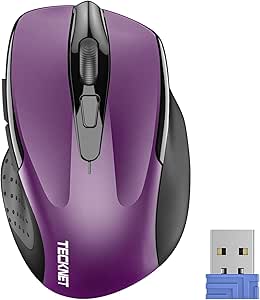 | Best for Precise Control and Long Battery Life | Dimensions: 4.09 x 2.68 x 1.49 inches | DPI: 800/1200/1600/2000/2600 | Battery Life: Up to 24 months | VIEW ON AMAZON | See Our Full Breakdown |
| Logitech M317 Compact Ambidextrous 2.4 GHz Wireless Mouse – Blue |  | Best for Line-by-Line Scrolling and Basic Navigation | Connectivity: Wireless 2.4 GHz | Battery Life: Up to 1 year | Compatibility: Windows, macOS, Chrome OS, Linux | VIEW ON AMAZON | See Our Full Breakdown |
| WeGear USB Wireless Mouse for Laptop, PC, Mac – Black |  | Best for Customizable Precision and Productivity | Connectivity: Wireless 2.4 GHz | DPI Levels: 800/1200/1600/2400/4000 | Buttons: 6 including forward/backward | VIEW ON AMAZON | See Our Full Breakdown |
| Logitech M720 Triathlon Full-Size Multi-Device Wireless Mouse – Black |  | Best Overall for Productivity and Cross-Device Use | Battery Life: 24 months | Connectivity: Bluetooth and Logitech Unifying receiver | Compatibility: Windows, macOS, Chrome OS, Linux, iPadOS | VIEW ON AMAZON | See Our Full Breakdown |
| VssoPlor Wireless Mouse, 2.4G Slim Computer Laptop Mouse, Black and Gold |  | Best for Portability and Quiet Use | Connectivity Technology: 2.4G Wireless | Additional Features: Ergonomic Design, Lightweight, Soundless | Button Quantity: 3 | VIEW ON AMAZON | See Our Full Breakdown |
| Amazon Basics 2.4 GHz Wireless Optical Computer Mouse with USB Nano Receiver, Portable, No Wires, Smooth Tracking, Multi-Device Compatibility, Black | 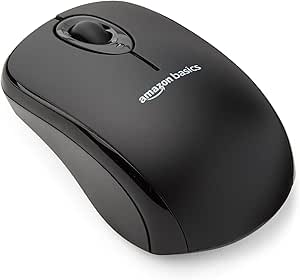 | Best Budget for Basic Wireless Functionality | Connectivity: Wireless 2.4 GHz | Buttons: 3 | Compatibility: Windows 2000, XP, Vista, 7, 8, 10 | VIEW ON AMAZON | See Our Full Breakdown |
| Logitech M510 Full Size Ambidextrous Wireless Mouse |  | Best for Comfort and Everyday Productivity | Connectivity: 2.4 GHz wireless | Battery Life: Two years | Receiver: Logitech Unifying receiver | VIEW ON AMAZON | See Our Full Breakdown |
| Logitech M330 Silent Plus Wireless Mouse – Black |  | Best Quiet Mouse for Focused Work | Connectivity: 2.4 GHz wireless | Battery Life: 18 months | Battery: 1 x AA (included) | VIEW ON AMAZON | See Our Full Breakdown |
| wireless mice | Battery Life | Connectivity | Compatibility |
|---|---|---|---|
| WisFox 2.4GHz Wireless Mouse f | — | — | — |
| Logitech G305 Lightspeed Wirel | Up to 9 months | — | — |
| Acer Wireless Mouse for Laptop | — | — | — |
| Logitech M240 Compact Silent B | Up to 18 months | — | — |
| Logitech Signature M650 L Full | Up to 2 years | Bluetooth Low Energy, Logi Bolt USB receiver | — |
| Logitech M185 Compact Ambidext | Up to 1 year | 2.4 GHz wireless | Windows, Mac |
| HP X3000 G3 Wireless Mouse | 15 months | 2.4 GHz USB-A | — |
| Tecknet Wireless Mouse | Up to 24 months | Wireless, USB-A receiver | Windows, Mac, Chrome OS, Linux |
| Logitech M317 Compact Ambidext | Up to 1 year | Wireless 2.4 GHz | Windows, macOS, Chrome OS, Linux |
| WeGear USB Wireless Mouse for | Up to 24 months | Wireless 2.4 GHz | Windows, macOS |
| Logitech M720 Triathlon Full-S | 24 months | Bluetooth and Logitech Unifying receiver | Windows, macOS, Chrome OS, Linux, iPadOS |
| VssoPlor Wireless Mouse | — | — | — |
| Amazon Basics 2.4 GHz Wireless | — | Wireless 2.4 GHz | Windows 2000, XP, Vista, 7, 8, 10 |
| Logitech M510 Full Size Ambide | Two years | 2.4 GHz wireless | Windows and Mac OS X |
| Logitech M330 Silent Plus Wire | 18 months | 2.4 GHz wireless | Windows, macOS, ChromeOS, Linux |
More Details on Our Top Picks
WisFox 2.4GHz Wireless Mouse for Laptop, Ergonomic 6-Button Design, Grey
The WisFox wireless mouse stands out for its ergonomic, contoured design, making it a solid choice for users who spend long hours at their desks. Its ambidextrous shape suits both left- and right-handed users better than the Logitech M240, which is primarily right-handed. The adjustable DPI and reliable 2.4GHz connection with a 33-foot range ensure smooth performance across different surfaces and environments. However, its reliance on a single AA battery and limited OS support—excluding macOS—may be inconvenient for some. Compared to the Logitech G305, which targets gamers with higher precision, WisFox offers a more comfortable experience for everyday tasks but sacrifices advanced features like customizable buttons. Overall, this model suits those prioritizing comfort and versatility over gaming or high customization.
Pros:- Ergonomic and comfortable design suitable for extended use
- Adjustable DPI for varied surface tracking
- Reliable 2.4GHz wireless connection with 33-foot range
- Ambidextrous shape for both hands
Cons:- Requires one AA battery, not rechargeable
- Limited OS compatibility, excluding macOS
- No customizable buttons or advanced features
Best for: Users seeking an ergonomic, ambidextrous mouse for long work sessions and varied environments
Not ideal for: Gamer or power users needing high DPI, customizable buttons, or rechargeable batteries
- Connectivity Technology:Radio Frequency, Wireless
- Additional Features:Ergonomic Design, Lightweight, Portable, Soundless, Wireless Movement Detection
- Button Quantity:6
- Hand Orientation:Ambidextrous
- Maximum Sensitivity:1600 dots_per_inch
- Range:33.0 feet
Our verdict“This mouse is ideal for users prioritizing comfort and ambidextrous use over gaming features.”
Logitech G305 Lightspeed Wireless Gaming Mouse – Black
The Logitech G305 Lightspeed is tailored for gamers seeking high-speed responsiveness, thanks to its HERO sensor with 12,000 DPI and 1 ms report rate. Unlike the WisFox, which is designed for comfort and versatility, the G305 emphasizes performance with ultra-fast response times and a lightweight 3.4 oz frame, making it perfect for fast-paced games. Its battery life of up to 9 months on a single AA battery is impressive, but the need to replace batteries after extended use can be a drawback for those wanting a rechargeable option. Compared to the Acer wireless mouse, which offers a similar range and DPI, the G305’s focus on gaming speeds and low weight makes it more suitable for competitive use, though it sacrifices some customization options found in wired gaming mice. This mouse excels for gamers prioritizing speed and precision over extended ergonomic comfort.
Pros:- High-precision HERO sensor with 12,000 DPI
- Ultra-fast 1 ms report rate for responsiveness
- Long battery life up to 9 months
- Lightweight and portable design
Cons:- Requires AA battery replacement after use, no rechargeable option
- Limited customization compared to wired gaming mice
- Not designed for ergonomic comfort during extended use
Best for: Gamers looking for a lightweight, high-DPI mouse with fast response times
Not ideal for: Office workers or casual users who prefer comfort and longer battery life over gaming-specific features
- Sensor:HERO optical
- DPI:12,000
- Wireless Technology:Lightspeed
- Battery Life:Up to 9 months
- Weight:3.4 oz
Our verdict“This mouse is best suited for gamers demanding speed and precision, not extended comfort or advanced customization.”
Acer Wireless Mouse for Laptop, 2.4GHz Computer Mouse with 3 Adjustable DPI
The Acer wireless mouse offers a straightforward solution for everyday tasks with stable 2.4GHz connectivity and a range of 32 feet. Its three adjustable DPI settings—800, 1200, and 1600—provide enough flexibility for most work scenarios, making it a solid choice for users who need reliable basic performance. Compared with the WisFox, which targets comfort, the Acer emphasizes simplicity and affordability. However, its side buttons do not function on Mac, and it requires two AAA batteries, which may be less convenient than rechargeable options. While the Logitech M240 provides a quieter click, the Acer’s adjustable DPI and longer range make it more versatile for varied working environments. This mouse fits those who prioritize basic features and reliability over advanced customization or ergonomic design.
Pros:- Stable wireless connection up to 32 feet
- Three adjustable DPI settings for flexibility
- Ergonomic design suitable for medium to large hands
- Long battery life with power-saving features
Cons:- Side button does not work on Mac devices
- Requires two AAA batteries, not rechargeable
- Limited to basic features without customization
Best for: Office workers or students needing a reliable, budget-friendly mouse for daily use
Not ideal for: Gamers or users requiring high DPI, rechargeable batteries, or advanced features
- Connectivity Technology:USB A
- DPI Settings:800, 1200, 1600
- Range:32 feet
- Button Quantity:6
- Maximum Sensitivity:1600 dots per inch
- Batteries Required:2 AAA batteries
Our verdict“Ideal for users seeking a dependable, straightforward mouse for everyday work or study tasks.”
Logitech M240 Compact Silent Bluetooth Wireless Mouse – Graphite
The Logitech M240 Silent prioritizes quiet operation, reducing noise by 90%, making it ideal for shared environments or noise-sensitive settings. Its compact, ambidextrous shape is comparable to the WisFox but focuses more on portability and silent clicking rather than high DPI. With up to 18 months of battery life, it offers long-term convenience, but its Bluetooth-only connectivity limits flexibility compared to the 2.4GHz options. Unlike the WisFox, which supports multiple operating systems and higher DPI, the M240’s focus on minimal noise and portability makes it less suitable for power users or those needing adjustable sensitivity. For users who want a simple, quiet mouse for travel or light office work, this model is a strong contender, though it lacks advanced customization.
Pros:- Quiet clicking reduces noise and distractions
- Long battery life of up to 18 months
- Compact, ambidextrous design for portability
- Seamless multi-OS compatibility
Cons:- Limited to Bluetooth connectivity, less versatile than RF options
- No adjustable DPI or advanced customization
- Less suitable for high-precision tasks
Best for: Travelers and quiet workspace users who need a portable, silent mouse
Not ideal for: Power users or gamers who need high DPI, wired connectivity, or customization
- Connectivity Technology:Bluetooth
- Additional Features:Soundless, Portable, Silent Click
- Button Quantity:3
- Hand Orientation:Ambidextrous
- Battery Life:Up to 18 months
- Materials:Includes recycled plastic (minimum 65%)
Our verdict“This mouse is perfect for those who prioritize quiet operation, portability, and long battery life over high DPI or customization.”
Logitech Signature M650 L Full Size Wireless Mouse – Black
The Logitech Signature M650 L offers a full-size, ergonomic design with quiet clicking, making it suitable for extended work sessions. Its customizable buttons add efficiency, while the long battery life—up to 2 years—reduces maintenance. Compared to the WisFox, which emphasizes portability, the M650 L leans toward comfort and versatility across platforms, including Windows, macOS, and Linux. Its size might be less ideal for users who prefer smaller mice, but for those seeking a more substantial, comfortable grip, this model hits the mark. The inclusion of recycled plastic supports eco-conscious buyers, although the need for a single AA battery, which isn’t rechargeable, could be a minor inconvenience. This pick is aimed at professionals who value comfort and customization for all-day use.
Pros:- Quiet clicking with 90% less noise
- Long-lasting battery of up to 2 years
- Customizable buttons for shortcuts
- Compatible across multiple platforms
Cons:- Requires single AA battery, not rechargeable
- Size may be too large for small hands or limited space
- Lacks advanced gaming or high-DPI features
Best for: Office professionals or remote workers needing a comfortable, customizable mouse with a long battery life
Not ideal for: Travelers or users with limited desk space who prefer smaller, portable mice
- Connectivity:Bluetooth Low Energy, Logi Bolt USB receiver
- Battery Life:Up to 2 years
- Size:Large
- Color:Black
- Materials:Includes recycled plastic (minimum 65%)
Our verdict“This mouse suits those who need a comfortable, quiet, and long-lasting device for all-day productivity.”
Logitech M185 Compact Ambidextrous Wireless Mouse – Swift Grey
The Logitech M185 stands out for its simplicity and dependability, making it ideal for those who need a no-fuss wireless mouse. Compared with the M317, it offers a longer battery life of up to a year but lacks advanced features like adjustable DPI or extra buttons. Its ambidextrous design suits both left- and right-handed users, and the plug-and-play setup ensures quick connectivity. However, it doesn’t support customization or high-precision tasks, and the AA battery will need replacement after a year. This pick is perfect for everyday use in a home or office where basic navigation suffices, especially for budget-conscious buyers.
Pros:- Ambidextrous design suitable for both hands
- Battery life lasts up to one year
- Plug-and-play setup with stable connection
- Made with recycled plastics for eco-friendliness
Cons:- No adjustable DPI or customizable buttons
- Requires AA battery replacement after a year
- Limited to basic mouse functions
Best for: Students or office workers who want a reliable, straightforward mouse for daily tasks without extra frills.
Not ideal for: Power users or gamers who need adjustable DPI, programmable buttons, or advanced customization.
- Connectivity:2.4 GHz wireless
- Battery Life:Up to 1 year
- Compatibility:Windows, Mac
- Wireless Range:33 feet / 10 meters
- Dimensions:Compact size suitable for small to medium hands
- Material:Includes recycled plastic (77% black, 49% grey)
Our verdict“This is a solid choice for budget-minded users seeking basic reliability and comfort for everyday tasks.”
HP X3000 G3 Wireless Mouse – Black, 1600 DPI, 15-Month Battery, Travel-Friendly
The HP X3000 G3 offers a versatile, ambidextrous design with a reliable 1600 DPI optical sensor, making it a practical choice for frequent travelers. Its 15-month battery life outperforms many competitors like the Logitech M185 by offering longer use between charges. The 30-foot wireless range and multi-surface technology allow it to work reliably on various surfaces, making it more adaptable than mice with fixed surface compatibility. However, its 1600 DPI may fall short for high-precision tasks, and it requires a single AA battery (not included). This mouse makes the most sense for users who need a dependable travel companion that handles multiple surfaces without fuss.
Pros:- Ambidextrous ergonomic design
- Long battery life of up to 15 months
- Works on virtually any surface with multi-surface tech
- Reliable wireless connection with a 30-foot range
Cons:- Limited to 1600 DPI, not suitable for high-precision work
- Requires one AA battery (not included)
- Basic three-button layout without extra programmable buttons
Best for: Travelers or remote workers needing a versatile mouse for different surfaces with long-lasting battery life.
Not ideal for: High-precision gamers or graphic designers requiring higher DPI settings and advanced customization.
- Color:Black
- Battery Life:15 months
- DPI:1600
- Connectivity:2.4 GHz USB-A
- Surface Compatibility:Multi-surface
- Wireless Range:30 feet
Our verdict“Ideal for frequent travelers or remote workers who prioritize surface versatility and long battery life over advanced features.”
Tecknet Wireless Mouse, 2.4G Ergonomic Computer Mouse, 2600 DPI, Purple
The Tecknet Wireless Mouse distinguishes itself with its high-precision 2600 DPI sensor, making it a strong choice for users who need detailed control, such as graphic designers or CAD users. Its adjustable DPI settings provide flexibility, unlike the HP or Logitech options with fixed resolutions. The long-lasting battery life of up to 24 months offers convenience for heavy users. Its ergonomic shape and rubber side grips enhance comfort during extended sessions. However, the side button isn’t compatible with Mac systems, and it relies on a USB-A receiver, which could be limiting for users with only USB-C ports. Compared to the Logitech M185, this mouse offers higher precision at a slightly larger size, suited for serious or professional use.
Pros:- High-performance 2600 DPI sensor
- Adjustable DPI for customized precision
- Up to 24 months of battery life
- Ergonomic design with rubber grips
Cons:- Side button not compatible with Mac systems
- Requires USB-A receiver, limiting for USB-C-only devices
- Bigger than basic mice, less portable
Best for: Creative professionals or power users who require high DPI and adjustable settings for detailed work.
Not ideal for: Casual users or those with only USB-C ports, as the receiver isn’t compatible or may require an adapter.
- Dimensions:4.09 x 2.68 x 1.49 inches
- DPI:800/1200/1600/2000/2600
- Battery Life:Up to 24 months
- Connectivity:Wireless, USB-A receiver
- Compatibility:Windows, Mac, Chrome OS, Linux
- Batteries Included:No
Our verdict“This mouse offers professional-grade precision and comfort, ideal for detailed work, at the expense of compatibility with some systems.”
Logitech M317 Compact Ambidextrous 2.4 GHz Wireless Mouse – Blue
The Logitech M317 offers precise, line-by-line scrolling and smooth optical tracking, making it well-suited for detailed document work or browsing. Its ambidextrous design caters to both hands comfortably, similar to the M185, but with added scroll wheel precision. Its one-year battery life and plug-and-play setup are reliable, though it remains a basic navigation tool without extra buttons or high DPI. This mouse is less ideal for gaming or design tasks where higher DPI or customization matters. It fits well into setups where simplicity and reliability are priorities, especially for users who prefer straightforward operation.
Pros:- Long battery life of up to one year
- Comfortable ambidextrous design
- Easy plug-and-play connection
- Precise line-by-line scrolling
Cons:- Limited to basic navigation features
- Requires USB receiver for connection
- No adjustable DPI or extra buttons
Best for: Office workers or students who need a dependable, easy-to-use mouse for everyday browsing and document navigation.
Not ideal for: Gamers or power users who require high DPI, customization, or gaming-specific features.
- Connectivity:Wireless 2.4 GHz
- Battery Life:Up to 1 year
- Compatibility:Windows, macOS, Chrome OS, Linux
- Range:Up to 33 feet
- Color:Blue
- Scroll Feature:Line-by-line scrolling
Our verdict“A practical, simple mouse ideal for everyday office or school tasks without the need for advanced features.”
WeGear USB Wireless Mouse for Laptop, PC, Mac – Black
The WeGear wireless mouse offers a notable combination of adjustable DPI levels up to 4000 and six buttons, making it a versatile tool for productivity and precise control. Its ergonomic shape reduces hand fatigue during long work sessions, and the plug-and-play setup guarantees straightforward connectivity. Compared with the HP X3000, it provides higher DPI options for more detailed tasks but at a slightly larger size, which might be less portable. The lack of included batteries and forward/backward button recognition on Mac are minor inconveniences. This mouse appeals to users who want customizable control and a comfortable grip for extended use, especially in multitasking environments.
Pros:- Adjustable DPI levels from 800 to 4000
- Six programmable buttons for multitasking
- Ergonomic design that reduces hand strain
- Reliable plug-and-play connection
Cons:- Batteries not included, requiring an AA purchase
- Forward/backward buttons not recognized on Mac
- Larger size may reduce portability
Best for: Productivity-focused professionals who need adjustable DPI and extra buttons for multi-application workflows.
Not ideal for: Casual users or travelers seeking a lightweight, minimal mouse with basic features.
- Connectivity:Wireless 2.4 GHz
- DPI Levels:800/1200/1600/2400/4000
- Buttons:6 including forward/backward
- Battery Life:Up to 24 months
- Compatibility:Windows, macOS
- Color:Black
Our verdict“This mouse is well-suited for users who prioritize customization and productivity over portability or simplicity.”
Logitech M720 Triathlon Full-Size Multi-Device Wireless Mouse – Black
The Logitech M720 Triathlon stands out for its ability to seamlessly switch between multiple devices, supporting cross-platform productivity with ease. Compared to the Logitech M510, it offers more customizable buttons and supports operating systems beyond Windows and Mac, making it ideal for users juggling several computers. The tradeoff is its larger size, which might not suit users preferring a more compact mouse. Its impressive 24-month battery life reduces maintenance, while hyper-fast scrolling boosts navigation efficiency. However, the need for software installation for full customization can be a hassle for some. Overall, this mouse is perfect for professionals working across multiple OS environments who prioritize longevity and versatility.
Pros:- Long-lasting 24-month battery life
- Supports multi-device and cross-platform use
- Customizable buttons for personalized productivity
- Hyper-fast scrolling for efficient navigation
Cons:- Requires software installation for customization
- May be larger for users preferring smaller mice
Best for: Professionals who work across multiple devices and platforms and need customizable controls
Not ideal for: Users seeking a small, portable mouse or those preferring plug-and-play simplicity without software
- Battery Life:24 months
- Connectivity:Bluetooth and Logitech Unifying receiver
- Compatibility:Windows, macOS, Chrome OS, Linux, iPadOS
- Number of Buttons:6
- Color:Black
- Product Type:Wireless Mouse
Our verdict“This mouse suits users who need a durable, multi-device solution with extensive customization options.”
VssoPlor Wireless Mouse, 2.4G Slim Computer Laptop Mouse, Black and Gold
The VssoPlor Wireless Mouse excels in mobility, combining a slim profile with quiet clicking—ideal for travel and quiet office environments. Compared to the Logitech M510, it offers a more portable design but fewer programmable features, making it less suitable for users who need extensive customization. Its stable 2.4 GHz connection ensures reliable performance within 10 meters, and the ergonomic shape caters to ambidextrous users, although its basic three-button layout limits advanced functions. The 2400 DPI sensitivity suits everyday tasks, but the absence of rechargeable batteries and limited functionality might turn off power users. Overall, this model makes sense for frequent travelers or those working in shared spaces where noise reduction matters.
Pros:- Quiet clicking reduces noise during use
- Stable 2.4 GHz wireless connection with up to 10 meters range
- Ergonomic and portable design suitable for travel and office use
Cons:- Requires one AA battery (not included)
- Limited to basic three-button functionality
- No rechargeable battery option
Best for: Travelers and office workers who prioritize portability and quiet operation
Not ideal for: Heavy users requiring programmable buttons or rechargeable batteries for daily intensive use
- Connectivity Technology:2.4G Wireless
- Additional Features:Ergonomic Design, Lightweight, Soundless
- Button Quantity:3
- Hand Orientation:Ambidextrous
- Range:10.0 meters
- Item Weight:2.4 ounces
Our verdict“Ideal for users who need a compact, quiet mouse for portable use, sacrificing advanced features for mobility.”
Amazon Basics 2.4 GHz Wireless Optical Computer Mouse with USB Nano Receiver, Portable, No Wires, Smooth Tracking, Multi-Device Compatibility, Black
The Amazon Basics Wireless Mouse offers reliable basic wireless performance at a compelling price point. Its 2.4 GHz connection ensures stable operation on most surfaces, similar to the Logitech M330 Silent Plus, but without the advanced features or quiet clicking. Its simplicity makes it easy for anyone needing an affordable, straightforward mouse, though the lack of Bluetooth support and the necessity to remove the nano receiver during setup can be inconvenient. The 3-button design is sufficient for everyday tasks but limits customization options. If you’re after a no-frills, cost-effective mouse for occasional use, this model fits well, but power users might find it too basic.
Pros:- Reliable 2.4 GHz wireless connection
- Compact nano receiver stores inside the mouse
- Easy to install and compatible with multiple Windows versions
Cons:- Not Bluetooth compatible
- Requires removal of the receiver during setup
- Limited to basic three-button functionality
Best for: Budget-conscious users needing a simple, reliable wireless mouse for everyday tasks
Not ideal for: Power users or those seeking advanced customization and multi-device support
- Connectivity:Wireless 2.4 GHz
- Buttons:3
- Compatibility:Windows 2000, XP, Vista, 7, 8, 10
- Receiver:USB Nano Receiver
- Color:Black
Our verdict“This mouse is a solid choice for casual users who want dependable wireless performance without extra features.”
Logitech M510 Full Size Ambidextrous Wireless Mouse
The Logitech M510 offers a familiar, ergonomic design tailored for extended daily use, with a good balance of features and simplicity. Compared to the Logitech M720, it lacks multi-device switching but compensates with a more traditional, ambidextrous shape that suits right-handed users seeking comfort. Its two-year battery life and programmable buttons enhance productivity without the need for software for basic functions, although full customization does require Logitech software. Its design may not appeal to left-handed users, and it doesn’t support cross-platform use as extensively as the M720. Overall, this mouse fits users who prefer straightforward functionality and comfort over advanced features.
Pros:- Ergonomically designed for comfort during long use
- Long battery life of up to two years
- Includes a Unifying receiver for easy wireless connectivity
- Programmable buttons for customization
Cons:- Requires Logitech software for full functionality
- Some features need software setup
- Design not suitable for left-handed users
Best for: Office workers who prioritize ergonomic comfort and long battery life over multi-device switching
Not ideal for: Users needing multi-platform or highly customizable mice, or left-handed users
- Connectivity:2.4 GHz wireless
- Battery Life:Two years
- Receiver:Logitech Unifying receiver
- Compatibility:Windows and Mac OS X
- Buttons:Standard plus Back/Forward, programmable
Our verdict“This mouse appeals to users who want a reliable, comfortable device for daily work with long-lasting batteries.”
Logitech M330 Silent Plus Wireless Mouse – Black
The Logitech M330 Silent Plus distinguishes itself through its SilentTouch technology, reducing over 90% of clicking noise—perfect for quiet environments like shared offices or late-night work. Compared to the Logitech M510, it sacrifices some buttons for a calmer operation, but this tradeoff benefits those sensitive to noise. Its 18-month battery life and comfortable contour make it a practical choice, though it is limited to right-handed users and basic features. Its advanced optical tracking ensures reliable performance across various surfaces, but it doesn’t include customizable controls or rechargeable batteries. This model makes an excellent choice for individuals prioritizing silence and comfort over extensive features.
Pros:- Significantly quieter clicking with SilentTouch technology
- Long-lasting 18-month battery life
- Comfortable ergonomic design for right-handed users
- Reliable wireless connection with a 33 ft range
Cons:- Requires AA battery replacement after extended use
- Limited to right-handed users
- Basic features without advanced customization
Best for: Users working in shared or quiet environments who need a comfortable, noise-reducing mouse
Not ideal for: Power users or left-handed individuals seeking customizable or ambidextrous models
- Connectivity:2.4 GHz wireless
- Battery Life:18 months
- Battery:1 x AA (included)
- Wireless Range:up to 33 ft (10 m)
- Compatibility:Windows, macOS, ChromeOS, Linux
- Material:Post-consumer recycled plastic
Our verdict“This mouse is perfect for those who need a quiet, comfortable device for daily use in noise-sensitive environments.”

How We Picked
For this roundup, I evaluated each wireless mouse based on core factors that matter most to buyers: performance, build quality, battery life, comfort, and value. I also considered connectivity stability, ease of use, and additional features such as programmable buttons or silent clicks. Products were ranked by how well they balance these qualities, with a focus on versatility for different use cases—be it gaming, office work, or casual browsing. The lineup aims to showcase options across a range of budgets and priorities, ensuring there’s a suitable pick for every type of user.Factors to Consider When Choosing Wireless Mice
Choosing the right wireless mouse requires matching its features to your specific needs. While performance and comfort are key, there are other factors that can influence your satisfaction and long-term usability. Understanding these can help you avoid common pitfalls and make a more informed decision.Connectivity and Reliability
Wireless mice typically connect via Bluetooth or a dedicated 2.4 GHz receiver. Bluetooth offers convenience but can sometimes introduce lag or connection drops, especially on older devices. A dedicated USB receiver generally provides more stable and responsive performance, which is essential for gaming or precision tasks. Consider your device’s ports and compatibility before choosing, and for critical use, prioritize mice with a reliable connection history to avoid frustrating interruptions.
Battery Life and Power
Battery longevity varies widely among wireless mice, from a few weeks to over a year. Mice with replaceable batteries are often more convenient for heavy daily use, while rechargeable models reduce waste and clutter. Think about your usage pattern: if you prefer minimal charging, opt for high-capacity batteries or models with quick charging features. Keep in mind that frequent recharging or short battery life can interrupt your workflow, especially during long work or gaming sessions.
Size, Shape, and Ergonomics
The shape and size of a mouse directly impact comfort, especially during prolonged use. Full-sized ergonomic models help reduce strain but may be less portable, while compact or ambidextrous designs are better suited for travel or smaller hands. Consider your hand size, grip style, and whether you prefer a palm, claw, or fingertip grip. Investing in an ergonomically designed mouse can prevent discomfort and repetitive strain injuries over time.
Additional Features and Customization
Modern wireless mice often include programmable buttons, adjustable DPI, and silent clicking, which can enhance productivity and quiet environments. However, more features usually come at a higher cost and sometimes add complexity. Evaluate which extras genuinely improve your experience—if you do a lot of photo editing, DPI adjustment might matter; for office use, silent clicks could be more beneficial. Avoid paying for gimmicks that you won’t use regularly, and prioritize features that align with your primary tasks.
Price and Value
While budget models can suffice for casual browsing, investing in a mid-range or premium mouse often results in better durability, comfort, and performance. Consider how often you’ll use the mouse and for what tasks; spending more on a reliable, comfortable option makes sense if you rely heavily on a mouse daily. Conversely, for occasional use, a basic model may be perfectly adequate. Balance your needs with your budget to find a model that offers the best value for your specific use case.
Frequently Asked Questions
How long does the battery last on a typical wireless mouse?
Battery life varies significantly based on the model and usage, ranging from a few weeks to over a year. Many modern wireless mice use power-efficient components, and some feature automatic sleep modes to conserve energy. Rechargeable models can be charged quickly and can often last several days on a short charge, making them suitable for daily use. If you prefer minimal maintenance, look for mice with long-lasting batteries or those that support quick charging to reduce downtime.
Is Bluetooth or a dedicated receiver better for gaming?
For gaming, a dedicated 2.4 GHz receiver generally provides more stable and responsive connectivity than Bluetooth, which can introduce lag or occasional disconnections. Many gaming mice are optimized for this connection type, ensuring minimal latency. Bluetooth might be more convenient for casual use or when portability is a priority, but for competitive or high-precision tasks, a dedicated receiver is usually the better choice. Always check the product specifications to confirm compatibility with your gaming setup.
Can I use a wireless mouse on multiple devices?
Many wireless mice support multi-device pairing via Bluetooth or a multi-channel receiver, allowing you to switch between devices with a button press. This is especially useful for users who work across a laptop, tablet, and desktop. However, not all models include this feature, so if multi-device use is important, verify compatibility before purchasing. Be aware that switching may sometimes require re-pairing or software configuration, which can add a small layer of complexity.
Are silent click mice less responsive?
Silent click mice are designed to reduce noise, making them ideal for shared spaces or quiet environments. While some users worry about tactile feedback, many models maintain excellent responsiveness and accuracy. Advances in switch technology have allowed silent mice to match the performance of traditional clickers, though very lightweight or budget models may still have slightly less tactile feel. Test the mouse if possible, to ensure it meets your expectations for responsiveness and comfort.
What should I consider when choosing a wireless mouse for travel?
For travel, portability, weight, and battery life are key considerations. Compact or foldable mice save space and fit easily in bags, but they may sacrifice ergonomic comfort. Long battery life reduces the need for frequent charging, and models with rechargeable batteries can be more convenient. Additionally, a reliable connection is vital to prevent interruptions during work or leisure. Look for a lightweight, durable design with a snug fit for your hand, and consider models that include a carrying case or protective cover for added convenience.
Conclusion
For general office work and everyday tasks, the Logitech Signature M650 offers a blend of comfort, reliability, and features at a reasonable price, making it the best choice for most users. Gamers seeking responsiveness should consider the Logitech G305 Lightspeed, which excels in speed and accuracy. Budget-conscious buyers will find the Amazon Basics Wireless Mouse provides decent performance without breaking the bank. If you prioritize silence and minimal distraction, the Logitech M330 Silent Plus stands out as the best silent option. For those who need a versatile, multi-device mouse, the Logitech M720 Triathlon provides seamless switching across devices. Your ideal choice depends on your primary use—consider these recommendations to find the perfect fit.Halloween Picks
halloween
As an affiliate, we earn on qualifying purchases.